Online Ruler (Actual Size)
Calibrate once with a bank card, then measure in centimetres, millimetres or inches on your screen.
Not calibrated yet
Without calibration this ruler uses the browser's idea of a centimetre, which is often wrong. Calibrate once with a bank card.
Settings
- Scale
- 3.780 CSS px per mm
- Screen
- calibrate to find out
- Source
- Browser default (1 inch = 96 CSS px)
The ruler follows browser zoom. Calibrate again on each screen, and after you change the display scaling of your computer.
The calibration is kept in this browser only.
How to use the online ruler
- Step 1Tap Calibrate with a cardAn outline of a card appears. Any bank card, debit card, driving licence or ID card of the usual size works.
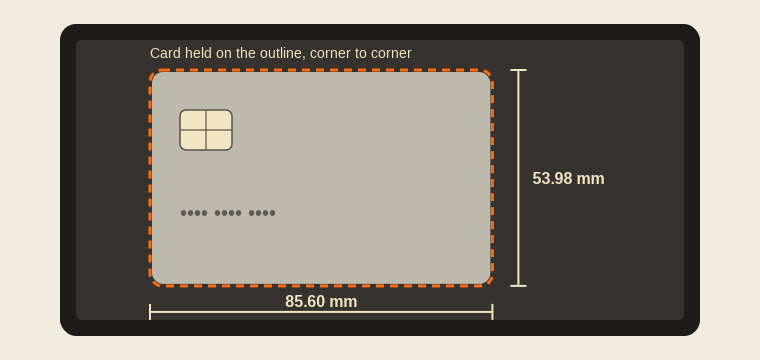
- Step 2Match the cardHold the card flat against the screen, corner to corner with the outline. Drag the slider or tap − and + until the outline and the card line up. Then tap It matches.
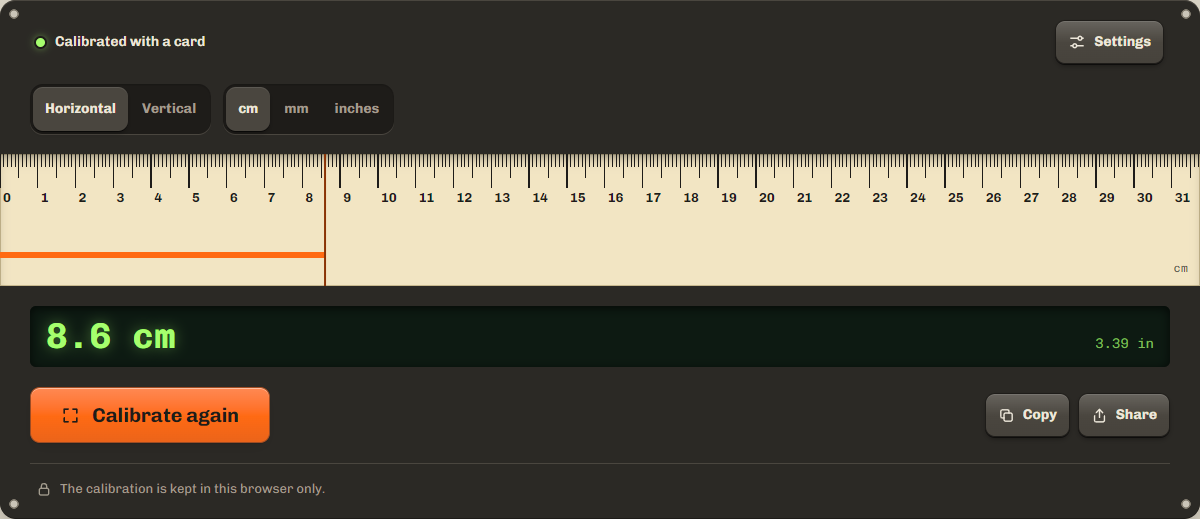
- Step 3MeasurePut one end of the object on the zero mark and tap the ruler at the other end. Choose cm, mm or inches, and Vertical for a longer ruler on a phone.
Common lengths at actual size
Each of these opens the ruler on that length, with the length in mm, cm and inches and everyday objects of about the same size, such as coins, cards and batteries. Calibrate once here and the pages use the same calibration.
mm actual size chart
Millimetres with their size in centimetres and inches, and the nearest mark on an inch ruler. To see any of them at real size, calibrate the ruler above, choose mm and tap the ruler at that mark. Lengths with a link have their own page with objects for scale.
| mm | cm | Inches | Nearest 1/16 in |
|---|---|---|---|
| 1 | 0.1 | 0.039 | 1/16 in |
| 2 | 0.2 | 0.079 | 1/16 in |
| 3 | 0.3 | 0.118 | 1/8 in |
| 4 | 0.4 | 0.157 | 3/16 in |
| 5 | 0.5 | 0.197 | 3/16 in |
| 6 | 0.6 | 0.236 | 1/4 in |
| 7 | 0.7 | 0.276 | 1/4 in |
| 8 | 0.8 | 0.315 | 5/16 in |
| 9 | 0.9 | 0.354 | 3/8 in |
| 10 | 1 | 0.394 | 3/8 in |
| 11 | 1.1 | 0.433 | 7/16 in |
| 12 | 1.2 | 0.472 | 1/2 in |
| 15 | 1.5 | 0.591 | 9/16 in |
| 20 | 2 | 0.787 | 13/16 in |
| 25 | 2.5 | 0.984 | 1 in |
| 30 | 3 | 1.181 | 1 3/16 in |
| 40 | 4 | 1.575 | 1 9/16 in |
| 50 | 5 | 1.969 | 1 15/16 in |
| 60 | 6 | 2.362 | 2 3/8 in |
| 75 | 7.5 | 2.953 | 2 15/16 in |
| 97.5 | 9.75 | 3.839 | 3 13/16 in |
| 100 | 10 | 3.937 | 3 15/16 in |
How to calibrate with a card
Payment cards use a fixed size, the ID-1 format of the ISO/IEC 7810 standard: 85.60 mm wide and 53.98 mm tall. Driving licences and national ID cards in many countries use it too. Because every one of these cards is the same width, it is a reference you already carry.
- Set browser zoom to 100% first (Ctrl or Cmd and 0), so the outline starts close to the right size.
- Hold the card flat against the glass. Put its top left corner on the top left corner of the outline.
- Change the size until the right edge of the outline sits exactly at the right edge of the card. Look straight at it, not from the side.
- Tap It matches. The ruler saves the calibration in this browser and uses it from now on.
Inches, cm and mm
In metric mode the ruler has a mark every millimetre, a longer mark every 5 mm and a number every centimetre. Choose mm to number the marks in millimetres instead. In inch mode it has marks every 1/16 inch, with longer marks at 1/8, 1/4 and 1/2 inch and a number at each inch. One inch is exactly 25.4 mm.
Tap the ruler to measure from zero to that point. The reading shows in your unit and in the other system, and in inch mode it also shows the nearest fraction, such as 2 3/8 in. On a very small scale the ruler leaves out marks that would sit too close to see.
Measuring on a phone
A phone screen is small, so choose Vertical: the ruler then runs down the screen, which on most phones is the longer side. Calibrate on the phone itself, because a phone shows a CSS centimetre at a different size than a computer. A card can be wider than a phone screen held upright, so on a narrow screen the outline stands upright too and you match the card's short side, 53.98 mm. Lay small things, such as a screw, a ring or a coin, flat on the screen at the zero mark.
Calibrate again if you change the phone's display size or text zoom setting, because that changes the size of everything on the page.
Why online rulers are wrong without calibration
Browsers measure in CSS units. CSS defines 1 inch as 96 CSS pixels, so 1 mm is about 3.78 CSS pixels. A CSS pixel is not tied to the real size of your screen, so these units, in the words of the MDN reference on CSS lengths, "don't necessarily match the size of the physical unit with the same name".
A web page also cannot ask the screen how big it is. That is why any online ruler that claims actual size without asking you to calibrate is a guess. Matching a card of known width replaces the guess with a measurement of your own screen.
FAQ
Is this ruler actual size?
Only after you calibrate it. Before that it uses the browser's own centimetre, which is often too big or too small. After you match a bank card, a centimetre on the ruler is a real centimetre on your screen.
I do not have a bank card. What else can I use?
Any card of the same size. Besides bank cards, the ID-1 size is used by driving licences and national ID cards in many countries, by many transit fare cards and by retail loyalty cards. Check that your card is a standard size before you rely on it.
Is it safe to hold my card to the screen?
Yes. The ruler never reads the card. Nothing is photographed or typed in. You can also turn the card over so the number faces away from you.
Why did the ruler change size?
Browser zoom changes the size of everything on the page. The ruler tries to follow zoom, but if the size looks off, set zoom back to 100% or calibrate again. Calibrate again too if you change the display scaling of your computer or move the window to another screen.
How long can I measure?
As long as the screen. On a phone, choose Vertical: the ruler runs down the screen, which is longer than its width. For longer things, mark the end of the ruler on the object, move it and add the lengths.
Related tools
All measuring toolsUse the same bank card to measure your pupillary distance from a photo.
Print a millimetre PD ruler with a 10 cm check bar.
Fill the screen with plain colors to find dead or stuck pixels.
Check sharpness, gamma and uniformity with test patterns.
See your webcam's resolution and frame rate.
Maintained by NabeelUpdated Nov 9, 2026.