Speaker Test: Left, Right & Stereo
Test your speakers and headphones online. Play each channel, sweep the frequencies and check the bass.
Not playing
Turn your volume down first.
Then tap Quick check, or play one side.
More tests
Alternate moves a tone from side to side. Headphone mode plays shorter, softer tones. Out of phase flips the right speaker.
How to test your speakers
- Step 1Turn the volume downSet your device volume low before you press anything, then raise it slowly.
- Step 2Tap Quick checkIt plays left, right, then both, and asks two questions. The result says if your channels are correct, swapped or one side is silent.
- Step 3Open More testsRun the sweep, bass tones and pink noise. Listen for rattles, buzzing, or parts of the range that go quiet.
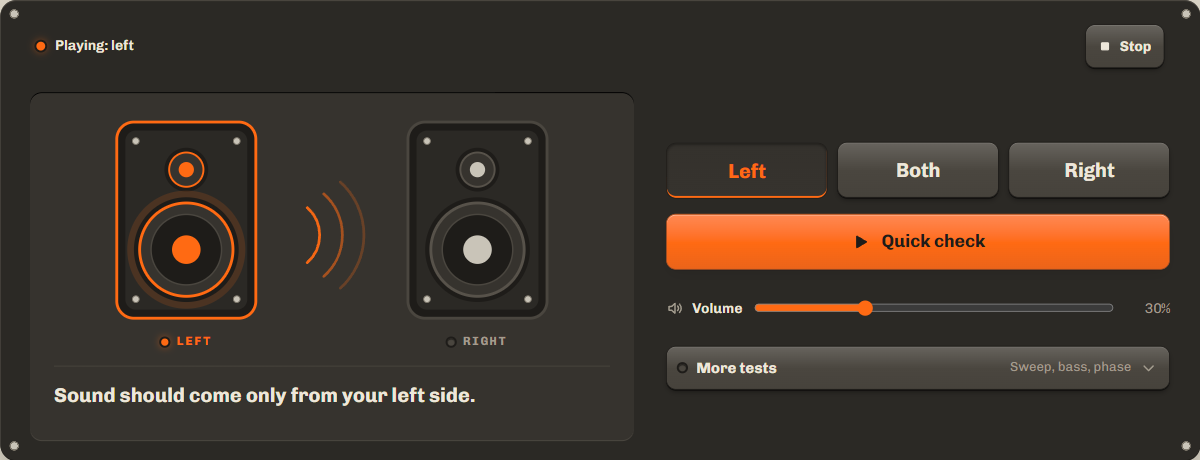
Left and right audio test: are your channels the right way round?
Press Left. A tone plays from your left speaker only. Then press Right. If the sound comes from the other side, a cable or a setting is swapped. If it comes from both sides at once, your device may be set to mono audio.
Quick check does this for you. It plays each side and then both, asks where you heard them, and names the result, with a link to the fix.
Stereo test: balance and phase
Both plays the same tone from both speakers. It should sound like it comes from the middle. If it leans to one side, check the balance setting in Troubleshooting below.
Out of phase, under More tests, flips one speaker. A correctly wired pair then sounds thin, wide and hard to place, with weak bass. If out of phase sounds fuller than in phase, one speaker's wires are reversed.
Headphone test, left and right
Open More tests and turn on Headphone mode for shorter, softer tones, then press Left and Right. The left tone belongs in your left ear. Most earbuds mark L and R on the stem or inside the ear tip.
Bass test and frequency sweep (20 Hz to 20 kHz)
The sweep, under More tests, glides from the lowest note people hear to the highest. Small speakers fade at the bottom, and that is normal. Rattles, buzzing or sudden drops are what to listen for. To hold one note, test a single frequency with thetone generator. To check how loud your speakers really are, use thedecibel meter.
| Frequency | What to listen for |
|---|---|
| 20 to 30 Hz | The bottom of human hearing. Many speakers cannot play it, and you may feel it more than hear it. |
| 40 to 60 Hz | Deep bass. A subwoofer should play this cleanly, without rattles. |
| 100 Hz | Upper bass. Most small speakers and laptops can play this. |
| 1 kHz | A standard reference tone in the middle of the range. |
| 10 kHz | Treble. It should sound clear, not harsh. |
| 15 to 20 kHz | The top of the range. High tones get harder to hear with age, so missing the end of the sweep is normal. |
Troubleshooting: one side, crackling, swapped channels
| Problem | What to check |
|---|---|
| Sound from only one side | The balance setting. Windows: Settings › System › Sound › your device, left and right channel sliders. Mac: System Settings › Sound › Output › Balance. iPhone: Settings › Accessibility › Audio & Visual › Balance. Android: Settings › Accessibility › Audio adjustment (names vary by phone).Official help: Windows, Mac, iPhone, Android |
| Both sides play the same | Mono audio is on. Turn it off in the same accessibility settings.Official help: Windows, iPhone, Android |
| Crackling or buzzing | Lower the volume. If it stays at low volume, check the cable or try another device. Bluetooth crackle often comes from distance or interference. |
| Left and right swapped | Swap the cables at the back of the speakers, or swap the speakers' positions. |
FAQ
Why do I only hear one speaker?
Usually the balance is turned to one side, mono audio is on, or a cable is loose. Start with the balance setting in Troubleshooting.
Is this safe for my speakers?
At normal volume, yes. Start low, keep the deepest bass tones and the top of the sweep quiet, and stop if you hear distortion.
Can I test 5.1 surround sound?
Not yet. This test covers two channels, left and right.
Does it work with Bluetooth earbuds?
Yes. Bluetooth adds a short delay, so the sound starts a moment after you press a button. That is normal.
Related tools
All audio toolsFind the note you sing or play, in Hz and cents.
Test one exact frequency at a time.
Check how loud your speakers really are.
Maintained by NabeelUpdated Oct 20, 2026.