Online Tone Generator
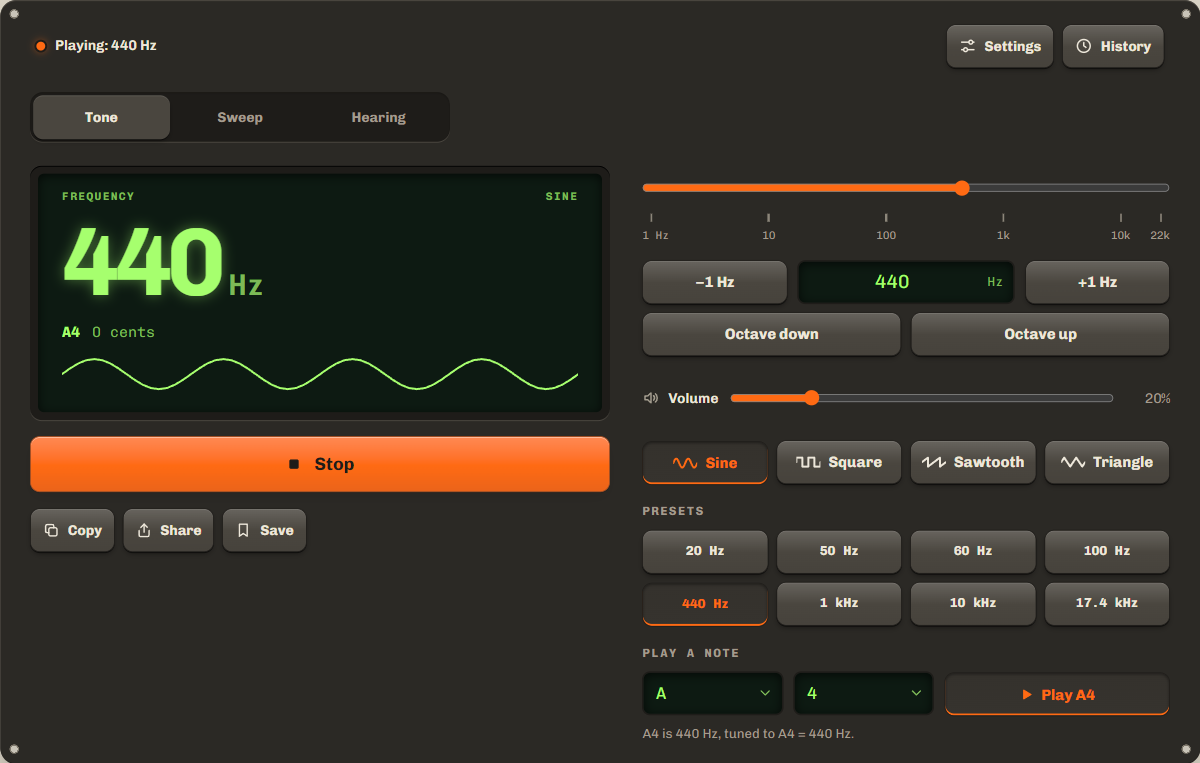
Play any frequency in Hz. Pick a waveform, set the volume and sweep through the range.
Not playing
440Hz
Nearest note: A40 cents
A4 is 440 Hz, tuned to A4 = 440 Hz.
Settings
Square and sawtooth are turned down to sound about as loud as a sine. The hearing check always plays a sine.
Keys: arrows change the frequency, Page Up and Page Down jump an octave.
History
Tones and hearing results you save appear here. They stay on this device.
How to use the tone generator
Use this tone generator online with nothing to install: set a frequency, press Play tone and adjust the tone while it plays. Three modes share one screen: Tone holds one frequency, Sweep glides through a range, and Hearing checks the highest tone you can hear. Balance is in Settings, and saved tones are in History.
- Step 1Turn your volume downSet your device volume low first. The tool starts quiet too, at 20%.
- Step 2Choose a frequencyDrag the slider, type a number in Hz, tap a preset or play a note such as A4. Then pick a waveform.
- Step 3Press Play toneChange anything while it plays. Share sends a link to your settings, and Save keeps the tone on this device.
Common frequencies and what they're for
These frequencies cover most jobs for an audio frequency generator, from bass checks to tuning, and each has a preset in the tool.
| Frequency | What it's for |
|---|---|
| 20 Hz | The bottom of the commonly stated range of human hearing, 20 Hz to 20 kHz. A good subwoofer test. |
| 50 and 60 Hz | The mains power frequency: 50 Hz in most of the world, 60 Hz in the Americas. Electrical hum is often at twice that, 100 or 120 Hz. |
| 100 Hz | A quick bass check. Listen for rattles or buzzing. |
| 440 Hz | A4, the standard tuning note (ISO 16). Tune an instrument or sing along with it. |
| 1 kHz | The usual reference tone. Sound level scales such as A-weighting are set to 0 dB at 1 kHz. |
| 17.4 kHz | The "mosquito tone". The Mosquito, a device used to deter loitering, plays it, and mostly people under 25 can hear it. |
Sine, square, sawtooth and triangle waves
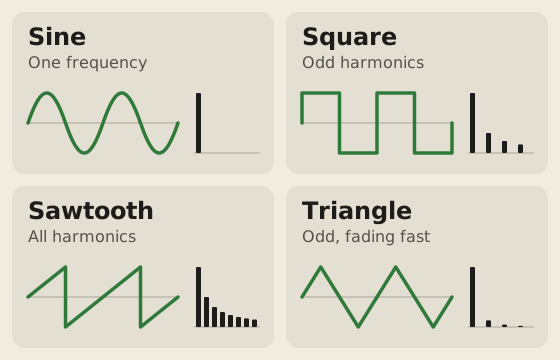
A sine wave is a pure tone: one frequency and nothing else. The other three add harmonics, softer tones at whole multiples of the frequency, which give each wave its sound.
- Sine
- Smooth and pure. Best for hearing checks, tuning and speaker tests.
- Square
- Hollow and buzzy. Only odd harmonics: 3, 5, 7 times the frequency.
- Sawtooth
- Bright and buzzy, with every harmonic. The richest of the four.
- Triangle
- Soft, close to a sine. Odd harmonics that fade fast.
The Web Audio standard defines each wave by these harmonics. Low square and sawtooth tones can sound much louder than a sine, so the tool turns them down to match. Above 10 kHz all four sound almost the same: their extra harmonics are above 20 kHz.
Test speakers and subwoofers with a sweep
A sweep glides from one frequency to another, so you hear how your speakers handle the whole range. Switch to Sweep, set From, To and Time, then press Play sweep.
For a subwoofer, sweep 20 to 200 Hz, the typical range of consumer subwoofers, or tap the Subwoofer preset. Listen for rattles, buzzing and notes that suddenly go quiet. Press Stop when you hear a problem: the screen keeps that frequency, and Hold this tone plays it in Tone mode, where you can fine-tune it.
Log, the default, spends the same time on every octave, so the bass does not rush past. Linear moves the same number of hertz every second. To check left and right first, use the speaker test.
Check how high you can hear
Switch to Hearing and use headphones. The first tone plays at 10% volume or lower: raise it until the 8 kHz start tone is soft but clear. The tone then rises slowly to 20 kHz. Tap I can't hear it when it fades out. The check runs twice and shows the average.
The commonly stated top of human hearing is 20 kHz, and it falls with age. In aclinic study of healthy adults, every ear aged 21 to 30 heard 16 kHz, but only about half heard 20 kHz. From 41 to 50, 9 in 10 ears heard up to 12.5 kHz.
Not a medical hearing test. Speakers, headphones and volume all change the result, and some devices cannot play the highest tones. If you notice changes in your hearing, see a doctor or an audiologist.
Use it safely
Start quiet and turn the volume up slowly. The tool starts at 20% and warns you above 80%.
Loud, steady high tones are hard on tweeters, the small speakers that play the treble. Even in speakers rated for 100-watt amplifiers, tweeters may handle only about 10 watts of steady power. A tone too high for you to hear still reaches the tweeter, so keep tones above 15 kHz quiet.
Protect your ears too. Long or repeated exposure to sounds at or above 85 dBA can cause hearing loss, and the hair cells that noise damages do not grow back. With headphones, set the volume before you put them on, and stop if you hear distortion.
FAQ
No sound on iPhone?
Check Silent mode first. If the switch on the side of your iPhone shows orange, Silent mode is on. On newer models, the Action button turns Silent mode on and off. Then turn up the volume and tap Play again.
What is 432 Hz?
An alternative tuning for the note A that some musicians prefer to the 440 Hz standard. It is about 32 cents lower, a third of a semitone. Type 432 in the box, then 440, to hear the difference.
Can I play two tones at once?
Not in one page. On a computer, open the tool in two windows side by side and play a tone in each. A background tab stops playing, so use windows, not tabs.
How do I share a tone?
Press Share. A phone opens its share sheet; a computer copies the link. The link keeps the frequency, waveform, balance and sweep settings, for example ?f=440&w=sine. It never includes the volume, so shared links start quiet.
How high does this Hz generator go?
Up to 22,000 Hz. A device can only play tones below half its audio sample rate, so a few stop lower, and the tool says so.
Related tools
All audio toolsCheck left, right and bass in a few taps.
Check what note a frequency is.
Measure how loud a tone is.
Maintained by NabeelUpdated Oct 20, 2026.