BPM Tapper: Tap to Find the Tempo
This free tap tempo counter turns your taps into BPM: tap the pad, the space bar or any letter key on every beat.
Tap on the beat to begin
No tempo yetBPM
- Rounded
- --
- Taps
- 0
Note lengths in ms
- 1/4 note, straight
- --
- 1/8 note, straight
- --
- 1/16 note, straight
- --
History
Tempos you save appear here, with their label. Tap one to play it in the metronome. They stay on this device.
How to find the BPM by tapping
Tap along with the beat for a few bars, and the tool turns the time between your taps into beats per minute.
- Step 1Play the songStart the music and find the beat you would clap or nod along to.
- Step 2Tap on every beatTap the pad, or press the space bar or any letter key. Keep going for at least 8 beats.
- Step 3Read the BPMThe number settles as you tap. When the status says Steady, the reading is ready.
- Step 4Play it backSwitch to Metronome to hear a click at the tempo you found. Copy, share or save the tempo to keep it.
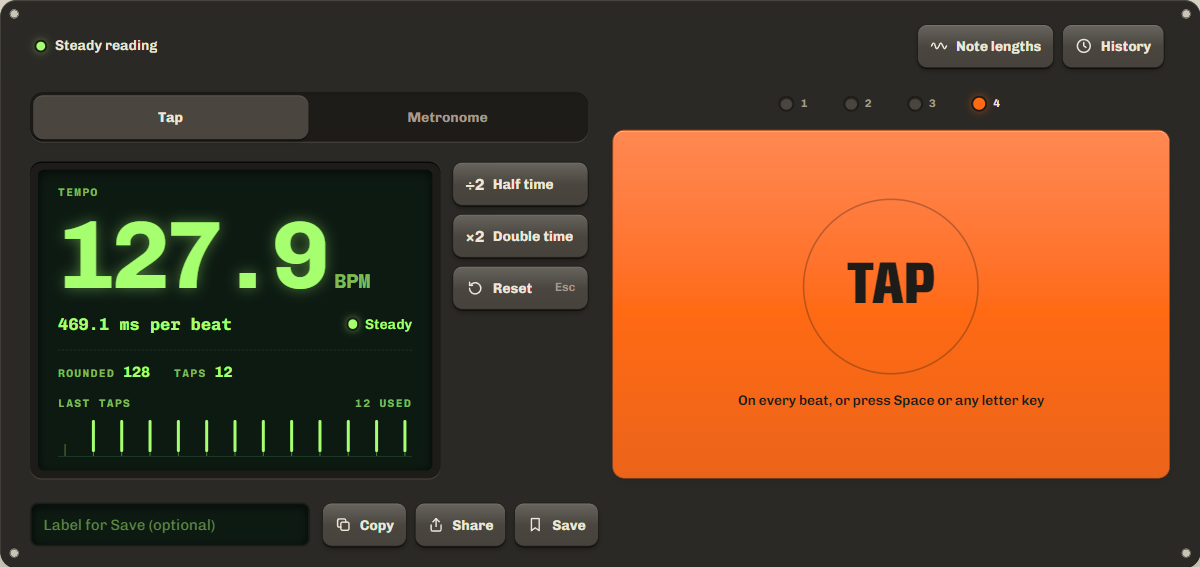
To start over, press Reset or Esc, or stop for 2 seconds: your next tap starts a new count. The tool only times your taps. It does not use the microphone, and nothing is recorded.
Online metronome
Switch the tool to Metronome to hear a click on every beat. It starts at the tempo you tapped, so you can tap a song and then play along at the same speed. Set the tempo from 30 to 300 BPM with the slider, or press −1 and +1 to change it one BPM at a time. ÷2 and ×2 halve or double it.
Choose 2, 3, 4 or 6 beats per bar. Beat 1 has a higher click, and the lamps show which beat is playing. Your browser's audio clock times each click, not a page timer, so the clicks stay even when the page is busy for a moment. A shared link with a tempo opens here, ready to play.
How accurate is tap tempo?
Tap tempo gets accurate to a fraction of a BPM once you have tapped about a dozen beats, because the tool averages your taps and their small errors cancel out.
No one taps exactly on the beat. At 120 BPM, a tap that is 15 ms late makes the gap before it read 116.5 BPM. So the tool does not trust single gaps. It fits one steady beat to your last 12 beats, and the same late tap moves that reading by about 0.1 BPM. In our simulations, where every tap was up to 15 ms early or late, 13 taps at 120 BPM read within 0.6 BPM every time, and within 0.2 BPM on average.
Slips are handled too. A tap more than a quarter of a beat off is left out of the average, and it shows in amber on the Last taps strip. A missed beat counts as two beats, so it does not drag the reading down.
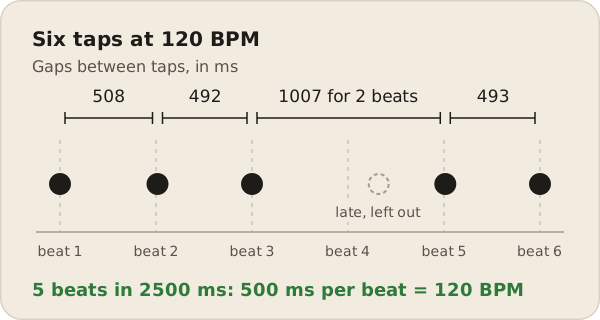
For the best result, tap at least 8 beats and wait for the status to say Steady. Steady means the average holds at least 8 taps and its error estimate is under half a percent of the tempo.
Typical BPM by genre
Most genres have a typical tempo range: hip hop often sits around 80 to 100 BPM, house around 120 to 130 BPM and drum and bass around 160 to 180 BPM.
| Genre | Typical tempo |
|---|---|
| Reggae | 60 to 90 BPM |
| Hip hop | 80 to 100 BPM |
| Pop | 100 to 130 BPM |
| Rock | 110 to 140 BPM |
| House | 120 to 130 BPM |
| Techno | 120 to 150 BPM |
| Trance | 125 to 150 BPM |
| Dubstep | About 140 BPM, felt as 70 |
| Trap | About 140 BPM, felt as 70 |
| Drum and bass | 160 to 180 BPM |
These are typical ranges, not rules. Plenty of songs sit outside them, and the same song can be counted at half or double speed, as the next section explains.
Half time and double time
Half time means the music feels half as fast as its tempo, and double time means it feels twice as fast.
Your taps follow the pulse you feel, so a reading can come out at half or double the tempo a track was made at. For example, most dubstep is made at about 140 BPM with the snare on the third beat of each bar, which makes it feel like 70. Trap beats are often written in half time at around 140 BPM too.
The ×2 and ÷2 buttons fix this. If you tap a drum and bass track at 87 BPM, ×2 shows 174. If you tap every hi-hat of a 120 BPM song and get 240, ÷2 shows 120. The tool keeps your tapped value next to the result, and each new count starts at ×1. Not sure which one is right? The beat is usually the pulse you would count as 1, 2, 3, 4 in each bar.
BPM to milliseconds
To turn BPM into milliseconds, divide 60,000 by the BPM: at 120 BPM, one beat lasts 60,000 ÷ 120 = 500 ms.
This counts the beat as a quarter note, as in most pop and dance music. An eighth note is half a beat and a sixteenth note is a quarter of a beat. A dotted note is 1.5 times as long, and a triplet note is two thirds as long. Producers use these times to set delay and reverb, so the echoes land on the beat. Open Note lengths on the tool to see them for your tempo.
| BPM | 1/4 | 1/8 | 1/16 | Dotted 1/8 | 1/8 triplet |
|---|---|---|---|---|---|
| 60 | 1000.0 | 500.0 | 250.0 | 750.0 | 333.3 |
| 70 | 857.1 | 428.6 | 214.3 | 642.9 | 285.7 |
| 80 | 750.0 | 375.0 | 187.5 | 562.5 | 250.0 |
| 90 | 666.7 | 333.3 | 166.7 | 500.0 | 222.2 |
| 100 | 600.0 | 300.0 | 150.0 | 450.0 | 200.0 |
| 110 | 545.5 | 272.7 | 136.4 | 409.1 | 181.8 |
| 120 | 500.0 | 250.0 | 125.0 | 375.0 | 166.7 |
| 128 | 468.8 | 234.4 | 117.2 | 351.6 | 156.3 |
| 140 | 428.6 | 214.3 | 107.1 | 321.4 | 142.9 |
| 150 | 400.0 | 200.0 | 100.0 | 300.0 | 133.3 |
| 160 | 375.0 | 187.5 | 93.8 | 281.3 | 125.0 |
| 174 | 344.8 | 172.4 | 86.2 | 258.6 | 114.9 |
All values in milliseconds, rounded to one decimal.
FAQ
How many taps do I need?
Two taps give a first reading, but it jumps around. After about 8 even taps the status changes to Steady. The average always uses your last 12 beats, so you can keep tapping to check it.
Why did my count start over?
The tool starts a new count when you pause for more than 2 seconds, so you can move on to the next song without pressing anything. The last reading stays on screen until you tap again. Press Reset or Esc to start over at any time.
Should I tap the kick, the snare or the hi-hat?
Tap the steady pulse you would clap along to. If you tap only the snare on beats 2 and 4, you get half the tempo, so press ×2. If you tap every hi-hat, you may get double, so press ÷2.
Can it find the BPM of a song by itself?
Not this tool. It measures your taps, so play the song and tap along. A BPM finder that listens to a song through the microphone is coming later.
Does the BPM tapper use the microphone?
No. It only times your taps, so it needs no permission, and nothing is recorded or uploaded. It works in any modern browser on a phone, tablet or computer.
What does BPM mean?
Beats per minute: how many beats fit in one minute. At 60 BPM there is one beat every second, and at 120 BPM there are two.
Related tools
All audio toolsFind the note you sing or play, in Hz and cents.
Play a steady tone at any frequency.
Maintained by NabeelUpdated Oct 20, 2026.