Dead Pixel Test
Find dead and stuck pixels on any screen. Go full screen and cycle through solid colors.
Ready: 7 colors
Each color fills the screen. Look for any dot that does not match.
Click, Space or the arrow keys for the next color. A cycles on its own. M marks a pixel. Esc leaves.
Stuck pixel fixer
Photosensitive epilepsy warning
The fixer flashes bright red, green, blue and white many times a second. Flashing light can cause seizures in people with photosensitive epilepsy. Do not use it if you, or anyone who can see the screen, has epilepsy or feels unwell with flashing light. Look away while it runs.
It helps only sometimes, and only with a stuck pixel (one that stays red, green, blue or white). It cannot fix a dead pixel. Put the square over the pixel and leave it for 10 to 30 minutes.
Fast (20 changes a second). If you marked a stuck pixel in the test, the square starts on it.
Runs on your device. Marks stay in this tab and are gone when you leave.
How to run a dead pixel test
Fill the whole screen with one plain color at a time and look for a dot that does not match. This pixel test shows black, white, red, green, blue, gray and dark gray, so it works as a stuck pixel test and a dead pixel checker in one.
- Step 1Clean and brightenWipe the screen with a dry microfiber cloth, so dust does not look like a pixel. Turn the brightness up.
- Step 2Start the testTap Start test. Each color fills the screen. Tap, click or press an arrow key for the next one, or turn on Auto cycle for a new color every 4 seconds.
- Step 3Mark what you seeTurn on Mark a pixel and tap each dot that does not match. Leave with Esc or Close to see the result.
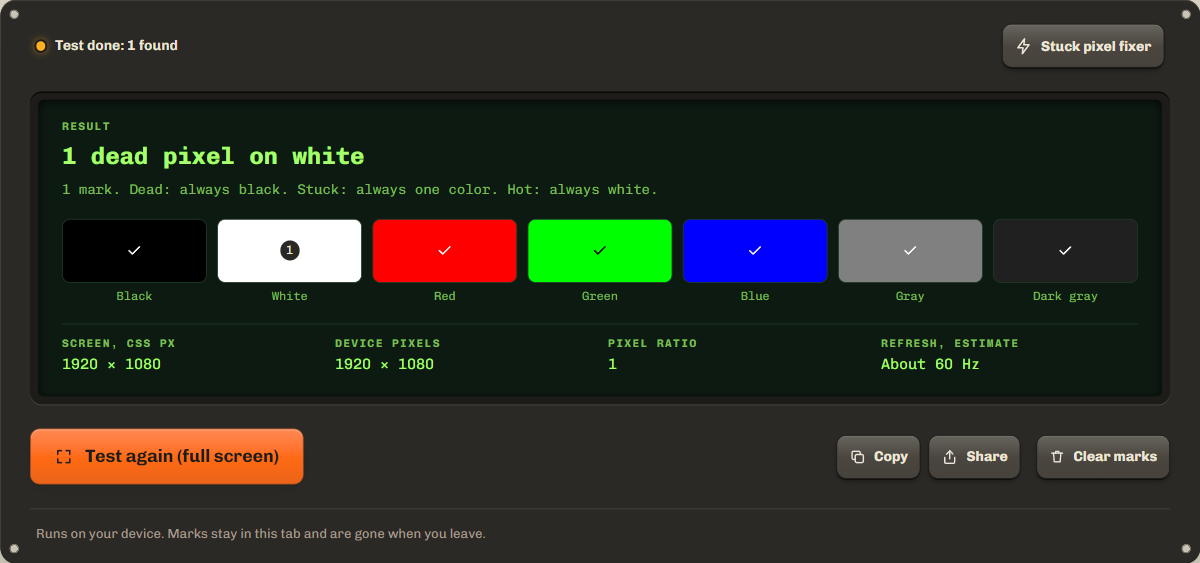
Look from a normal distance first, then move closer and scan in rows, edges and corners included. Mark each dot on every color where you see it: the result uses those colors to tell a dead pixel from a stuck one. Auto cycle stops as soon as you tap or press a key.
Dead pixel vs stuck pixel vs hot pixel
A dead pixel is always black, a stuck pixel is always one color, and a hot pixel is always white. Each pixel has a red, a green and a blue subpixel, so the color you see tells you which of them are on. Makers do not all use the same words: Dell, for one, calls a pixel with all three subpixels on a bright pixel.

| Kind | Looks | Easy to see on | What it means |
|---|---|---|---|
| Dead pixel | Always black | White and every bright color | No subpixel lights. It gets no power. |
| Stuck pixel | Always one color, often red, green or blue | Black, and the colors it does not match | One or two subpixels stay on. |
| Hot pixel | Always white | Black and every dark color | All three subpixels stay on. |
Testing a new monitor, laptop, phone or TV
Test a new screen on the first day, while the store's return period is open. A monitor dead pixel test works best with the page open on that monitor: with two monitors, move the window there first, because full screen fills the screen the window is on. On a laptop, open the lid to your normal angle and do not press on the panel.
For a dead pixel test on a phone, turn the brightness up and tap through the colors; turn an iPhone sideways to hide most of the browser bars. For a TV, open the page in the TV's browser and use the remote's arrow keys, or connect a laptop with HDMI and move the window to the TV. Large screens are easier with Auto cycle: sit back and watch each color.
How many dead pixels is acceptable?
It depends on the maker and the model: each one publishes its own pixel policy, with the number and kind of faulty pixels a panel may have before they replace it. Bright and dark pixels often have different limits, so read the policy for your screen rather than a number from a forum.
Two examples: the Dell display pixel guidelines and the Lenovo monitor pixel policy. For other brands, search for the maker's name and "pixel policy". If your result is over the limit, copy it from the tool and send it with your claim. A store return inside the return period is usually easier than a warranty claim.
Can you fix a stuck pixel?
Sometimes, but a dead pixel cannot be fixed. A stuck pixel can come back on its own, or with a small square that flashes colors over it: open Stuck pixel fixer at the top right of the tool. It flashes far more than the WCAG limit of three flashes a second, so read its warning first. On a new screen, ask for a replacement before you try anything else.
Troubleshooting and privacy
If full screen does not open, the test fills the window instead. If the hint bar covers a spot, wait a few seconds: it hides by itself. A faint glow at the edges on dark gray is backlight bleed, not a pixel fault, and faint shapes on gray are a job for the screen burn-in test.
Everything runs on your device and nothing is sent anywhere. Your marks stay in this tab and are gone when you leave or reload.
FAQ
Does the dead pixel test work on phones?
Yes. Open this page on the phone, turn the brightness up and tap through the colors. Android browsers go full screen. On iPhone the test fills the window, because Safari lets only videos go full screen.
Why does one dot stay black on every color?
A dot that is black on white, red, green and blue is a dead pixel: none of its subpixels light. If it moves when you wipe the screen, it is dust. If it is dark on only one color, one subpixel is stuck off.
Can dead pixels spread?
Usually not. One dead pixel stays one dead pixel. If new ones keep appearing, or a line or patch goes dark, the panel or its connection is failing, and that needs a repair or a warranty claim.
Can a dead pixel fix itself?
A dead pixel almost never comes back, because it gets no power. A stuck pixel can come back on its own, so test again after a few days.
Related tools
All display testsCheck an LCD screen for light leaking at the edges and IPS glow.
Find burned-in logos and taskbars on OLED and LCD screens.
Check gradients, black level, gamma, sharpness and uniformity with test patterns.
Maintained by NabeelUpdated Oct 21, 2026.