Pitch Detector: What Note Is This?
A free online note finder for voice and instruments. Tap Start, allow the microphone, then sing or play a note.
Ready
Tap Start, then sing or play a note.
Settings
Raise it for quiet sounds. Lower it in a noisy room.
History
Notes and ranges you save appear here. They stay on this device.
Processed on your device. Nothing is recorded.
How to use the pitch detector
- Step 1Tap Start listeningYour browser asks to use the microphone. Choose Allow. The tool hears sound only while it is on.
- Step 2Sing, hum or play one noteHold it for a second. The keyboard lights the note's key, and Steady shows when you hold the pitch still.
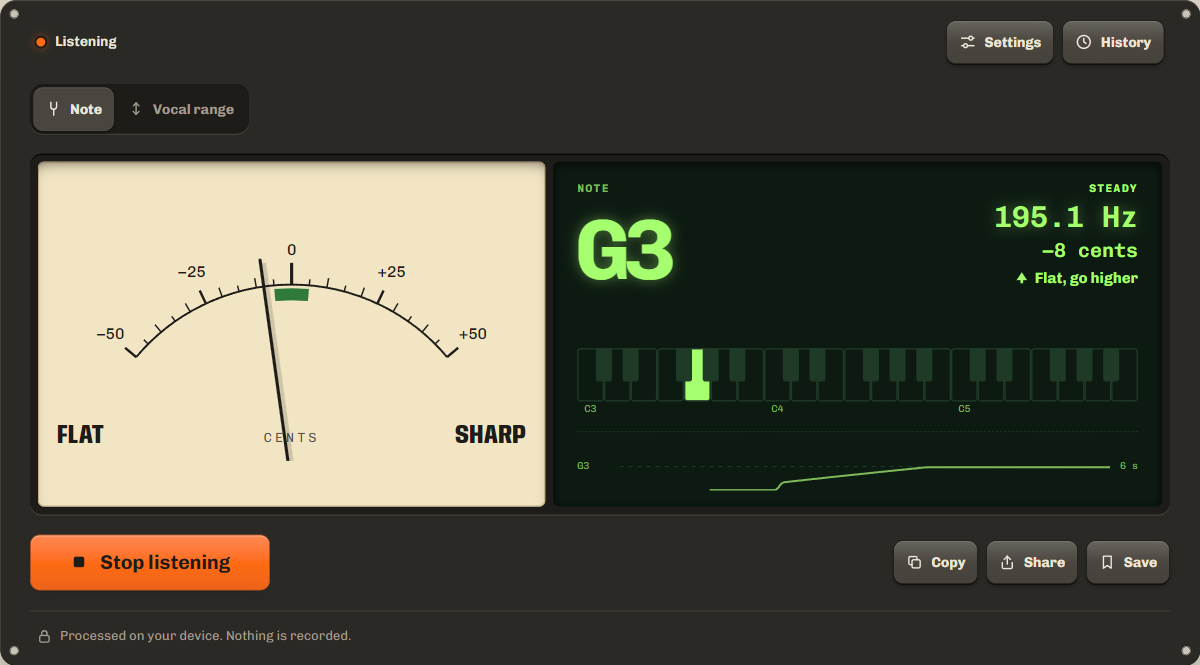
- Step 3Read the note and the needleThe big letter is the note. Green means in tune. Left of center is flat, right is sharp. When you stop, the last note stays on screen to copy, share or save.
What note is this? Reading the note finder
The pitch detector listens for the strongest repeating pattern in the sound and turns it into four readings.
- Note name
- The letter of the note, with ♯ for sharps.
- Octave number
- Which A it is. A4 is the A above middle C.
- Frequency
- How many times per second the sound wave repeats.
- Cents
- How far you are from the exact note. 100 cents make one semitone.
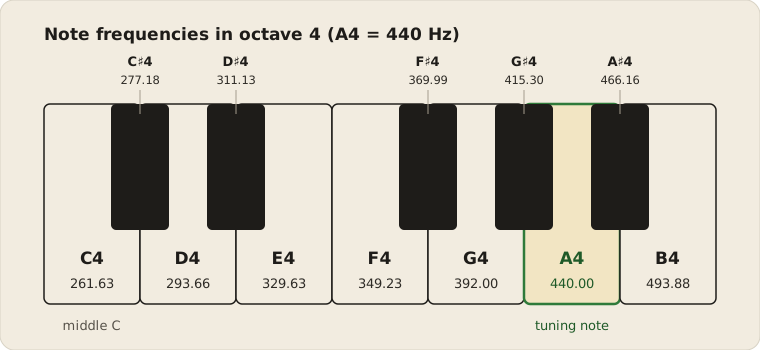
Middle C is C4 at 261.63 Hz. Each octave up doubles the frequency, so A5 is 880 Hz and A3 is 220 Hz.
Pitch finder for singers: are you in tune?
The needle is in the green zone within 5 cents of the note, a common target for singers and tuners. Further off, the readout shows which way to move: left of center means sing a little higher, right means a little lower.
Hold an open vowel like "ah" and watch the pitch line. A flat line is a steady note, and the readout says Steady when the pitch stays within 5 cents for about a second. A gentle wave is vibrato, which is normal, so read the middle of the wave. To practise against a fixed pitch, play a 440 Hz reference with the tone generator.
Find your vocal range
Choose Vocal range above the meter, then tap Start listening. Sing your lowest comfortable note on an open vowel like "ah" and hold it for a moment. Then slide up slowly and hold your highest comfortable note. Do not push or strain. A note counts only after you hold it clearly for about a third of a second, so a crack or a breath does not stretch the range.
The tool shows your range, such as E2 to G4, its size in octaves and semitones, and the typical ranges it overlaps, from bass to soprano, as listed under voice type. These are typical ranges, not a test of your voice type: training, comfort and tone matter too. Tap Reset range to start again.
Note detector for instruments
Play one string or key at a time and let it ring. Compare the reading with the standard frequencies below.
| String | Note | Hz |
|---|---|---|
| 6 | E2 | 82.41 |
| 5 | A2 | 110.00 |
| 4 | D3 | 146.83 |
| 3 | G3 | 196.00 |
| 2 | B3 | 246.94 |
| 1 | E4 | 329.63 |
| String | Note | Hz |
|---|---|---|
| 4 | G4 | 392.00 |
| 3 | C4 | 261.63 |
| 2 | E4 | 329.63 |
| 1 | A4 | 440.00 |
| String | Note | Hz |
|---|---|---|
| 4 | G3 | 196.00 |
| 3 | D4 | 293.66 |
| 2 | A4 | 440.00 |
| 1 | E5 | 659.26 |
Note frequency chart, A4 = 440 Hz
Every note from C2 to B6 in standard tuning, in hertz. A4 is highlighted. C4 (261.63 Hz) is middle C. A4 = 440 Hz is the international tuning standard, set in ISO 16.
| Note | Octave 2 | Octave 3 | Octave 4 | Octave 5 | Octave 6 |
|---|---|---|---|---|---|
| C | 65.41 | 130.81 | 261.63 | 523.25 | 1046.50 |
| C♯ | 69.30 | 138.59 | 277.18 | 554.37 | 1108.73 |
| D | 73.42 | 146.83 | 293.66 | 587.33 | 1174.66 |
| D♯ | 77.78 | 155.56 | 311.13 | 622.25 | 1244.51 |
| E | 82.41 | 164.81 | 329.63 | 659.26 | 1318.51 |
| F | 87.31 | 174.61 | 349.23 | 698.46 | 1396.91 |
| F♯ | 92.50 | 185.00 | 369.99 | 739.99 | 1479.98 |
| G | 98.00 | 196.00 | 392.00 | 783.99 | 1567.98 |
| G♯ | 103.83 | 207.65 | 415.30 | 830.61 | 1661.22 |
| A | 110.00 | 220.00 | 440.00 | 880.00 | 1760.00 |
| A♯ | 116.54 | 233.08 | 466.16 | 932.33 | 1864.66 |
| B | 123.47 | 246.94 | 493.88 | 987.77 | 1975.53 |
Why the reading jumps around, and how to get a steady note
- Background noiseFans, traffic and music confuse the reading. Move somewhere quiet.
- Too quietSing or play louder, or hold the phone closer. Raise Sensitivity under Settings if you need to.
- More than one noteChords and harmonies hold several pitches. Play one note at a time.
- VibratoA wavy pitch moves the number. Watch the pitch line instead.
- Laptop microphonesSome clean up sound for calls, which can blur notes. A headset or a phone often reads better.
Is my voice recorded?
No. Your browser analyzes the sound from your microphone with the Web Audio API and then discards it. Nothing is recorded, uploaded or stored, and the microphone turns off when you tap Stop or leave the page. Notes and ranges you save stay in this browser.
FAQ
Can it find the notes of a song?
It reads one note at a time. To find a melody, sing or play it note by note and write each reading down. Chords and full songs hold several notes at once, so the reading jumps.
What is the difference between 440 Hz and 432 Hz?
Most music today tunes A4 to 440 Hz. Some musicians prefer 432 Hz, which is about 32 cents lower. Set A4 reference under Settings to the tuning you use.
Does the pitch detector work on iPhone?
Yes, in Safari and Chrome. Tap Start listening and allow the microphone. If you said no before, tap aA in the address bar, then Website Settings, and set Microphone to Allow.
How accurate is it?
With a clear, steady note it reads to within a few cents. Noise, chords and very low notes make it less exact.
Is a pitch detector the same as a tuner?
Close. A tuner checks an instrument against set notes. The pitch detector names any note you sing or play. Our guitar tuner uses the same engine and adds the target strings for each tuning.
Related tools
All audio toolsCheck left, right and bass on your speakers or headphones.
Play a 440 Hz reference tone to sing along with.
Tune each string with the same engine.
Maintained by NabeelUpdated Oct 20, 2026.