Online Guitar Tuner
A free guitar tuner for acoustic and electric guitars: tap Start, allow the microphone, then play a string.
Ready
Tap Start, then play a string.
Settings
Processed on your device. Nothing is recorded.
How to tune your guitar with the tuner
- Step 1Tap Start listeningYour browser asks to use the microphone. Choose Allow. If you do not use standard tuning, pick yours under Settings.
- Step 2Play one open stringLet it ring. Auto finds the string for you, or tap a string to lock the tuner to it.
- Step 3Turn the peg to greenLeft of center is flat, so tune up. Right of center is sharp, so tune down. Stay green for a second and the string's lamp lights. When every lamp is lit, the tuner says All strings in tune.
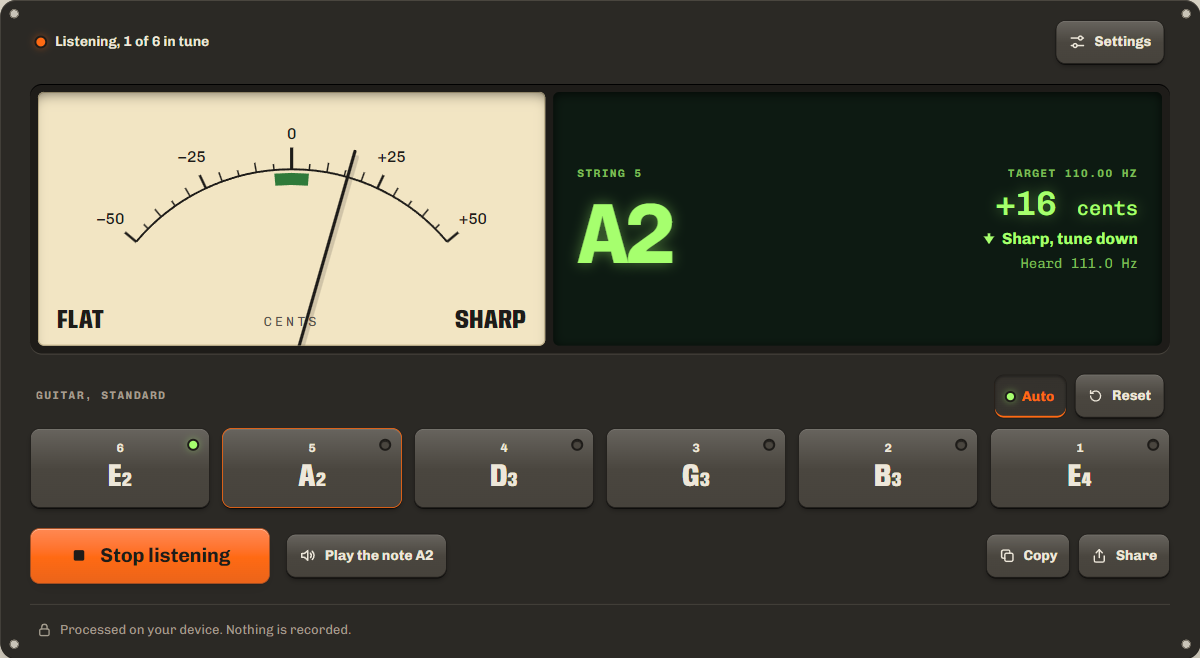
To tune your guitar by ear instead, tap Play the note for a short plucked tone of the string. While it plays, the tuner stops listening, so it does not tune to its own sound.
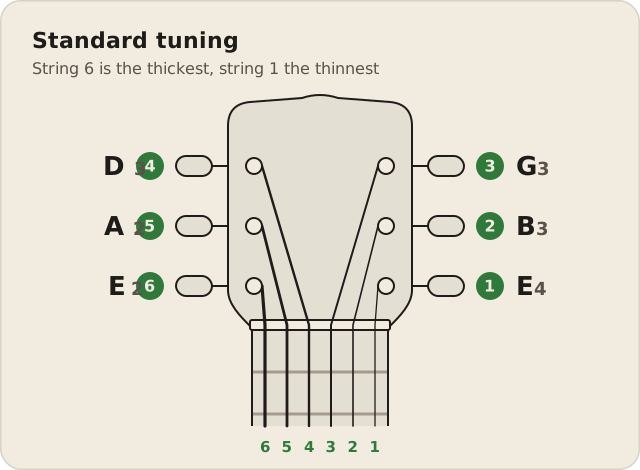
Standard tuning: E A D G B E
Standard tuning, from the thickest string to the thinnest, is E A D G B E. With octave numbers it is E2 A2 D3 G3 B3 E4. The frequencies below are at A4 = 440 Hz, the standard tuning pitch set in ISO 16.
| String | Note | Frequency |
|---|---|---|
| 6 | E2 | 82.41 Hz |
| 5 | A2 | 110.00 Hz |
| 4 | D3 | 146.83 Hz |
| 3 | G3 | 196.00 Hz |
| 2 | B3 | 246.94 Hz |
| 1 | E4 | 329.63 Hz |
To remember the order, say Eddie Ate Dynamite, Good Bye Eddie.
Alternate tunings
Pick one of these six common guitar tunings under Settings, and the string buttons change to match. Notes run low to high. A new tuning turns the tuned lamps off.
| Tuning | Notes, low to high | From standard |
|---|---|---|
| Drop D | D2 A2 D3 G3 B3 E4 | String 6 down a whole step |
| Half step down (E♭) | E♭2 A♭2 D♭3 G♭3 B♭3 E♭4 | All six strings down a half step |
| D standard | D2 G2 C3 F3 A3 D4 | All six strings down a whole step |
| Open G | D2 G2 D3 G3 B3 D4 | Strings 6, 5 and 1 down a whole step |
| Open D | D2 A2 D3 F♯3 A3 D4 | Strings 6, 2 and 1 down a whole step, string 3 down a half step |
| DADGAD | D2 A2 D3 G3 A3 D4 | Strings 6, 2 and 1 down a whole step |
Drop D lowers only string 6, so a power chord on the three lowest strings takes one finger. In open G and open D, the open strings play a major chord. DADGAD is an open D suspended fourth chord. Half step down, also called E♭ standard, and D standard keep every chord shape, only lower.
Tune up to the note
Always finish a string by tuning up to the note. If it is sharp, go a little below the note, then come back up. Fender's tuning tips say the extra tension of an upward turn holds the pitch better.
Pluck once and let the string ring. Right after a pluck the pitch is a little high, so wait a moment before you read the needle.
New strings stretch. They need breaking in before they hold their tension, so expect them to go flat a few times. Tune them, gently pull each string away from the fretboard, and tune again until it stays green.
Check again after a full pass. Each string pulls on the neck, so tuning one can move the others. Start with string 6, tune all six, then check them again.
Bass and other instruments
To tune a bass guitar, open Settings and choose Bass. Standard bass tuning is one octave below the four lowest guitar strings: E1 (41.20 Hz), A1 (55.00 Hz), D2 (73.42 Hz) and G2 (98.00 Hz). A 5-string bass adds a low B, B0 (30.87 Hz), below the E. Notes this low are hard for a phone microphone to pick up, so hold the phone close to the bass, or play through an amp.
Also tune a ukulele, violin or bass on its own tuner page. The tuner also tunes a ukulele (G C E A, with a high or a low G) and a violin (G D A E): choose them under Settings. For any other instrument, use the pitch detector: it names any note you play, in hertz and cents. To hear a steady reference pitch, use the tone generator.
Is my audio recorded?
No. Your browser analyzes the sound from your microphone on your device and then discards it. Nothing is recorded, uploaded or stored, and the microphone turns off when you tap Stop or leave the page. Only your tuning and A4 reference are saved, in this browser. The privacy policy has the details.
FAQ
Can I tune an acoustic guitar with my phone?
Yes. Open this page on your phone, tap Start listening and hold the phone near the sound hole. An electric guitar works too: play it through an amp, or hold the phone close to the strings when it is unplugged.
Does it work on iPhone?
Yes, in Safari and Chrome. Tap Start listening and allow the microphone. If you said no before, tap aA in the address bar, then Website Settings, and set Microphone to Allow. If Play the note is silent, turn up the volume and check Silent mode.
How accurate is it?
With one clear string it reads to within a few cents, and green means within 5 cents of the note. The tuner uses the same pitch engine as our pitch detector.
What is A440?
A440 is the A above middle C (A4) tuned to 440 Hz, the standard tuning pitch. Every other note is set from it. Some players use 432 or 442 Hz: choose yours under Settings, A4 reference.
Why does my guitar go out of tune?
New strings stretch until they settle in, and changes in temperature and humidity affect the strings and the wood. Tune each time you play, and check new strings again after a few minutes.
Related tools
All audio toolsFind any note you sing or play, in Hz and cents.
Play a reference note at any frequency.
Check left, right and bass on your speakers or headphones.
Maintained by NabeelUpdated Oct 20, 2026.