The fastest way to solve a word search is to stop looking for whole words and look for one letter instead: the rarest letter in the word. Find each place that letter appears, then check the 8 letters around it for the next letter of the word, and follow that line. Work through the word list in an order that helps you, with long words and words with unusual letters first, and scan the grid in a fixed pattern rather than at random. When one word refuses to show up, check the list and the grid for a mistake, or use a word search solver to mark just that one word.
How a word search works
In a classic word search each word is a straight line of letters next to each other. It can run in 8 directions: left to right, right to left, top to bottom, bottom to top, and along the four diagonals. Words can cross and share letters, and the other cells are filled with random letters. Most puzzles for adults use all 8 directions; puzzles for young children often use only across and down.
Knowing this tells you what not to do. Words never bend and never wrap around the edge, so once a line leaves the grid, that start is wrong and you can move on.
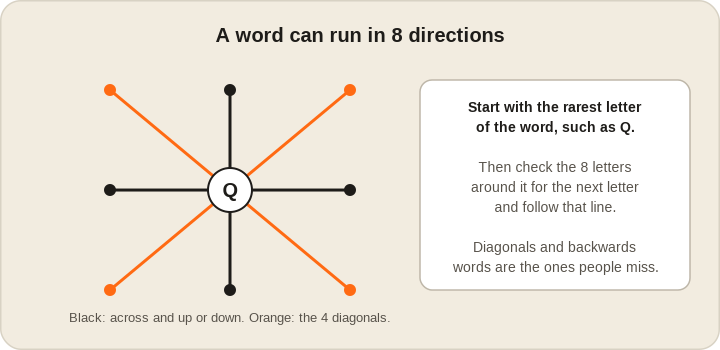
1. Start at the rarest letter
Your eyes find a letter faster when it stands out. Common letters such as E, A, S and T are everywhere in the filler, so looking for words that start with them is slow. Instead, pick the least common letter in the word:
- For QUARTZ, look for the Q or the Z.
- For JACKET, look for the J or the K.
- For VELVET, look for the V.
Each place that letter appears is a candidate. There are usually only a few, so checking each one is quick.
2. Check the 8 neighbours, then follow the line
At each candidate, look at the 8 letters around it for the next letter of the word. When you find it, you also know the direction: follow that line and check the rest of the word. If the line breaks, go back to the next candidate. This is exactly what a computer does, and it is far faster than reading every row.
3. Look for letter pairs that are rare
If a word has no rare letter, use a pair of letters that rarely sit next to each other. Double letters such as OO, LL or SS stand out well. So do pairs such as CK, PH or WH. Scanning for a pair cuts the number of false starts compared with a single common letter.
4. Find long words first
Long words are easier to spot because they cross a big part of the grid, and they use up many cells. Once they are found and marked, the grid gets less crowded, and short words are easier to see among fewer free letters. Save the short three and four letter words for last.
5. Scan in sweeps, one direction at a time
Random searching wastes time because your eyes go over the same area again and again. Pick a system instead:
- Read every row left to right, looking for the first letters of several words at once.
- Read every column top to bottom.
- Read the diagonals, first down to the right, then down to the left.
Words that read backwards or upwards are found on the same sweeps if you look for their last letter followed by the one before it. Many people find it easier to search for the word reversed: for a backwards STAR, look for RATS left to right.
6. Turn the page
If you are solving on paper, turn the puzzle a quarter turn. Columns become rows, and words running up or down read like normal text. It sounds too simple, but our eyes are trained to read rows, so a word in a column can hide in plain sight until it lies flat.
7. Mark found words clearly
Draw a loop around each word, or a line through it, and cross it off the list. A clean grid keeps you from finding the same word twice and shows which letters are still free. Some puzzles have a hidden message in the leftover letters, read in order once every word is found.
8. Check for mistakes when a word is missing
When a word seems impossible, it may not be your fault:
- Spelling: check the word list against the grid’s language. A puzzle may use COLOUR where you look for COLOR.
- Plurals and forms: the list may say MICE and the grid MOUSE.
- Spaces: a phrase such as ICE CREAM is written without the space in the grid.
- Printing errors: some printed puzzles contain mistakes.
If you typed the puzzle into a solver and it says a word is not in the grid, check the row you typed for a missing letter: one short row shifts every letter after it.
Use a solver to check, not to spoil
A word search solver can help without spoiling the whole puzzle. Type or paste the letter grid, one row per line, and the word list. Then tap only the word you are stuck on: the solver marks just that word and says where it starts and which way it runs. Tap Find all words only when you want every answer.
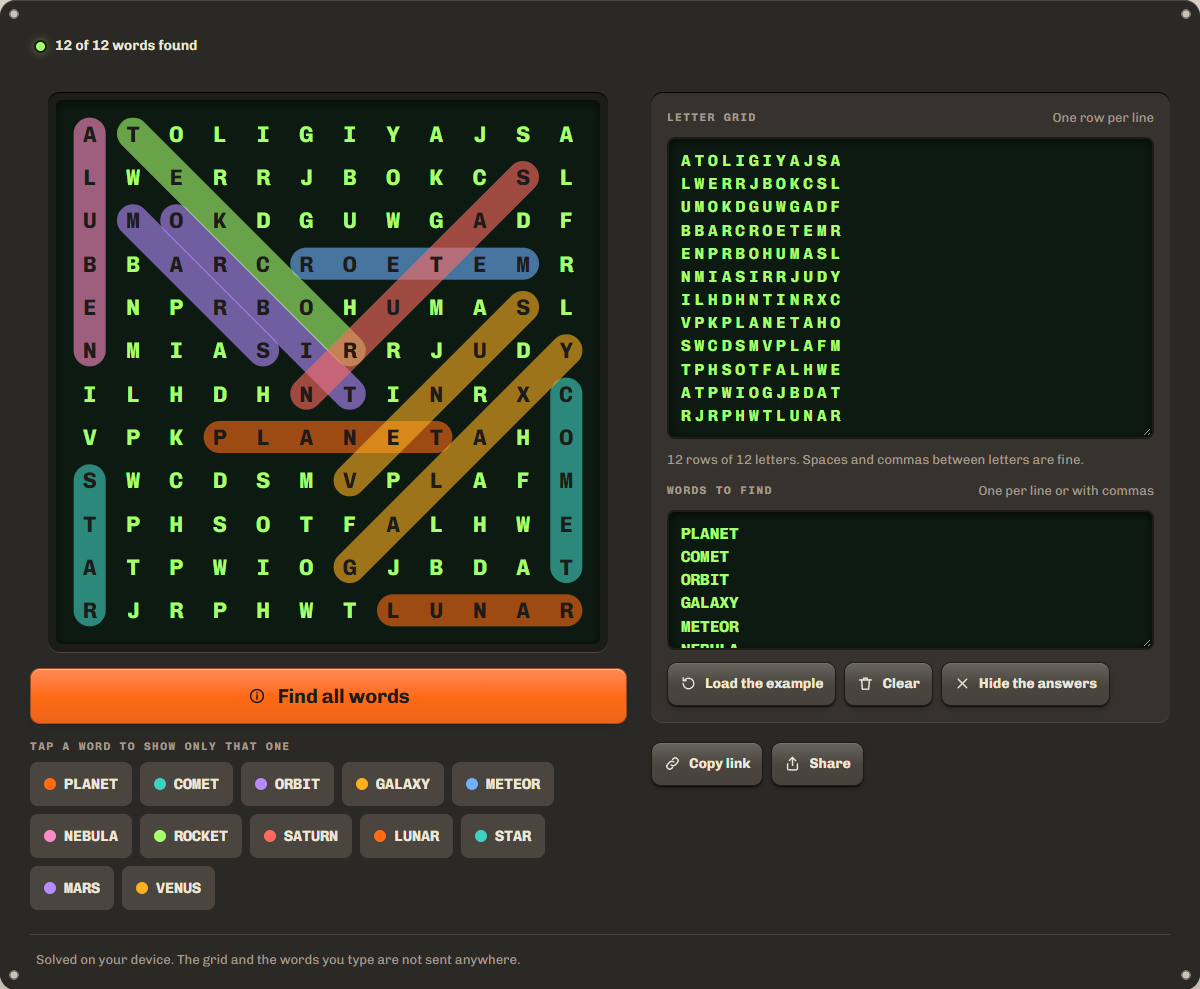
The solver runs on your device, and the grid you type is not sent anywhere. It finds words in straight lines only, like a classic word search, so it is not for puzzles where words bend. For those, such as Strands, use the Strands solver.
Quick answers
Which words are hardest to find? Short words, words made of common letters, and words that run diagonally or backwards.
Should I look for the first letter of each word? Only if it is rare. Otherwise use the rarest letter of the word, or a rare pair, as your starting point.
Is it cheating to use a solver? It is your puzzle and your rules. Many people use one only to check a word after trying, the same way you would look at the answer page of a puzzle book.