Discord Text Color Generator
This Discord text color generator turns your message into colored text: select words, pick a color, copy, paste.
2 colored parts, ready to copy
Select words in the box, then pick a color. With nothing selected, a color goes on the whole message.
Text color
Background
Then paste it into a Discord message and send.
How to paste it
- Tap Copy for Discord. It copies a code block that starts with ```ansi.
- Paste it into the message box in Discord with Ctrl+V, Cmd+V or a long press. Keep the three backticks on their own lines.
- Send it. The Discord desktop app shows the colors. If you see plain text, the app you read it in does not show ANSI colors.
Do not retype the code by hand: it holds an invisible escape character that only a copy and paste carries.
The code
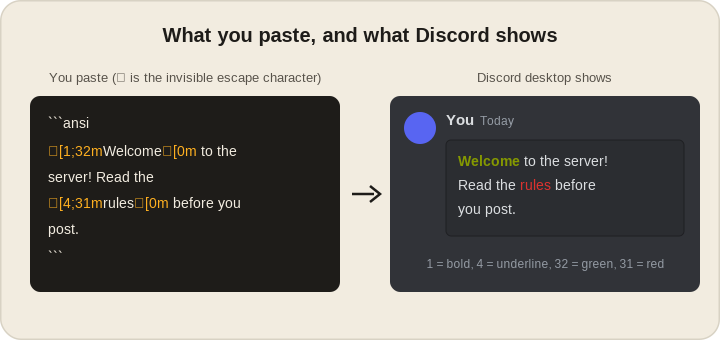
The escape character is invisible, so it shows here as ␛. The copy has the real character.
```ansi
␛[1;32mWelcome␛[0m to the server! Read the ␛[4;31mrules␛[0m before you post.
```
Runs in your browser. Nothing is sent anywhere. Not affiliated with Discord.
How to type in color on Discord
Discord has no color button. Colored text works through a trick: a code block tagged ansi, with ANSI escape codes in front of the words. Discord reads the codes and paints the words, the way a terminal does. The codes start with an invisible escape character, so this generator writes them for you.
- Step 1Type your messageWrite or paste it in the box. Line breaks and emoji are fine.
- Step 2Select words and pick a colorSelect a word, then tap a text color, a background, Bold or Underline. Select another word for the next color.
- Step 3Copy and paste into DiscordTap Copy for Discord, paste into the message box and send. The colors show in the Discord desktop app.
With nothing selected, a color goes on the whole message. Bold and Underline switch off again with a second tap. Open Code in the tool to see what you are about to paste, with the escape character shown as ␛.
Colors Discord supports
Discord's help article on Markdown text formatting explains code blocks but does not list ANSI colors. The list below is the set that Discord users tested and wrote up, for example in this widely shared guide to colored text on Discord and the colored text generator by rebane2001: 8 text colors, 8 backgrounds, bold and underline. The names are how most guides describe the colors; the exact shades depend on the app and theme, and the preview above shows close shades, not Discord's exact ones.
| Color | Text code | Background code |
|---|---|---|
| Gray (background: black) | 30 | 40 |
| Red | 31 | 41 |
| Green | 32 | 42 |
| Yellow | 33 | 43 |
| Blue | 34 | 44 |
| Pink | 35 | 45 |
| Cyan | 36 | 46 |
| White | 37 | 47 |
| Bold | 1 | |
| Underline | 4 | |
| Reset everything | 0 | |
Codes join with a semicolon, so ␛[1;4;33m is bold, underlined yellow text. A text color and a background can go on the same words.
Does colored text show on mobile?
On a computer, yes: the Discord desktop app shows the colors in an ansi code block. On phones it has varied. One of the guides above says the phone apps did not show ANSI colors when it was written, and Discord changes its apps often, so a phone may show the colors or plain text in a code block. The message itself is the same either way: readers on a phone see your words, just possibly without the colors.
You can make the code on your phone, though. This generator works in a phone browser: select words, tap a color, tap Copy for Discord, then paste into the Discord app.
Other Discord formatting
For everything that is not color, Discord uses Markdown. These are from Discord's own Markdown Text 101 article. They work in normal messages, but not inside a code block, so you cannot mix them with colored text in the same block.
| Style | Type this |
|---|---|
| Italics | *italics* or _italics_ |
| Bold | **bold** |
| Underline | __underline__ |
| Strikethrough | ~~strikethrough~~ |
| Spoiler | ||spoiler|| |
| Headers | # big, ## smaller, ### smallest |
| Block quote | > one line, >>> many lines |
| Code block | ```text``` |
To tell a server when an event starts, in each member's own time zone, use the Discord timestamp generator. A timestamp is a separate code and does not work inside a code block, so send it in its own line next to the colored block.
FAQ
How do you type in color on Discord?
Put the text in a code block tagged ansi and add ANSI escape codes before the words you want colored, such as the code 31 for red. Typing the escape character by hand is hard, so use a generator: select the words, pick a color, copy and paste.
Why does my colored text show as plain text?
Either the code block lost its ansi tag or the invisible escape characters, which happens when you retype the code instead of pasting it, or the Discord app you read it in does not show ANSI colors. Copy it again from the generator and check it in the desktop app.
Can I use any color, such as a hex color?
Not reliably. The 8 text colors (codes 30 to 37) and 8 backgrounds (40 to 47) are the ones users report working in Discord. Guides also mention 24-bit color codes, but reports of them working are mixed, so this tool sticks to the 16 colors.
Can I color text in a nickname, channel name or bio?
No. The colors only work inside a code block in a message, because that is where Discord reads the ansi tag.
Does colored text work in embeds from bots?
Bots can send the same ansi code block in a normal message. Test anything else, such as an embed, in your own server before you rely on it.
Is this a fancy font generator?
No. It does not swap your letters for look-alike Unicode symbols. Your text stays normal text, and only the color changes.
Related tools
All everyday toolsMake a timestamp that every reader sees in their own time zone.
Check that text on a server banner or event image is easy to read.
Check that an announcement fits Bluesky's 300 character limit.
Maintained by NabeelUpdated Nov 9, 2026.