Word Search Solver
Type or paste the letter grid and the word list. Every word is found in all 8 directions and marked in the grid.
Ready
12 rows of 12 letters. Spaces and commas between letters are fine.
Solved on your device. The grid and the words you type are not sent anywhere.
How to use the word search solver
The tool opens with an example puzzle made for this site, on the theme of space, so you can try it first. Clear it, then enter your own puzzle in three steps.
- Step 1Enter the gridType the letters row by row, one row per line, or paste the whole grid. Spaces and commas between letters are fine.
- Step 2Add the wordsType or paste the word list, one word per line or with commas. Spaces inside a word, as in ICE CREAM, are ignored.
- Step 3Find themTap one word to see only that one, or tap Find all words to mark every word in the grid in its own color.
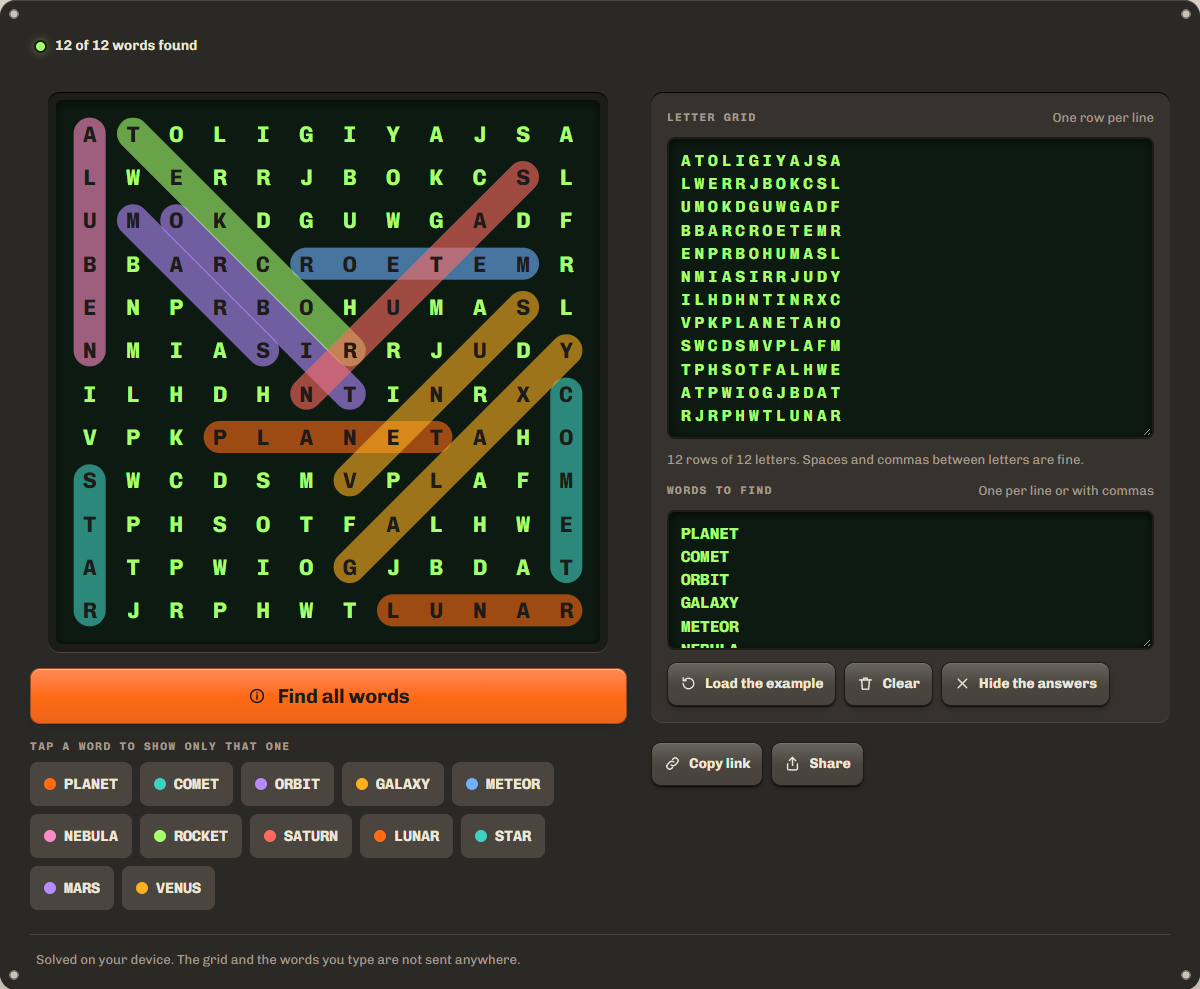
The grid and the words go into the address bar as you type, so Copy link gives you a link that opens the same puzzle on another device, or for a friend who is stuck on the same page of a puzzle book.
The 8 directions of a word search
In a classic word search, each word is a straight line of letters next to each other. It can run across, down or on a diagonal, forwards or backwards. That gives 8 directions, and the solver checks every one from every letter.
| Direction | What it looks like | Notes |
|---|---|---|
| Left to right | C A T | The most common direction. Read first. |
| Right to left | T A C | Backwards. Harder for the eye, easy for the solver. |
| Top to bottom | C, A, T down a column | Common in every puzzle. |
| Bottom to top | T, A, C down a column | Backwards in a column. |
| Down to the right | Diagonal from the top left | The usual diagonal. |
| Up to the left | Diagonal, backwards | Found in harder puzzles. |
| Up to the right | Diagonal from the bottom left | Found in harder puzzles. |
| Down to the left | Diagonal from the top right | Found in harder puzzles. |
Puzzles for young children often use only the first few directions. Puzzles for adults use all 8, and backwards diagonals are the ones people miss most, simply because we do not read that way.
How the solver searches
For each word on the list, the solver starts at every letter in the grid and reads in each of the 8 directions, letter by letter, until the word matches or a letter does not. The first match is marked. It stops at the edge of the grid: a word never wraps around to the other side. A word such as LEVEL that reads the same both ways is counted once.
This is the same thing you do by eye, done for every letter and every direction in a fraction of a second. If you want to get faster yourself, look for the rarest letter of a word (a J, Q, X or Z) instead of the first letter, then check the 8 letters around it for the second letter.
Using the solver on a phone
The grid sits at the top and fills the width of the screen, with the word list right under it, so you can tap a word and see it marked without scrolling. Type the grid with one row per line: the line break is the end of a row. If the phone capitalizes or autocorrects, that is fine, since the solver reads every letter as a capital and ignores spaces.
Typing a large grid on a phone keyboard takes a few minutes. Count the letters in the first row of the puzzle and check the note under the box: it says how many rows and letters it read, and which rows are short.
When a word is not found
- A short row: the note under the grid names any row with fewer letters. Find the missing letter and the words in that row line up again.
- A swapped letter: O and Q, I and L, M and N are easy to mix up in small print.
- The word list: check the spelling, including plurals. A list can say MICE where the grid has MOUSE.
- The puzzle itself: a printed puzzle can contain a mistake. If every letter is right, the word may simply not be there.
Privacy: the solver runs on your device. The grid and the words are not uploaded or saved anywhere. They are kept only in the page address, for the share link.
FAQ
Why does the solver say a word is not in the grid?
Usually one letter was typed wrong, in the grid or in the word list. Check the word first, then look along the rows near where you expect it. A row that is shorter than the others is flagged under the grid, because a missing letter moves every letter after it. Some printed puzzles also leave a word out on purpose or contain a mistake.
Does it find words that bend or wrap around the edge?
No. In a classic word search every word is a straight line in one of 8 directions, and the solver looks only for those. It does not wrap from one edge to the other and does not follow a bent path. For puzzles where words bend, such as Strands, use the Strands solver.
Can I use it to check my answers without seeing them all?
Yes. Nothing is marked until you tap. Tap one word in the list to see only that word, and tap it again to hide it. Find all words marks every word at once.
How big can the grid be?
Up to 40 rows of 40 letters, which is larger than almost any printed puzzle. The grid scales to fit the screen, so a large grid is easier to read on a tablet or computer than on a small phone.
Is it free, and is my puzzle sent anywhere?
It is free with no sign-up. The solver runs in your browser, and the grid and words you type stay on your device. They are only put in the page address, so Copy link can open the same puzzle on another device.
Related tools
All puzzle solversFind the spangram and theme words, one hint at a time.
Get a hint or the full answer for a Pips board.
Find the best moves for your three blocks on an 8 by 8 board.
Plan circles, ovals and spheres block by block.
Maintained by NabeelUpdated Nov 8, 2026.