Chord Finder: Find Chords from Audio
Upload a song or play into the microphone. The chords show as a timeline you can play along with.
Ready
Choose a song (MP3, WAV or M4A) or drop it here. It is analysed on this device and never uploaded.
The chord shape shows here once there is a chord.
Settings
Major and minor only gives a simpler chart for beginners: a seventh chord shows as its major or minor chord.
Your file is analysed on your device. Nothing is uploaded.
How to use the chord finder
- Step 1Choose a songTap Choose a song and pick an MP3, WAV or M4A file, or drop it on the screen. To use live sound instead, choose Microphone.
- Step 2Wait a few secondsYour browser reads the file and estimates the chords on your device. A three minute song takes a few seconds on a recent phone or computer.
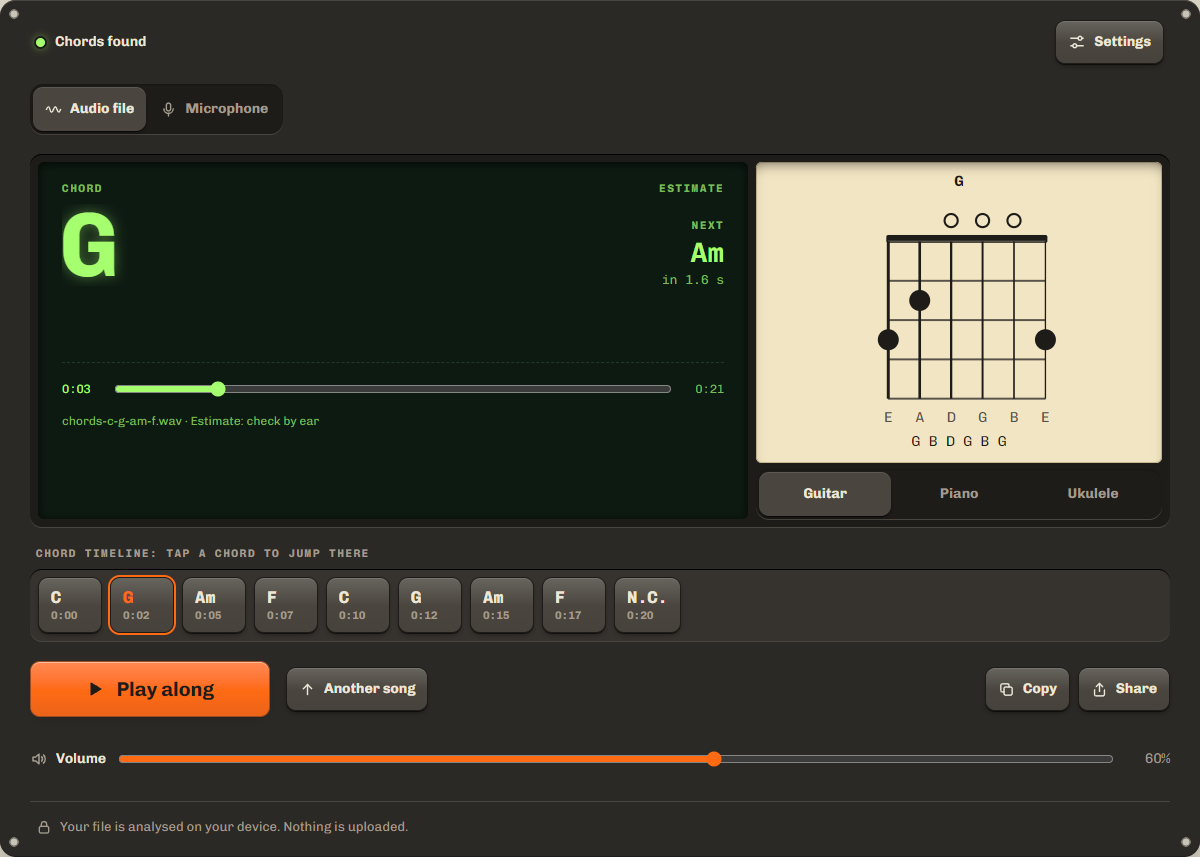
- Step 3Play alongTap Play along. The big chord is the one playing now, with the next one beside it and its shape for guitar, piano or ukulele. Tap any chord in the timeline to jump there.
Find chords from an audio file
This chord finder works with an audio file online, for free: an MP3, a WAV, or an M4A from a phone or a music app. The browser decodes the file with the Web Audio API (decodeAudioData), so the formats that work are the ones your browser can play. MP3, M4A (AAC) and FLAC work in current major browsers, and the details by browser are in MDN's audio codec guide. Files with copy protection cannot be read.
The result is a chord timeline: every chord change with its start time. Copy turns it into a short chord chart such as "0:00 C | 0:04 G | 0:08 Am" that you can paste into notes. A chord finder for MP3 files works best on songs with clear guitar or piano chords and a steady band. A solo voice, a rap track or heavy distortion give less to work with.
Find chords from the microphone
Choose Microphone and tap Start listening. Play a chord on a guitar, piano or ukulele, or hold your phone near a speaker, and the chord shows within about a second. The reading changes only when a new chord holds for a moment, so a single passing note does not flip it.
The microphone mode hears the room as well as the music, so it is less exact than a file. Play close to the microphone, keep the room quiet, and strum the whole chord rather than single notes.
Guitar, piano and ukulele chord views
Under the chord, pick Guitar, Piano or Ukulele. The guitar view shows the usual open chord where there is one, such as C, G, Am or E7, and otherwise a barre chord with the root on the 6th or 5th string. The ukulele view is for standard G C E A tuning. The piano view lights the notes of the chord in root position, starting from the root.
Every shape plays only notes of the chord. Dots are fingers, a bar is one finger across several strings, o is an open string and × is a string you do not play. A number beside the box is the fret where the box starts.
How accurate is it?
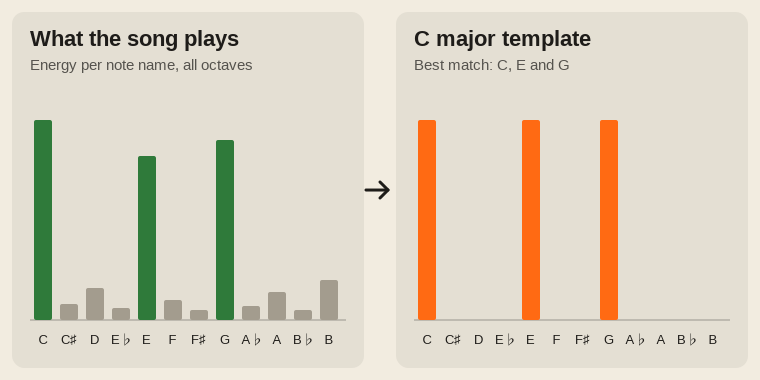
Treat the chords as a good first guess, not a transcription. The tool uses a classic method: it measures how much of each of the 12 note names (a chroma or pitch class profile) sounds at each moment and compares that with a template for every chord, an approach described by Takuya Fujishima in his 1999 paper on realtime chord recognition. A smoothing step then prefers chords that last, so the chart does not flicker.
- Works wellPop, rock, folk and worship songs with clear strummed or played chords; a solo guitar or piano.
- Often confusedChords that share notes, such as Am7 and C6, or C and Am when the bass is quiet. A loud melody note can add a seventh that is not in the chord.
- Not detectedInversions and slash chords (C/G shows as C), sus, diminished and extended chords. For the key of the song, use the song key finder.
- TuningIt expects standard tuning, A4 = 440 Hz. A song tuned a quarter tone off, or recorded with a detuned guitar, can read as the chord one semitone away.
Always check the chart by ear while you play along, and change any chord that sounds wrong.
Why your file stays on your device
The whole analysis runs in your browser, in a background worker so the page stays responsive. The song is never uploaded, so there is no waiting in a queue, no upload limit, and no copy of your music anywhere else. When you close the page, the file and the chords are gone. In microphone mode, nothing is recorded.
FAQ
Can it find chords from a YouTube or Spotify link?
No. It works only with an audio file on your device, or with sound it hears through the microphone. To use the microphone, choose Microphone and play the song near your device, though a file gives a cleaner result.
Is the chord finder free?
Yes. There is no sign-up, no limit on songs and nothing to install.
Why does it show N.C.?
N.C. means no chord: silence, drums alone, or a part where no chord matched well. Intros with speech or noise often show N.C.
Does it find the key of a song or the capo position?
It estimates chords only. For the key, open the same file in the song key finder, which uses the same analysis. It does not suggest a capo, but you can read the root notes from the chart and pick one yourself.
Which chords can it find?
Major, minor, dominant seventh, major seventh and minor seventh chords on all 12 roots. Under Settings you can limit it to major and minor for a simpler chart. Other chords, such as sus4, diminished or added ninths, show as the nearest of these.
Related tools
All audio toolsFind the key of the same song.
Detect the tempo of the same file.
Find single notes of a melody.
Maintained by NabeelUpdated Oct 23, 2026.