Invisible Character
Copy a blank character for an empty name or message, or paste text to find the hidden characters in it.
Ready: Hangul filler
U+3164
HANGUL FILLER
- Width
- Often a wide blank
- Counts as space
- No
- Often used for
- Blank names and empty messages in games and chat apps
Then paste it where you want an empty space.
Runs in your browser. Nothing you paste is sent anywhere.
How to copy a blank character
An invisible character is a real Unicode character that shows as empty space or as nothing at all. Apps count it as text, which is why it works where a normal space does not: a blank name, an empty message or a gap that does not collapse.
- Step 1Pick a blankThe Hangul filler is ready. Pick another one from the list if an app does not take it.
- Step 2Choose how manyTap 1, 3, 5, 10 or 50, or type any number up to 500.
- Step 3Copy and pasteTap Copy blank character, then paste it into the name field or message box.
The dashed box on the tool's screen shows the copied text, so you can see how wide it is in this font. Each app uses its own font, so the width can look different after you paste.
Invisible characters list
Names and categories come from the Unicode Character Database. "Space" means Unicode lists the character as white space, so apps that trim spaces remove it. "Ignorable" means Unicode says to show nothing when a font has no picture for it.
| Code point | Name | Type | Width | Often used for |
|---|---|---|---|---|
| U+3164 | HANGUL FILLER | Letter, ignorable | Often a wide blank | Blank names and empty messages in games and chat apps |
| U+2800 | BRAILLE PATTERN BLANK | Symbol | One blank Braille cell | Blank lines and spacing in bios and posts |
| U+200B | ZERO WIDTH SPACE | Format, ignorable | Zero width | Line break hints in long words, splitting text without a visible gap |
| U+00A0 | NO-BREAK SPACE | Space, space | Same as a space | Keeping two words on one line, such as 10 kg |
| U+2007 | FIGURE SPACE | Space, space | Width of a digit | Lining up numbers in columns |
| U+2008 | PUNCTUATION SPACE | Space, space | Width of a period | Fine spacing next to punctuation |
| U+200C | ZERO WIDTH NON-JOINER | Format, ignorable | Zero width | Stopping letters from joining in Persian and other scripts |
| U+200D | ZERO WIDTH JOINER | Format, ignorable | Zero width | Joining emoji into one, such as family emoji |
| U+2060 | WORD JOINER | Format, ignorable | Zero width | Stopping a line break between two characters |
| U+FEFF | ZERO WIDTH NO-BREAK SPACEUnicode prefers the word joiner (U+2060) inside text. | Format, ignorable | Zero width | Byte order mark at the start of a file |
| U+115F | HANGUL CHOSEONG FILLER | Letter, ignorable | Often a wide blank | Blank names where the Hangul filler is blocked |
| U+1160 | HANGUL JUNGSEONG FILLER | Letter, ignorable | Often zero width or a blank | Blank names where the Hangul filler is blocked |
| U+FFA0 | HALFWIDTH HANGUL FILLER | Letter, ignorable | Often a narrow blank | Blank names where the Hangul filler is blocked |
| U+180E | MONGOLIAN VOWEL SEPARATORChanged from a space to a format character in Unicode 6.3, so many apps now drop it or show nothing. Avoid it for new text. | Format, ignorable | Zero width since Unicode 6.3 | Older tricks for blank text |
Where blank characters work
No list can promise that a character works in a given app: each game, chat app and social network has its own rules for names and messages, and they change them without notice. What Unicode does tell you is how a character is classed, and that predicts a lot.
Characters marked as space (the no-break, figure and punctuation spaces) are the ones most often trimmed away, because apps remove white space before they check a name. The Hangul fillers are letters in Unicode, so a trim leaves them in place; that is why they are often used for blank names in games and chat apps, and also why some apps now block them by name. The Braille blank is a symbol, not a space, and is often used for blank lines in bios and posts. The zero width characters are often removed or ignored, because they have no width to keep.
When a character shows as a box or a question mark, the app's font has no picture for it. Characters marked ignorable should show as nothing in that case, but not every app follows that. Try another character from the list.
Find hidden characters in text
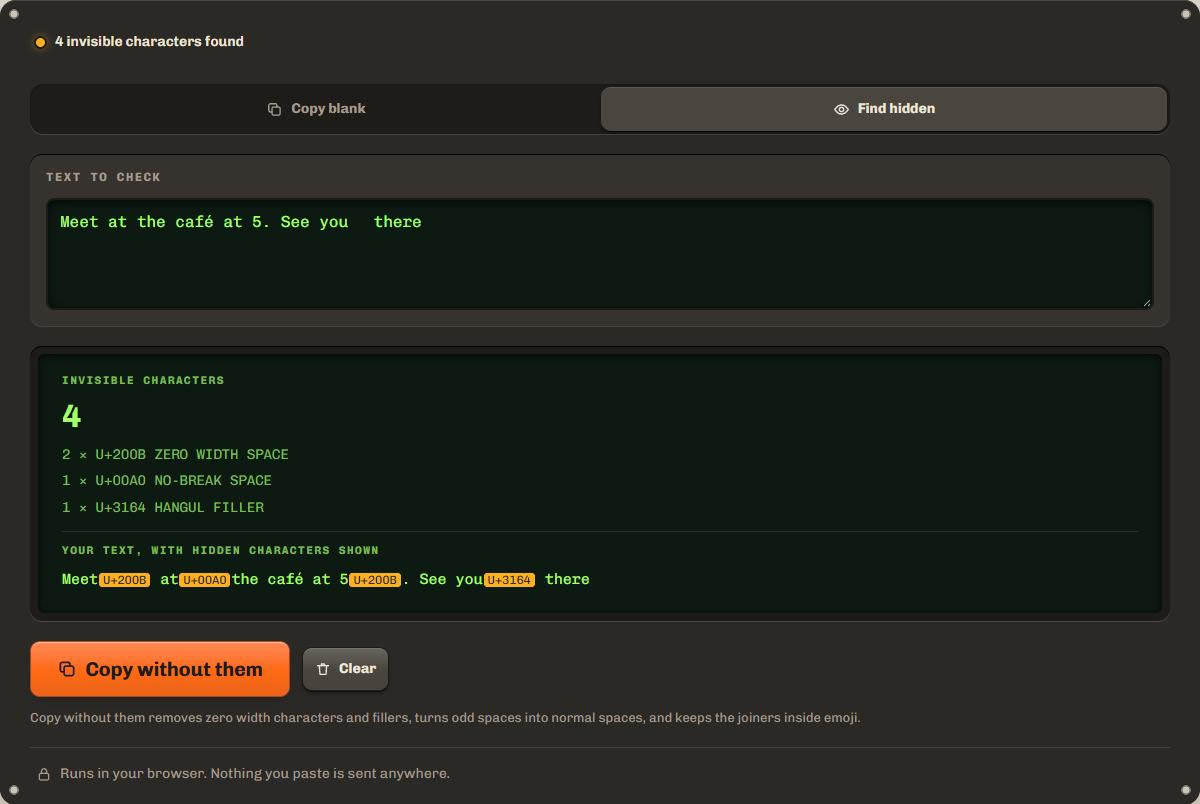
Switch the tool to Find hidden and paste any text. It counts the invisible characters, lists them by code point and shows your text with a marker where each one sits. It finds the characters in the list above and also direction marks, the soft hyphen, other Unicode spaces and tag characters. Plain spaces, tabs and line breaks are not counted.
Copy without them gives you clean text: zero width characters and fillers go, and odd spaces become normal spaces so words stay apart. Joiners inside emoji stay, because a family or flag emoji falls apart without them. Use it on code, data for a spreadsheet, or a password that will not work after you pasted it.
FAQ
What is the invisible character to copy and paste?
The one most people mean is U+3164, the Hangul filler. It is a Korean letter that is drawn as empty space, so many apps treat it as text and not as a space. The Braille blank, U+2800, is the other common choice.
Why does an app say my name is empty?
Many apps remove spaces at the start and end of a name and then check that something is left. Spaces such as the no-break space can be removed that way, and some apps also block the Hangul filler. Try another character from the list, or put one visible character next to the blank.
Is a zero width space the same as a space?
No. A zero width space (U+200B) has no width at all and is not a white space character in Unicode. It marks a place where a line can break. A no-break space (U+00A0) is as wide as a space but keeps the words on each side on one line.
Why does my copied text have strange characters in it?
Text copied from web pages, PDFs and chat apps often carries zero width characters, no-break spaces or direction marks. Paste it in Find hidden: the tool shows each one with its code point and copies the text without them.
Can I send a completely blank message?
Often, yes: paste one or more blank characters and send. Each app decides what it accepts, and it can change that at any time, so test with a friend before you count on it.
Related tools
All creator toolsTurn text into glitchy text with stacked marks, or clean it again.
Color words in a Discord message with an ansi code block.
Count a post against the 300 character limit, as Bluesky does.
Maintained by NabeelUpdated Nov 22, 2026.