Zip Puzzle Solver
A free solver for Zip-style path puzzles. Enter the numbers and walls, then reveal the path one number at a time, check yours or see it all.
Ready to solve
Tap an empty cell to place the next number. Tap a number to remove it; the higher numbers move down by one.
Numbers 1 to 9 on a 7 by 7 grid.
Board
Solved on your device. Nothing is sent anywhere. Not affiliated with or endorsed by LinkedIn.
How to enter the grid
Copy the grid from the game into the tool, then take as much help as you want. The tool opens with a 7 by 7 example made for this site. It works for the daily LinkedIn puzzle and for any other number path puzzle of this kind.
- Step 1Set the grid sizeOpen Board and pick the size, from 5 by 5 to 10 by 10.
- Step 2Place the numbersChoose Numbers and tap the cells in order: 1, then 2, then 3. Tap a number to remove it; the ones after it move down.
- Step 3Add the wallsChoose Walls and tap the line between two cells that the path may not cross. Tap it again to remove the wall.
- Step 4Hint, Check or SolveHint draws the path to the next number. Check tests the path you copied from the game. Solve draws all of it.
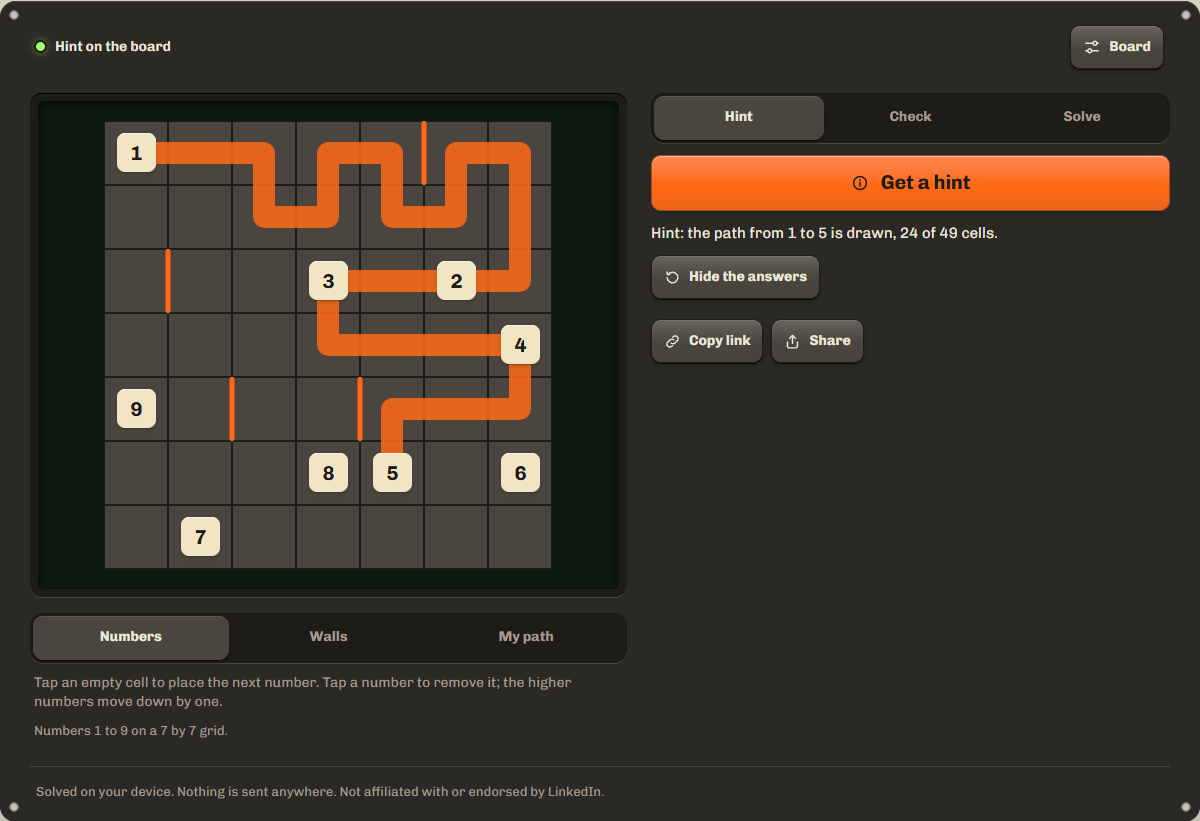
Drew part of the path already? Choose My path, tap 1, then tap each next cell in the order you drew it. Hints then carry on from the right part of your path, and Check shows the first step that goes wrong. The grid goes into the address bar as you edit, so Copy link opens it on another device.
The rules
- Draw one line that starts on 1 and ends on the highest number.
- The line passes the numbers in order: 1, 2, 3 and so on.
- It fills every cell of the grid, each cell exactly once.
- It moves up, down, left or right, never diagonally, and never through a wall.
How to find the path: techniques that work
Drawing from 1 and hoping works on small grids. On bigger ones, these checks save you from long wrong turns. The solver uses the same ideas to cut its search.
Corners and pockets fix the line
A corner cell has only two neighbours, so unless it holds 1 or the last number, the line must come in through one and leave through the other. The same goes for any cell that walls or the edge leave with just two ways in. Draw those short pieces first: they often join into long fixed stretches.
Never leave a dead end
If your line passes a cell in a way that leaves it with only one free neighbour, that cell can only be the end of the path. Unless it is the last number, the move is wrong. Two such cells at once are always wrong.
Do not cut the grid in two
The line can never come back across itself, so a move that splits the empty cells into two areas fails unless the line can finish one area and still reach the other. The same goes for the numbers: each pair of numbers in a row, 3 and 4 for example, needs a way between them that does not pass another number.
Count the steps like a checkerboard
Color the grid like a checkerboard. Every step changes color, so between two cells of the same color the line takes an even number of steps, and between different colors an odd number. On a grid with an odd number of cells, such as 7 by 7, the path starts and ends on the same color. This tells you at a glance that some long detours cannot work.
Work from number to number
Treat the puzzle as short trips: 1 to 2, 2 to 3, and so on. Each trip must cover some area of the grid, and every cell must be covered by one trip. A walled-off area next to only two numbers in a row has to be filled on the trip between them.
How the solver searches
The solver draws the line from 1, one cell at a time, and backs up when a rule says the line cannot be finished. It always tries the neighbour with the fewest ways onward first, the cell most likely to be cut off, and after every step it checks for dead ends, cells with only two ways in, areas that no trip can reach, and the checkerboard count. Those checks rule out almost every wrong turn before it is tried, so a grid of 100 cells takes a fraction of a second on a laptop.
It also looks for a second path. If there is one, the tool says so, because the game's grid has only one. A hint draws the true path from 1 up to the next number, in orange; tap again for the next stretch.
Gizmetto is not affiliated with or endorsed by LinkedIn. Queens, Tango and Zip are names of LinkedIn's games. This page solves grids you enter yourself and is not a copy of the game.
FAQ
Does it find the same path as the game?
Yes, when the numbers and walls match. A Zip grid has one path that follows the rules, and the solver finds every such path. If it finds two, it tells you, which means a number or a wall is missing.
Why does it say no path?
A number is in the wrong cell, the numbers are out of order, or a wall is in the wrong place. The most common slip is a wall on the wrong side of a cell. Compare the walls first, then the numbers.
How fast is it?
On a laptop it solves our 10 by 10 test grids in well under a second, and it runs in the background so the page never freezes. A grid with very few numbers can have millions of paths to rule out; the search then stops after a few seconds and says so.
Is the Zip puzzle solver free, and does it work on a phone?
Yes to both. There is no sign-up and nothing to install. The solver runs in your browser, and the grid stays on your device.
Related tools
All puzzle solversPlace one queen per row, column and region, step by step.
Fill a sun and moon grid one explained step at a time.
Get a hint or the full answer for a Pips domino board.
Find the spangram and theme words in a Strands grid.
Maintained by NabeelUpdated Nov 22, 2026.