White Screen
A plain white screen in one tap, for light, cleaning or tracing. Black, colors and your own color too.
Ready: white
White, 100%
Color
Timer and screen
When the time is up, the color closes and the screen can dim and sleep the way it normally does.
Asks the browser to keep the screen on while the color shows.
Runs on your device. Nothing is sent anywhere.
How to use the white screen
The white screen fills your whole display with pure white, the brightest color it can show. Nothing to install and no sign-up: it runs in the browser on a phone, tablet, laptop, monitor or TV.
- Step 1Pick a colorWhite is ready to go. Tap another swatch for black or a color, or Custom for any color you like.
- Step 2Set the lightTurn Brightness down for a softer light and Warmth up for a yellower, cozier tone. The preview shows the result.
- Step 3Go full screenTap Open. Use the arrow keys to change color. Tap the screen or press Esc to leave.
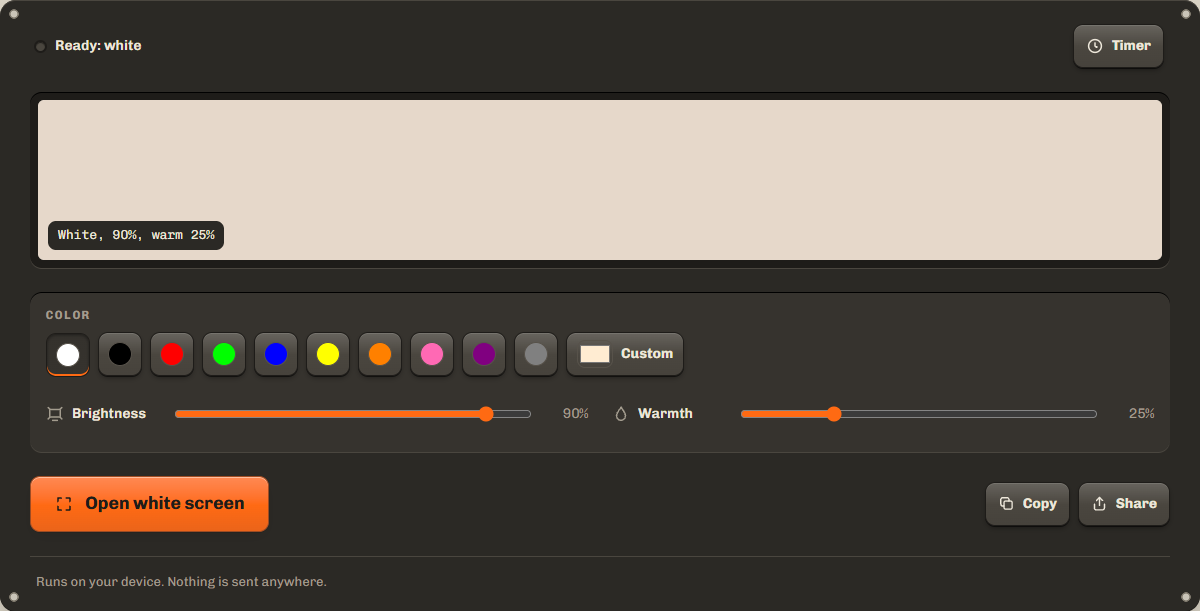
While the color shows, the controls sit in a bar at the bottom. It hides after a few seconds so the light stays even, and the mouse cursor hides too once you stop moving it. Move the mouse to the bottom edge or tap once to bring the bar back. Open Timer at the top of the tool to close the color by itself after 5, 10, 15, 30, 60 minutes, and to keep the screen from dimming while it shows.
What a white screen is good for
Light for video calls and photos
A bright screen in front of you works as a soft fill light, like a small ring light. Put a tablet or a second monitor behind the webcam, open the white screen and turn the Warmth slider up until your skin looks natural next to the room lights. For product photos, a phone showing white makes a small, even light source close to the object.
Cleaning the screen
Smudges and streaks are hard to see on a busy desktop. Switch between white and black while you wipe: dust and fingerprints stand out on black, and white shows any streak you left behind. Turn the screen off before you use any liquid, and use a soft dry cloth first.
Checking for dust and pixel faults
A dark dot on white is either dust on the glass or a dead pixel. Wipe it: if it stays, run the full dead pixel test, which goes through seven test colors and lets you mark each dot. For a dot stuck on one color, try the stuck pixel fixer.
Tracing drawings
Lay a sheet of thin paper over a tablet showing white at full brightness and it works like a light box. Tape the paper down so it does not slide, and press lightly: a hard pencil or pen tip can scratch the glass or a screen protector.
Colors you can show
Each color is the pure value the screen gets, written as red, green and blue from 0 to 255. Custom takes any color from your device's color picker.
| Color | RGB | Good for |
|---|---|---|
| White | 255, 255, 255 | Fill light for calls and photos, cleaning, tracing, dark pixel checks |
| Black | 0, 0, 0 | OLED off look, backlight bleed checks, a dark room |
| Red | 255, 0, 0 | Night light that is easy on dark-adapted eyes, stuck pixel checks |
| Green | 0, 255, 0 | Stuck pixel checks, a green backdrop for small objects |
| Blue | 0, 0, 255 | Stuck pixel checks, a cool mood light |
| Yellow | 255, 255, 0 | A warm accent light, stuck pixel checks |
| Orange | 255, 128, 0 | A warm mood light |
| Pink | 255, 105, 180 | A soft colored light for photos and video |
| Purple | 128, 0, 128 | A dim mood light |
| Gray | 128, 128, 128 | Uniformity checks, a neutral backdrop |
Every color name in the table opens the tool on that color. Red is the light astronomers use at night, because it disturbs eyes that have adjusted to the dark less than white does.
Black screen
Black is the second swatch in the tool. On an OLED phone or TV, black pixels switch off, so the screen looks off while it stays awake. On an LCD the backlight stays on behind the black, which makes black useful for the opposite job: in a dark room, light leaking at the edges shows up as glow. For that, the backlight bleed test adds a guided check. The black screen page opens on black by default and covers the black-only uses in more detail.
Screen brightness and battery safety
The Brightness slider dims the color in the page; it does not change your device's own brightness setting. For the strongest light, turn the device brightness all the way up and leave the slider at 100%. For a gentle night light, do the opposite.
A full white screen at full brightness is the most power a display uses, and on a phone it also makes the most heat. Plug the device in for long sessions, and use the off timer so it does not run all night. On an OLED screen, a plain color wears every pixel evenly, so it cannot burn a shape in, but hours at full brightness still age the panel faster than a dim screen. Do not stare at a bright white screen in a dark room: turn the brightness down or warm it up.
FAQ
How do I make my screen completely white?
Open this page, tap Open white screen and the whole display turns white. On a computer the page goes full screen, so the taskbar and browser bars hide. Turn your device's brightness up for the whitest result.
Can I use a white screen as a ring light on a video call?
Yes. Open the white screen on a second device, such as a tablet or a spare monitor, and set it behind your camera facing you. On the same laptop the call is on, open it in a window next to the call instead of full screen.
Why does my white screen look blue or yellow?
Every screen has its own white point, and night modes such as Night Shift or Night Light tint it yellow. Turn those off for the coolest white, or move the Warmth slider for a warmer one.
Why does my screen still turn off?
The page asks the browser to keep the screen on while the color shows. Some browsers do not support that, and battery saver modes can refuse it. Then raise the auto lock or sleep time in your device settings.
Can I open a color straight from a link?
Yes. Add ?color= and a color name to the address, such as /white-screen?color=red, or a hex color without the #. Share in the tool makes that link for you.
Related tools
All display testsA black screen for OLED displays, backlight bleed checks and dark rooms.
Cycle plain colors and mark any dot that does not match.
Flash a small square over a stuck pixel to try to wake it.
Check an LCD screen for light leaking at the edges.
Maintained by NabeelUpdated Nov 22, 2026.