Audio latency test
Tap along with a click on wired speakers, then on Bluetooth, and see how many milliseconds of delay the Bluetooth path adds.
Start with wired or built-in speakers
No reading yet
- Wired
- --
- Bluetooth
- --
- Browser reports
- --
Tap along with 16 clicks. The first 4 do not count.
It measures the delay you hear, with your own timing in it. The difference between two runs is the extra delay of the second device.
How the audio latency test works
This audio latency test measures the delay you hear between a sound being sent to your speakers or headphones and the moment it reaches your ears. It is a Bluetooth latency test in two runs, and it needs no microphone.
- Step 1Run 1 on wired or built-in speakersDisconnect Bluetooth. Tap Start and tap the pad, or press Space, on every click you hear. After 16 taps the run ends.
- Step 2Run 2 on the Bluetooth deviceConnect your Bluetooth headphones, earbuds or speaker, and do the same run again.
- Step 3Read the extra delayThe tool shows both runs and the difference between them: the delay the Bluetooth path adds.
The tool plays a click every 600 ms and times each of your taps against the moment that click left the browser. It leaves out the first 4 taps, while you lock on to the beat, and any tap far from the others, then averages the rest.
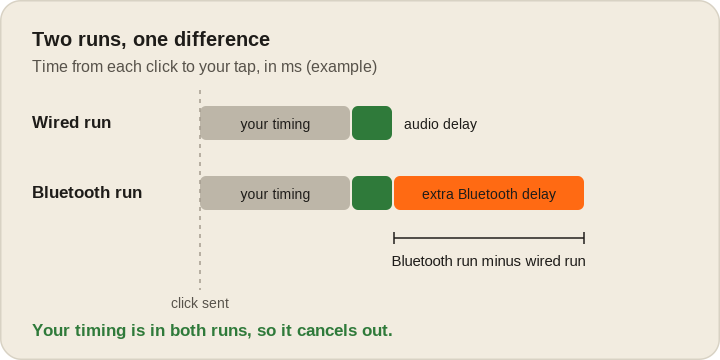
Why two runs? A single run includes your own timing: most people tap a little before or after the beat. The wired run measures that habit plus a short audio delay. The Bluetooth run measures the same habit plus the Bluetooth delay. The difference is the extra delay you hear on Bluetooth. Where the browser supports it, the tool also shows AudioContext.outputLatency, the system's own estimate of the output delay, as a second reading.
This is the delay you hear, not a lab figure for the hardware. It depends on the phone or computer, the browser and the connection as much as on the headphones.
Typical latency by codec (SBC, AAC, aptX, LDAC, LC3)
The codec is the format the audio is squeezed into for the radio link. It is only one part of the delay: the buffers in the phone and in the headphones often matter more. Published figures exist for only some codecs:
- SBC, the basic codec every Bluetooth audio device supports, has no fixed latency. The aptX article on Wikipedia notes that standard Bluetooth stereo latency "varies greatly depending on the system implementation and buffering", and that some SBC systems get under 40 ms end to end.
- aptX Low Latency is stated at 32 ms end to end over Bluetooth, on the same page.
- aptX Adaptive is stated at 80 ms end to end with hardware support. The page adds that most phones use software transmitters, which offer no latency advantage over other codecs.
- AAC and LDAC have no single published latency figure. The result depends on the phone and the headphones.
- LC3 is the codec the Bluetooth SIG specified for Bluetooth Low Energy audio. Its delay in practice also depends on the devices.
Because of all this, measuring your own setup tells you more than a codec name. Run the test with each device you want to compare.
How to reduce Bluetooth delay
- For games and music making, use wired headphones or the built-in speakers. They avoid the radio link.
- Check whether your earbuds or their app has a game mode or low latency mode, and run the test with it on and off.
- Keep the phone or computer close to the headphones, with nothing in between, and away from busy Wi-Fi routers.
- If both devices support a low latency codec, check that it is in use. On many Android phones you can see the active codec in the developer options.
- For video, try another app or player. Players can match the picture to the timing the audio system reports, asAmazon's guide for Fire TV app makers describes, so some apps stay in sync where others do not.
To check the rest of your audio, the headphone test checks left, right and balance, and the speaker test plays sweeps and a bass test.
FAQ
Why do I need two runs?
Everyone taps a little early or late, by an amount that is fairly steady for each person. One run measures that habit plus the delay of the audio. The second run has the same habit, so the difference between the two leaves only the extra delay of the Bluetooth device.
Is this the exact latency of my headphones?
No. It measures the delay you hear on this device, in this browser, with this connection, and your taps add some scatter. Phones, computers and apps can each add their own buffering, so the same headphones can show a different delay on another device.
What is a good Bluetooth latency?
As a rough guide: under 40 ms is hard to notice even in games, 40 to 150 ms is fine for music, and above 150 ms you may see lips move before you hear the words in videos. Video players can hold the picture back to match the sound, so a high number here does not always mean a problem in every app.
What does the browser's output latency mean?
Browsers that support it report AudioContext.outputLatency: the time from the browser handing audio to the system until the output device plays it. It is the system's own estimate, so it can differ from what you hear. Some browsers do not report it, and then the tool says so.
Why does my result change between runs?
Your taps are never exactly even, and Bluetooth delay can change with distance, interference and battery saving. The tool averages 12 taps and leaves out stray ones, but run it two or three times and compare.
Related tools
All audio toolsCheck left, right and balance on your headphones or earbuds.
Test left, right, the frequency range and the bass.
Play a test sound and find out why you hear nothing.
Tap along with a song to find its tempo.
Maintained by NabeelUpdated Nov 9, 2026.