Morse Code Translator
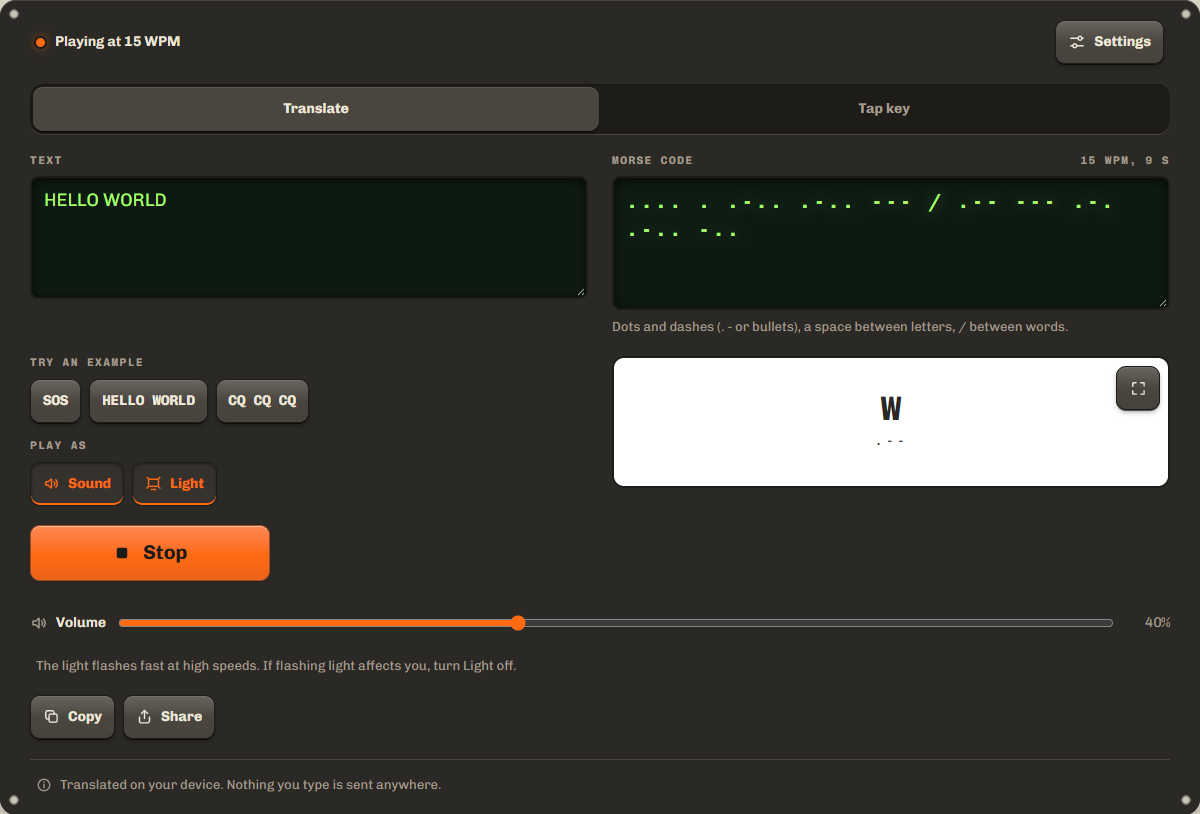
Turn text into Morse code and back as you type, then hear it, flash it as light or tap it in yourself.
Ready to play
The light flashes fast at high speeds. If flashing light affects you, turn Light off.
Settings
Letters keep the full speed, and the gaps between letters and words get longer. Learners use it to hear each letter as one sound.
Translated on your device. Nothing you type is sent anywhere.
How to use the Morse code translator
The translator works both ways at once. Type in the Text box and the Morse code appears; type dots and dashes in the Morse box and the text appears. Then play the message as a tone, watch it on the light panel, or switch to Tap key and send Morse yourself.
- Step 1Type or pasteType text in the Text box to get Morse code, or type dots and dashes in the Morse box to get text.
- Step 2Press PlayHear it as a tone and watch the light flash in time. Speed and tone are in Settings.
- Step 3Copy or shareCopy the result, or share a link that opens the same message in this translator.
Settings holds the speed (5 to 40 words per minute), Farnsworth spacing for learners and the tone, 400 to 1000 Hz. Volume stays on the main view. Letters with accents are sent as the plain letter, and signs with no Morse code are left out, with a note that names them.
Morse code chart
Every letter, number and sign the translator knows, from the international Morse code in ITU-R M.1677-1. Two common signs that are not in the ITU table, the exclamation mark and the semicolon, are marked.
| Character | Morse code |
|---|---|
| A | .- |
| B | -... |
| C | -.-. |
| D | -.. |
| E | . |
| F | ..-. |
| G | --. |
| H | .... |
| I | .. |
| J | .--- |
| K | -.- |
| L | .-.. |
| M | -- |
| N | -. |
| O | --- |
| P | .--. |
| Q | --.- |
| R | .-. |
| S | ... |
| T | - |
| U | ..- |
| V | ...- |
| W | .-- |
| X | -..- |
| Y | -.-- |
| Z | --.. |
| É | ..-.. |
| Character | Morse code |
|---|---|
| 1 | .---- |
| 2 | ..--- |
| 3 | ...-- |
| 4 | ....- |
| 5 | ..... |
| 6 | -.... |
| 7 | --... |
| 8 | ---.. |
| 9 | ----. |
| 0 | ----- |
| Character | Morse code | Name |
|---|---|---|
| . | .-.-.- | Full stop |
| , | --..-- | Comma |
| : | ---... | Colon |
| ? | ..--.. | Question mark |
| ' | .----. | Apostrophe |
| - | -....- | Hyphen |
| / | -..-. | Slash (fraction bar) |
| ( | -.--. | Open bracket |
| ) | -.--.- | Close bracket |
| " | .-..-. | Quotation marks |
| = | -...- | Equals (double hyphen) |
| + | .-.-. | Plus (cross) |
| @ | .--.-. | At sign |
| ! | -.-.-- | Exclamation mark (not in the ITU table) |
| ; | -.-.-. | Semicolon (not in the ITU table) |
| Prosign | Morse code | Meaning |
|---|---|---|
| <SOS> | ...---... | Distress signal |
| <AR> | .-.-. | End of message (same as +) |
| <BT> | -...- | Break, new section (same as =) |
| <SK> | ...-.- | End of work |
| <KA> | -.-.- | Starting signal |
| <AS> | .-... | Wait |
| <SN> | ...-. | Understood |
| <HH> | ........ | Error (eight dots) |
| <K> | -.- | Invitation to transmit (same as K) |
A prosign is two or three letters sent as one character, with no gap between them. Type the letters in angle brackets, such as <SK>, and the translator sends them joined. Numbers follow a pattern of five signals: 1 to 5 start with that many dots and end with dashes, 6 to 9 start with dashes and end with dots, and 0 is five dashes.
How to read Morse code
Read Morse one letter at a time. Each letter is a short group of dots and dashes, and a space or a pause ends it. In writing, a space separates letters and a slash separates words, so .... .. / - .... . .-. . reads HI THERE.
By ear, a dot sounds like "dit" and a dash like "dah", so A is "di-dah" and N is "dah-dit". Learn the sound of each letter as one rhythm rather than counting dots and dashes: counting is too slow once the speed goes up. The most common letters have the shortest codes. E is a single dot and T a single dash.
To practise, play a word at a low overall speed with Farnsworth spacing, write down what you hear, then compare it with the Text box. For sending, open Tap key: tap for a dot, hold for a dash, and pause between letters. The decoder follows your rhythm and shows the speed you are keying at.
SOS in Morse code
SOS is three dots, three dashes and three dots: ... --- .... As a distress signal it is sent as one continuous signal, ...---..., with no gaps between the letters, and it is repeated. Type <SOS> in the Text box to send it that way, or tap the SOS example for the three separate letters.
The letters do not stand for words. The pattern was chosen because it is easy to send and hard to mistake, andSOS became the international distress signal through the radiotelegraph conventions of the early 1900s. With a light, the same pattern works with a flashlight or the screen: press Play with Light on, or use the full screen light panel.
In a real emergency, call your local emergency number. A web page is no substitute for a phone call, a marine radio or a distress beacon.
Morse code timing rules
Morse timing is counted in units, the length of one dot. The ITU standard sets every other length from that unit:
| Part | Length | What it is |
|---|---|---|
| Dot | 1 unit | The basic unit. Everything else is counted in dots. |
| Dash | 3 units | Three times as long as a dot. |
| Gap inside a letter | 1 unit | Between the dots and dashes of one letter. |
| Gap between letters | 3 units | Silence that ends a letter. |
| Gap between words | 7 units | Silence that ends a word. |
Speed is measured in words per minute (WPM) with the standard word PARIS. Sent with the gap after it, PARIS is exactly 50units long (.--. .- .-. .. ... plus a 7 unit word gap), so at 1 WPM a unit lasts 1.2 seconds. The rule for any speed: one dot lasts 1200 divided by the WPM, in milliseconds.
| Speed | Dot | Dash |
|---|---|---|
| 5 WPM | 240 ms | 720 ms |
| 10 WPM | 120 ms | 360 ms |
| 13 WPM | 92 ms | 277 ms |
| 15 WPM | 80 ms | 240 ms |
| 20 WPM | 60 ms | 180 ms |
| 25 WPM | 48 ms | 144 ms |
| 30 WPM | 40 ms | 120 ms |
| 40 WPM | 30 ms | 90 ms |
Farnsworth spacing keeps the letters at the full speed and stretches only the gaps between letters and words, so the overall speed drops. The translator uses the timing in the ARRL standard for Farnsworth timing: letters at 18 WPM with an overall speed of 10 WPM sound like quick, crisp letters with long pauses between them.
Send Morse as sound, light or taps
Sound plays a clean sine tone with soft edges, so dots do not click. Light blinks the panel next to the keys in time with the tone: press its full screen key and the whole screen flashes, for signalling in the dark. On phones that allow it, the Flashlight key switches the camera light on and off with each dot and dash. Phones switch the flashlight slower than the screen, so keep the speed low for it.
Tap key turns the big key into a straight key. Hold it for a dash, tap it for a dot, or hold Space on a keyboard. The tone sounds while you hold the key, the light follows it, and the letters appear on the screen as you finish each one. Open in translator copies what you keyed into the translator, so you can play it back at a steady speed and compare.
Privacy and troubleshooting
Everything runs in your browser. What you type is not sent anywhere or saved, apart from the speed, Farnsworth and tone settings, which stay in this browser. A shared link carries the text in the address, so share it only with people who may read it.
- No sound: check that Sound is on, raise the volume on the page and on the device, then press Play again. Some phones pause web audio while the screen is locked.
- No Flashlight key: your browser does not let pages switch the flashlight. Use the screen light in full screen instead.
- Tap key gives the wrong letters: make dashes clearly longer than dots, about three times, and leave a pause between letters. Clear and start again to reset the speed it expects.
FAQ
How do I translate Morse code to English?
Type or paste the code into the Morse box, with a space between letters and a slash between words. The English text appears in the Text box as you type. Bullets and long dashes work too, so you can paste code copied from other pages.
What is SOS in Morse code?
Three dots, three dashes, three dots: ... --- ... As a real distress signal it is sent as one unbroken signal, ...---..., with no letter gaps. Type <SOS> in the Text box to play it that way.
What does the slash mean in Morse code?
In written Morse a slash marks the gap between words, and a space marks the gap between letters. When sent as sound or light, the slash is a silence of 7 dots and the space is a silence of 3 dots. A slash as a character in a message has its own code, -..-.
Why does my code show a # in the text?
The # marks a group of dots and dashes that is not a letter, number or sign in the table. Most often two letters ran together because a space is missing between them, such as .-... instead of .- ... for AS.
What is a good speed to learn Morse code?
A common way to learn is to hear the letters at 15 to 20 WPM with Farnsworth spacing, so each letter sounds like one pattern, and slow the overall speed by stretching the gaps. Turn on Farnsworth spacing in Settings and set the overall speed lower, then shorten the gaps as you improve.
Can I use the flashlight on my phone?
Where your browser allows it. The Flashlight key shows only when the browser says a page can switch the flashlight, and it asks for the camera permission, because the flashlight belongs to the camera. Where the key does not show, use the screen light: press the full screen key on the light panel.
Sources: Recommendation ITU-R M.1677-1, International Morse code (code table and timing); ARRL, A Standard for Morse Timing Using the Farnsworth Technique (Farnsworth gaps).
Related tools
All everyday toolsPlay a steady tone at any frequency, such as a Morse practice note.
Count words, letters or contacts with a big + key.
Tap a steady rhythm and see its tempo, good practice for an even hand.
Send a message in color once it is decoded.
Maintained by NabeelUpdated Nov 22, 2026.