Measure Your PD
Hold a bank card to your forehead and take a photo. The tool finds your pupils and measures your pupillary distance against the card.
Tap Start camera or Upload a photo
Hold a bank card flat on your forehead, long side across, and look straight at the camera. Take 3 photos for an average.
- PD, average
- --
- Right eye
- --
- Left eye
- --
An estimate, not a prescription. For glasses with a strong prescription, progressives or bifocals, ask an optician to measure your PD.
Settings
Photos from this page are not mirrored, so your right eye is on the left of the photo. Some phones save front camera photos mirrored; if writing in your photo reads backwards, tick this box. The PD itself does not change.
The photo stays on your device. It is never uploaded, saved or sent.
How to measure your PD with this tool
- Step 1Hold a card on your foreheadAny bank card, debit card or ID card of the standard size (85.60 × 53.98 mm). Hold it flat against your forehead, long side across, just above your eyebrows. The number can face the camera or away.
- Step 2Take a photo or upload oneTap Start camera and look straight into the lens. The photo is taken 3 seconds after you tap, so both hands can be ready. Or upload a photo taken with your phone.
- Step 3Check the marksThe tool finds your pupils and nose bridge. Drag the two orange marks onto the top corners of the card, and correct the green pupil marks if they are off. A magnifier shows the mark you move.
- Step 4Repeat 3 timesSave the reading and take 2 more photos, holding the card again each time. The tool shows the average and how far apart the readings are.
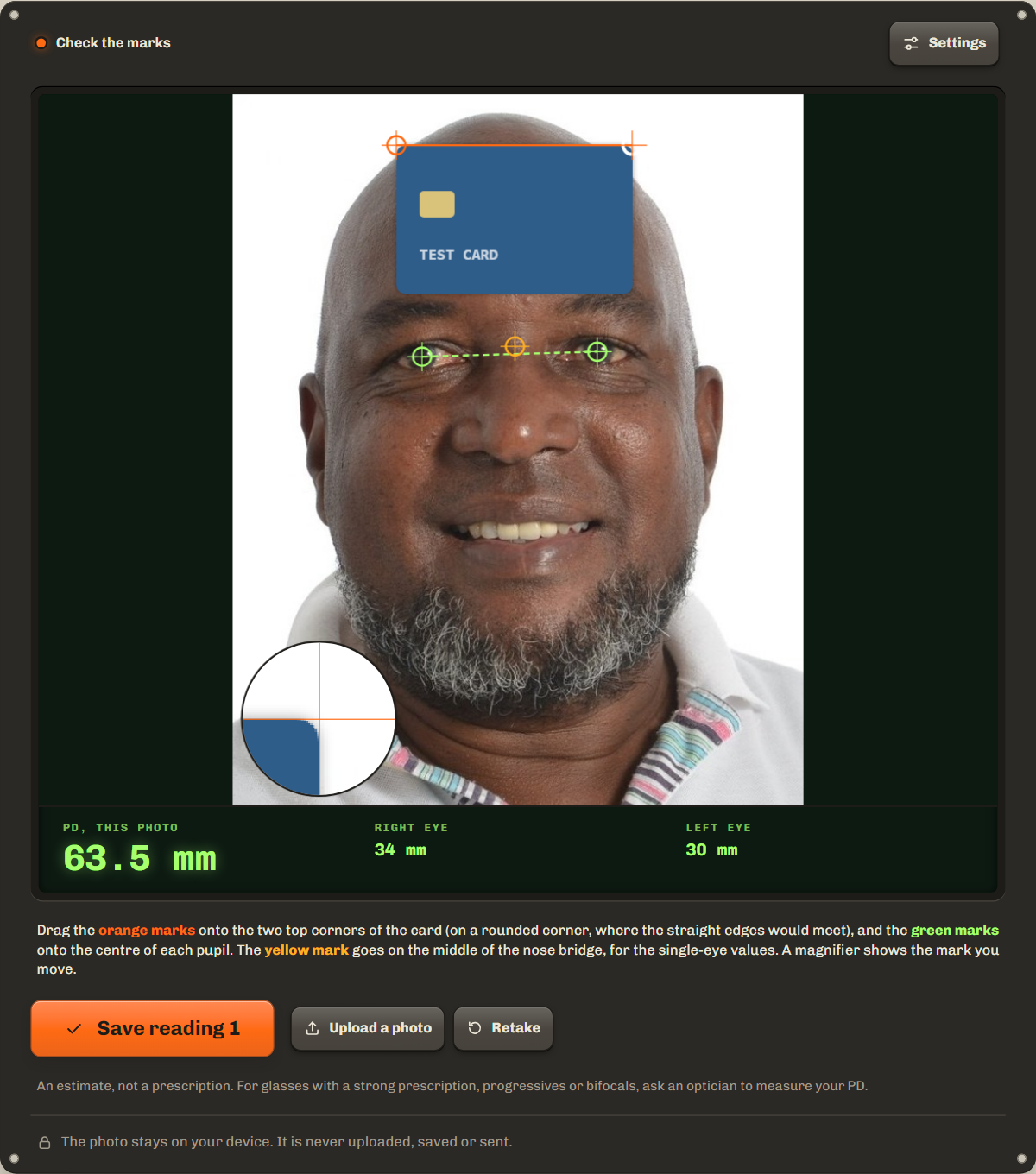
Test photo: Passport Photo Raymond by Traweekes, Wikimedia Commons, released under CC0 1.0. The card is drawn on, not real.
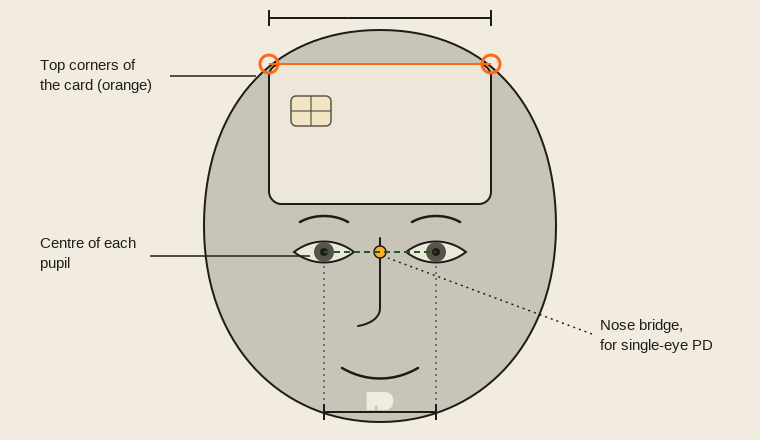
How to measure PD at home
Your pupillary distance (PD) is the distance between the centres of your pupils, in millimetres. Opticians measure it with a PD ruler or with a corneal reflection pupillometer, as described in the Wikipedia article on pupillary distance. At home you have two good options:
- A photo with a card of known size, as this tool does. It needs a camera or a phone photo, and no printer.
- A millimetre ruler and a mirror. Print our PD ruler, or use any ruler with millimetre marks.
Both give an estimate. Doing either several times and taking the average makes a slip in one try matter less.
How to measure PD with your phone or webcam
On a computer, use the webcam on this page. On a phone, you can open this page and use the front camera, or take a photo with the back camera and upload it: the back camera is usually sharper, and someone else can hold the phone.
- Light your face from the front, so both pupils are clear and there is no strong glare on the card.
- Keep your head straight and level, and look into the lens, not at the screen.
- Hold the card flat on your forehead. If it tilts away from the camera it looks narrower and the PD reads too high.
- Keep the camera farther away if you can: from about an arm's length, or have someone take the photo from farther. The section on accuracy below explains why.
- Take your glasses off, so the frame does not hide your pupils or the card.
How to measure PD with a ruler
The mirror method needs only a ruler with millimetre marks. Stand in front of a mirror and hold the ruler flat against your brow. Close your right eye and line up the zero with the centre of your left pupil. Then close your left eye, open your right eye, and read the mark over the centre of your right pupil. That reading is your PD.
The printable PD ruler has the scale, a 10 cm check bar to confirm it printed at the right size, and a second scale with zero in the middle for single-eye PD.
Single vs dual PD
A single (binocular) PD is one number, from pupil to pupil, such as 63. A dual (monocular) PD is two numbers, one per eye, each measured from the centre of the nose bridge to a pupil, such as 31/32 (right eye first). The two add up to the single PD. Faces are rarely perfectly even, so the two halves are often not equal; Medical News Today gives 31/33 as an example of how a dual PD is written (source).
This tool shows both. The single-eye values depend on where the yellow mark sits on your nose bridge, so check it before you save a reading.
Near vs distance PD
Your eyes turn in a little to look at something close, so your PD is smaller when you read than when you look far away. Distance PD is for glasses you wear all day or for driving. Near PD is for reading glasses.
Medical News Today, medically reviewed, says you can get your near PD by taking 3 mm off your single PD, or 1.5 mm off each side of a dual PD (source). That is a rule of thumb: an optician can measure your near PD at the distance you actually read at.
This tool measures with your eyes on the camera, an arm's length away, not on a far point. If the camera is close your eyes turn in a little, so the reading can come out slightly below your true distance PD. A camera farther away makes this smaller.
Average PD for adults
The 2012 anthropometric survey of US Army personnel measured the interpupillary distance of thousands of adults. The figures below are from the table in the Wikipedia article on pupillary distance, which cites the survey report (Gordon and others, 2014). Soldiers are not everyone, so treat this as a guide, not a norm.
| Group | People | Average | 5th to 95th percentile | Smallest to largest |
|---|---|---|---|---|
| Women | 1,986 | 61.7 mm | 55.5 to 67.5 mm | 51.0 to 74.5 mm |
| Men | 4,082 | 64.0 mm | 58.5 to 70.0 mm | 53.0 to 77.0 mm |
So nine in ten adult women in the survey had a PD between 55.5 and 67.5 mm, and nine in ten men between 58.5 and 70 mm. A reading far outside these ranges is more likely a slip than your real PD: check the marks and take another photo.
How accurate is it?
We have not yet finished testing this tool against PDs measured by opticians, so we do not give an accuracy figure yet. These are the things that move the result, and what you can do about each:
- The card sits in front of your eyes. The camera sees it a little closer than your pupils, so it looks a little bigger and the PD reads a little low. With the camera 50 cm from the card and the card 1 cm in front of your pupils, that is about 2%, or about 1.2 mm on a 63 mm PD. With the camera farther away the effect gets smaller.
- A card that tilts away from the camera looks narrower, so the PD reads high. Press it flat.
- The marks. At a typical webcam distance one pixel in the photo can be a fraction of a millimetre, so a mark that is a few pixels off moves the result. Use the magnifier and the arrow keys.
- The face finder places the pupil marks on the iris centre it estimates. Check them; the model can be off on dark or blurred eyes.
The pupils are found with MediaPipe Face Landmarker, an open source model from Google (the library is under the Apache License 2.0). It runs in your browser.
FAQ
Is my photo uploaded?
No. The photo is drawn on the page and checked in your browser. It is never uploaded, saved or sent. To find your eyes, the page downloads the face finder (Google's MediaPipe Face Landmarker) the first time you use it; that download contains no data about you.
How accurate is an online PD measurement?
It is an estimate. The result depends on how flat the card lies, how still you hold it, how sharp the photo is and how exactly the marks sit on the card corners and pupils. Use it to order everyday single vision glasses or to check a number you already have. For a strong prescription, progressives or bifocals, ask an optician to measure.
Why do I need a bank card?
A photo has no scale: the camera cannot tell how far away you are. Bank cards have a fixed size, the ID-1 format of the ISO/IEC 7810 standard, 85.60 mm wide. Measuring the card in the photo tells the tool how many millimetres one pixel is at your face.
Which eye is right and which is left?
Right and left are yours, as an optician writes them. In a photo from this page your right eye is on the left side of the picture, as other people see you. If you upload a photo that your phone saved mirrored, turn on the mirrored setting so the two single-eye values swap.
Can I measure my PD with glasses on?
Take them off. The frame can hide your pupils or the card, and lenses can make your eyes look shifted in the photo.
Why are my three readings different?
Each photo is a new try: the card sits a little differently, your head turns a little, and the marks land a pixel or two apart. That is why the tool asks for three and shows the spread. If one reading is far from the other two, delete it and take another photo.
Related tools
All measuring toolsNo camera? Print a PD ruler and measure in a mirror.
A ruler at real size on your screen, calibrated with the same card.
Check that your webcam works and see its resolution.
Maintained by NabeelUpdated Oct 23, 2026.