Mouse Double Click Test
This mouse double click test times every click and catches a button that clicks twice on its own. Keyboard mode catches a key that types twice.
Click in the box, one click at a time
Click anywhere in this box, one click at a time, about 20 times with each button you want to check.
- Clicks
- 0
- Last gap
- None yet
- Shortest double
- None yet
| Button | Presses | DoublesUnder 80 ms | GapShortest gap |
|---|---|---|---|
| Left0 | 0 | 0 | |
| Right2 | 0 | 0 | |
| Middle1 | 0 | 0 | |
| Back3 | 0 | 0 | |
| Forward4 | 0 | 0 |
Last 10 presses
Nothing yet.
Settings
Two clicks on one button closer than this count as a double click. A fast double click by hand is rarely under 80 ms.
Two presses of one key closer than this count as a double press. Typing a letter twice on purpose is rarely under 60 ms. Each limit applies to new presses.
Clicks and keys are counted on this page only. What you type is not saved, recorded or sent anywhere.
Double click test: mouse
Click inside the box with one button at a time, slowly, about 20 times. Each click is timed against the click before it on the same button. When two clicks come closer than 80 ms, the test counts a double click, shows the gap in ms and turns the button orange in the table. Left, right, middle, Back and Forward each have their own count, so you can see which switch is at fault.
- Step 1Pick Mouse or KeyboardMouse is the default. For a keyboard, pick Keyboard and click the box so it has focus.
- Step 2Click or type slowlyClick one button, or press one key, about 20 times, one press at a time. Do the same for every button or key that gives you trouble.
- Step 3Read the countThe big number counts presses that came too close together. The table shows which button or key it was and the shortest gap in ms.
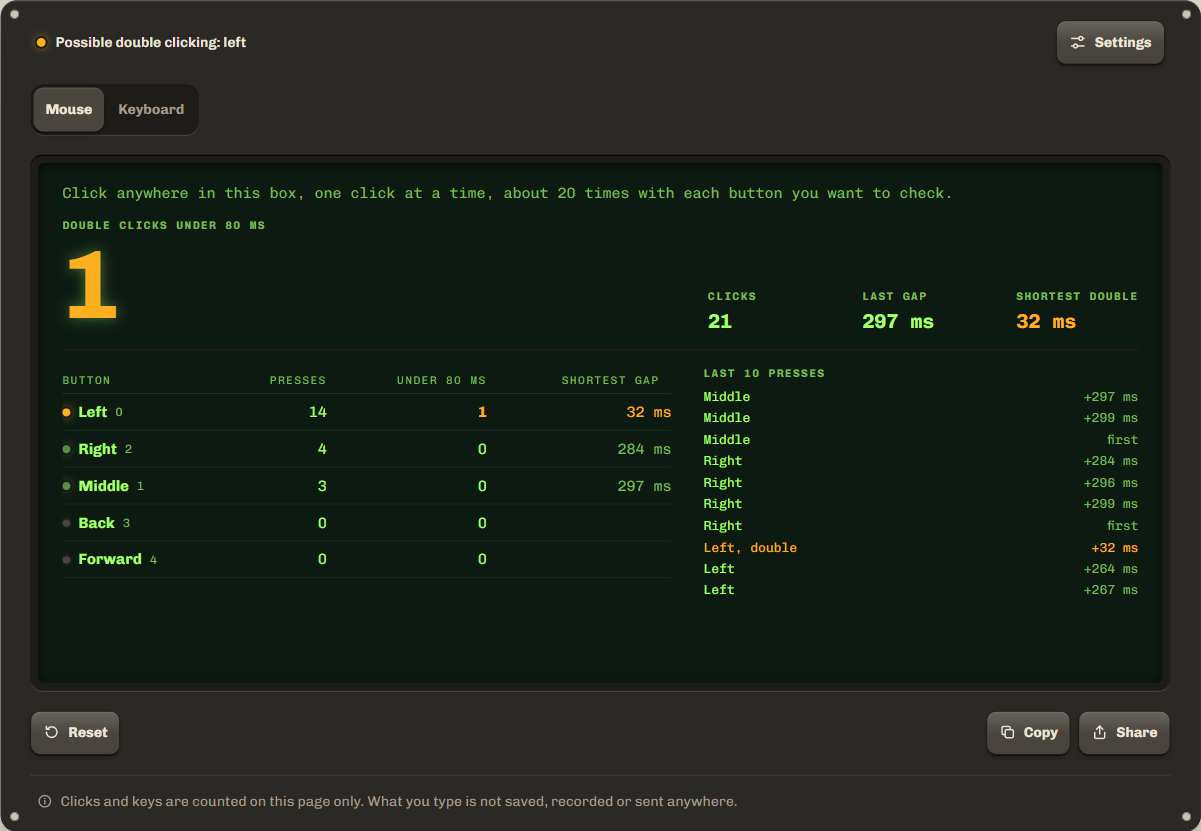
The right-click menu and middle-click scrolling are turned off inside the box, so every button can be tested there. To check that each button works at all, and the scroll wheel too, use the mouse button test. Browsers number the buttons from 0 to 4, as the MouseEvent.button reference lists; extra buttons on gaming mice usually send a key set in their software instead.
Double click test: keyboard
Pick Keyboard, click the box, then press the key you suspect, slowly, one press at a time. You can also type a few sentences as you normally do: a letter that came out twice too fast shows in orange in the typed line, and the table lists the keys that typed twice first. Any key works, including Space, Enter, Shift and the arrows. Tab still moves out of the box, and shortcuts with Ctrl or Cmd still work.
The test counts by the physical key (the KeyboardEvent.code the browser gives), so it works on any layout. When you hold a key down, your system repeats it; the browser marks those events as repeats, and the test leaves them out. Only a second real press under 60 ms counts as a double press. Typing the same letter twice on purpose, as in "keep", is rarely that fast.
Keyboard double typing letters?
A keyboard that types a letter twice from one press has a key that bounces: its contact closes, opens and closes again within a few milliseconds, and the keyboard sends two presses. Dust and crumbs under the key, a spill, a worn switch on a mechanical keyboard or a keyboard firmware with too short a debounce time all cause it. Run the keyboard test above first, so you know which keys do it and how often.
- Clean the key: unplug the keyboard or turn the laptop off, then blow compressed air under the key at an angle. On a mechanical keyboard, pull the keycap and press the switch 20 or 30 times.
- Try another port or computer: if the key types twice on another computer too, the fault is in the keyboard.
- Check the keyboard software: many mechanical and gaming keyboards have a debounce setting in their app. A longer debounce time hides chatter.
How to fix double typing on Windows 11
Windows can ignore a key that is pressed again too soon. Open Control Panel, then Ease of Access Center, then Make the keyboard easier to use, then Set up Filter Keys, and turn on Bounce Keys with a short wait time. Filter keys also has its own page in Settings, under Accessibility and Keyboard. Bounce Keys slows down fast double letters too, so use it as a stopgap until the key is cleaned or replaced. Then open Device Manager, find the keyboard under Keyboards and pick Update driver, or uninstall it and restart so Windows adds it again. A wireless keyboard with a low battery also doubles and misses keys.
How to fix double typing on a Mac
Open System Settings, then Keyboard, and set Delay until repeat a step longer, so a key held a moment too long does not repeat. Slow keys, under Accessibility and Keyboard, makes the Mac wait before it accepts a press, which also hides bounce. Some MacBook models from 2015 to 2019 have a butterfly keyboard with a known problem of keys that type twice; Apple support can tell you the repair options for your model. An external keyboard that types twice on the Mac and on another computer has a faulty key.
Mouse double clicking on its own (switch chatter)
A mouse that double clicks when you click once usually has a worn switch. Inside the button, a small metal contact closes when you press; as it wears, it bounces, and the computer sees two clicks a few milliseconds apart. This is switch chatter. You notice it when files open on one click, drags let go halfway or text selections jump. In the test, chatter shows as double clicks with gaps of about 5 to 30 ms, far faster than a hand can click. One double click can be a fluke; several in 20 slow clicks mean the switch is failing.
How to fix a mouse that double clicks
Work from the quick checks to the hardware. Run the test above after each step, with 20 slow clicks on the same button, so you can see if the count of double clicks went down.
- Test on another computer: if it double clicks there too, the switch is worn, not the settings.
- Check the double click speed: on Windows, open Control Panel, then Mouse, and make sure the double click speed is not set to the slowest end. On a Mac, the setting is under Accessibility, then Pointer Control.
- Use the mouse software: some gaming mice have a debounce or click delay setting that hides chatter.
- Wireless mouse: charge it or put in a fresh battery, and move the receiver closer. Then test again, so you know the doubles come from the switch and not from the link.
- Warranty: most makers replace a mouse that double clicks within the warranty. Copy the result line from the test to show what happens.
Troubleshooting and privacy
If nothing counts in keyboard mode, click inside the box first: keys only count while it has focus. If the page goes back when you press a side button, your mouse software acted before the browser; the button works. The test is free and counts presses on this page only. Nothing you click or type is recorded, uploaded or stored, and the limit setting is kept on your device.
FAQ
What does a double click tester measure?
The time between two presses of the same button or key. A press that comes less than 80 ms after the one before on a mouse button, or 60 ms on a key, is counted as a double, because a hand is rarely that fast and a bouncing switch is.
Is this double click test online and free?
Yes. It runs in your browser, with nothing to install and no sign-up, on Windows, Mac, Linux and ChromeOS.
Why does a fast double click by me not count?
A double click on purpose is usually 100 ms or more apart, above the 80 ms limit. If you click very fast, set a lower limit in Settings, or click slowly while you test.
Does holding a key down count as typing twice?
No. A held key repeats because the system repeats it, and the browser marks those events as repeats. The test leaves them out and counts only real presses.
Can I test a phone or tablet keyboard?
No. Screen keyboards do not send key codes and cannot chatter. A Bluetooth or USB keyboard connected to the phone or tablet works.
Is anything I type sent anywhere?
No. Presses are counted on this page only. Nothing you type is saved, recorded or sent, and a reload clears everything.
Related tools
All device testsCheck every mouse button, the side buttons and the scroll wheel.
Measure your mouse, keyboard or controller report rate in Hz.
Check key chatter, rollover and repeat, and compare two keyboards.
Find keys that drop out when you hold several together.
Maintained by NabeelUpdated Nov 9, 2026.