Minecraft Circle Generator
Plan a pixel circle, oval or sphere for Minecraft. See the block count, then build from the grid one row at a time.
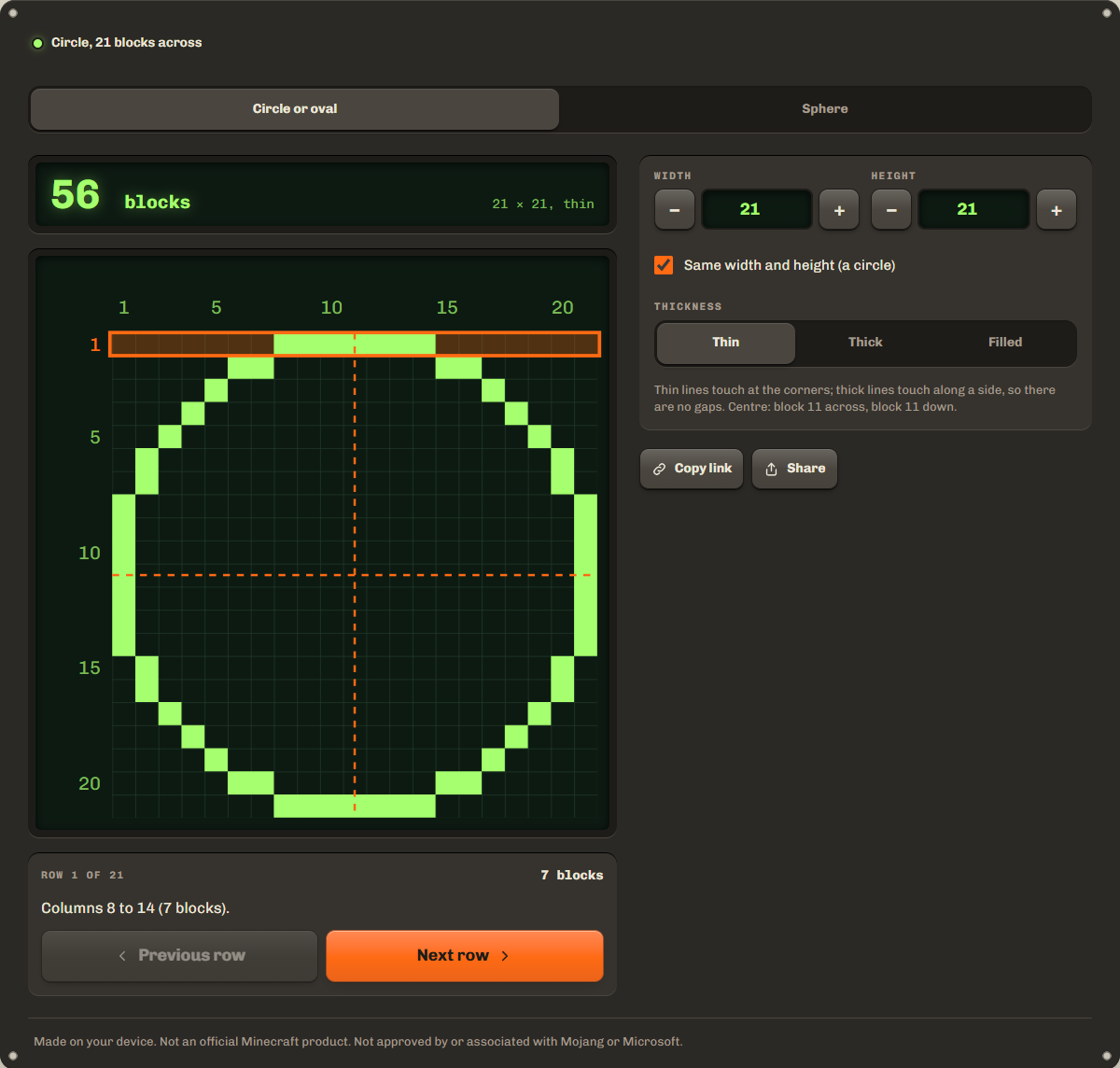
Circle, 21 blocks across
56 blocks
21 × 21, thin
Columns 8 to 14 (7 blocks).
Thin lines touch at the corners; thick lines touch along a side, so there are no gaps. Centre: block 11 across, block 11 down.
Made on your device. Not an official Minecraft product. Not approved by or associated with Mojang or Microsoft.
How to use the circle generator
The tool opens with a thin circle 21 blocks across. Every change shows at once, and the link in the address bar keeps your shape, so you can open the same plan on a second screen or a phone next to the game.
- Step 1Set the sizeType the width, or tap − and +. Untick Same width and height for an oval, or switch to Sphere and set the diameter.
- Step 2Pick the thicknessThin uses the fewest blocks. Thick closes the diagonal gaps, for walls and towers. Filled gives a solid floor or roof.
- Step 3Build row by rowStart at row 1 and tap Next row. The tool says which columns get a block. Tap any row in the grid to jump to it.
Not an official Minecraft product. Not approved by or associated with Mojang or Microsoft. The grid shows plain squares: what block you build with is up to you.
How many blocks for a circle: block counts table
The number of blocks for common circle sizes, worked out by the same code as the tool. The sphere column is a thin hollow shell, all layers added up. Use it to gather enough blocks before you start.
| Diameter | Thin circle | Thick circle | Filled circle | Hollow sphere |
|---|---|---|---|---|
| 5 blocks | 12 | 16 | 21 | 54 |
| 7 blocks | 16 | 24 | 37 | 98 |
| 9 blocks | 24 | 32 | 69 | 186 |
| 11 blocks | 28 | 40 | 97 | 278 |
| 13 blocks | 36 | 48 | 137 | 414 |
| 15 blocks | 40 | 56 | 177 | 530 |
| 17 blocks | 48 | 64 | 225 | 690 |
| 21 blocks | 56 | 80 | 349 | 1,082 |
| 25 blocks | 68 | 96 | 489 | 1,550 |
| 31 blocks | 84 | 120 | 749 | 2,382 |
| 41 blocks | 112 | 160 | 1,313 | 4,242 |
| 51 blocks | 144 | 200 | 2,053 | 6,642 |
| 64 blocks | 180 | 252 | 3,228 | 10,464 |
How a pixel circle is drawn
A circle on a block grid can only be an outline of steps. The generator places a block wherever the centre of that block falls inside the circle (or the oval) that fits the width and height you set. That gives the filled shape. The outline is the blocks of the filled shape that touch the outside: on one of their 4 sides for a thin line, or on any of their 8 sides, corners included, for a thick one.
The result is symmetric, so every quarter of the circle is the same. Builders often count the steps of one quarter and repeat them: a thin circle 15 blocks across has a top row of 5 blocks, then a step of 2, a single block, a step of 2 going down, and a straight side of 5 blocks. For a sphere, the same test runs in 3D, layer by layer, which is why the top and bottom layers of a sphere are small filled discs.
Tips for building circles
- Mark the centre first. Place a marker block at the centre lines, then count out to the edge in the four directions. The four widest rows are the easiest to check.
- Build one quarter, then mirror it. Every quarter is the same, turned. Counting the steps of one quarter is quicker than reading every row.
- Use thick for walls. A thin wall leaves corner gaps that you can see through.
- Check with the row reader. If a row looks wrong in the game, go to that row number and compare the columns.
Privacy: the generator runs in your browser. Nothing is uploaded or saved, and the shape is kept only in the page address for the share link.
FAQ
Should a circle be an odd or even number of blocks wide?
Odd sizes have one block in the middle, so a door, a pillar or a path lines up with the centre. Even sizes have their centre on the line between two blocks, which suits a two-block door or a 2 by 2 centre pillar. The tool shows the centre with dashed lines and says where it is.
What is the difference between thin and thick?
In a thin circle, the blocks on a diagonal step touch only at their corners. It uses the fewest blocks and looks smooth from above. In a thick circle, each step also gets a block on the side, so the blocks always touch along a face. Mobs cannot slip through and light cannot leak through the corners, so thick is better for walls.
How do I build a sphere or a dome?
Switch to Sphere, set the diameter and start at layer 1, the bottom. Build each layer as a circle, move up one block and go to the next layer. For a dome, start at the middle layer and build up. Thin and thick shells are worked out in 3D, so each layer joins the layers above and below.
How big can the circle be?
Up to 150 blocks across. Large circles are easier to read on a computer or tablet. The grid scrolls, row numbers stay on the left, and the row reader under the grid tells you each row's columns in words.
Is this made by Mojang?
No. Gizmetto is an independent site. This is a free planning tool for players. Not an official Minecraft product. Not approved by or associated with Mojang or Microsoft.
Related tools
All game toolsFind every word in a word search grid.
Find the best moves for your three blocks.
Measure real lengths on your screen once it is calibrated.
Check a game controller for stick drift.
Maintained by NabeelUpdated Nov 8, 2026.