A world made of cubes has no curves, so a circle in Minecraft is a ring of steps that looks round from a distance. The reliable way to build one is to follow a plan. Choose the size across, decide on a thin or thick outline, place a marker at the centre, then build the four widest rows (top, bottom, left and right) and fill in the diagonal steps between them. Every quarter of a circle is the same shape turned, so once one quarter is right, the rest is copying. A circle generator draws the plan for any size and counts the blocks for you.
This guide is about planning shapes for building. Not an official Minecraft product. Not approved by or associated with Mojang or Microsoft.
Step 1: choose the size
The size is the number of blocks across the widest part of the circle, its diameter. Two things to decide:
- Odd or even. An odd size, such as 15, has one block exactly in the middle. That makes it easy to put a door, a beacon or a pillar on the centre line. An even size, such as 16, has its centre on the line between two blocks, which suits a two block wide door or a 2 by 2 centre column.
- How big. Small circles look blocky: below about 9 blocks they read more like an octagon or a rounded square. From about 15 blocks up, the steps blend into a curve, and very large circles look smooth.
If you are building a tower, pick a size that leaves room inside. The walls take one block on each side, so a 15 block tower is 13 blocks across inside.
Step 2: thin, thick or filled
A pixel circle can be drawn three ways.
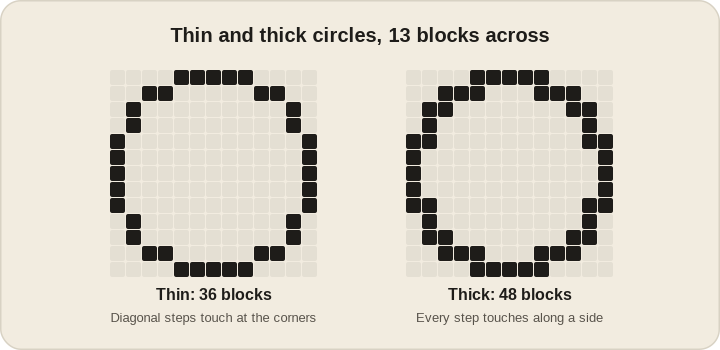
- Thin: the outline is one block wide, and blocks on a diagonal step touch only at their corners. It uses the fewest blocks and looks the smoothest from above. Use it for floor patterns, paths and anything you only see from the top.
- Thick: each diagonal step gets an extra block on the side, so every block touches the next along a face. There are no corner gaps for light, water or mobs to pass through, which makes it the right choice for walls, towers and tanks.
- Filled: every block inside the circle. Use it for floors, roofs and platforms.
How many blocks you need
The table gives the blocks for one layer of a circle at common sizes, and for a whole thin hollow sphere. The numbers come from the same code as the circle generator, which draws a block wherever the centre of that block is inside the circle. Other generators use slightly different rules, so their counts can differ by a few blocks.
| Diameter | Thin | Thick | Filled | Hollow sphere |
|---|---|---|---|---|
| 7 | 16 | 24 | 37 | 98 |
| 9 | 24 | 32 | 69 | 186 |
| 11 | 28 | 40 | 97 | 278 |
| 13 | 36 | 48 | 137 | 414 |
| 15 | 40 | 56 | 177 | 530 |
| 17 | 48 | 64 | 225 | 690 |
| 19 | 52 | 72 | 293 | 894 |
| 21 | 56 | 80 | 349 | 1082 |
| 25 | 68 | 96 | 489 | 1550 |
| 31 | 84 | 120 | 749 | 2382 |
For a round tower, multiply the thick count by the number of layers you plan to build. A 15 block thick wall that is 10 blocks high takes 10 times 56, so 560 blocks, before windows and doors.
Step 3: mark the centre and the four widest rows
Stand where you want the middle and place a marker block there. For an even size, place a 2 by 2 marker instead, because the centre is between blocks.
Now count out from the centre in the four directions, along the axes. For a 15 block circle, count 7 blocks out from the centre block each way: the 8th block in each direction is outside. Those four points are the middle of the top, bottom, left and right rows of the circle. Place the top row first. In a thin 15 block circle it is a straight run of 5 blocks, centred on the axis. Do the same for the other three sides.
Check the four rows against each other before you go on. If one is off by a block, the whole circle will look lopsided, and it is much easier to fix now.
Step 4: build one quarter, then mirror it
Between the straight rows the outline goes diagonally, in steps. Read the steps from the plan one row at a time. In the generator, tap a row in the grid or use Next row: it tells you which columns get a block, such as “columns 4 to 5 (2 blocks)”.
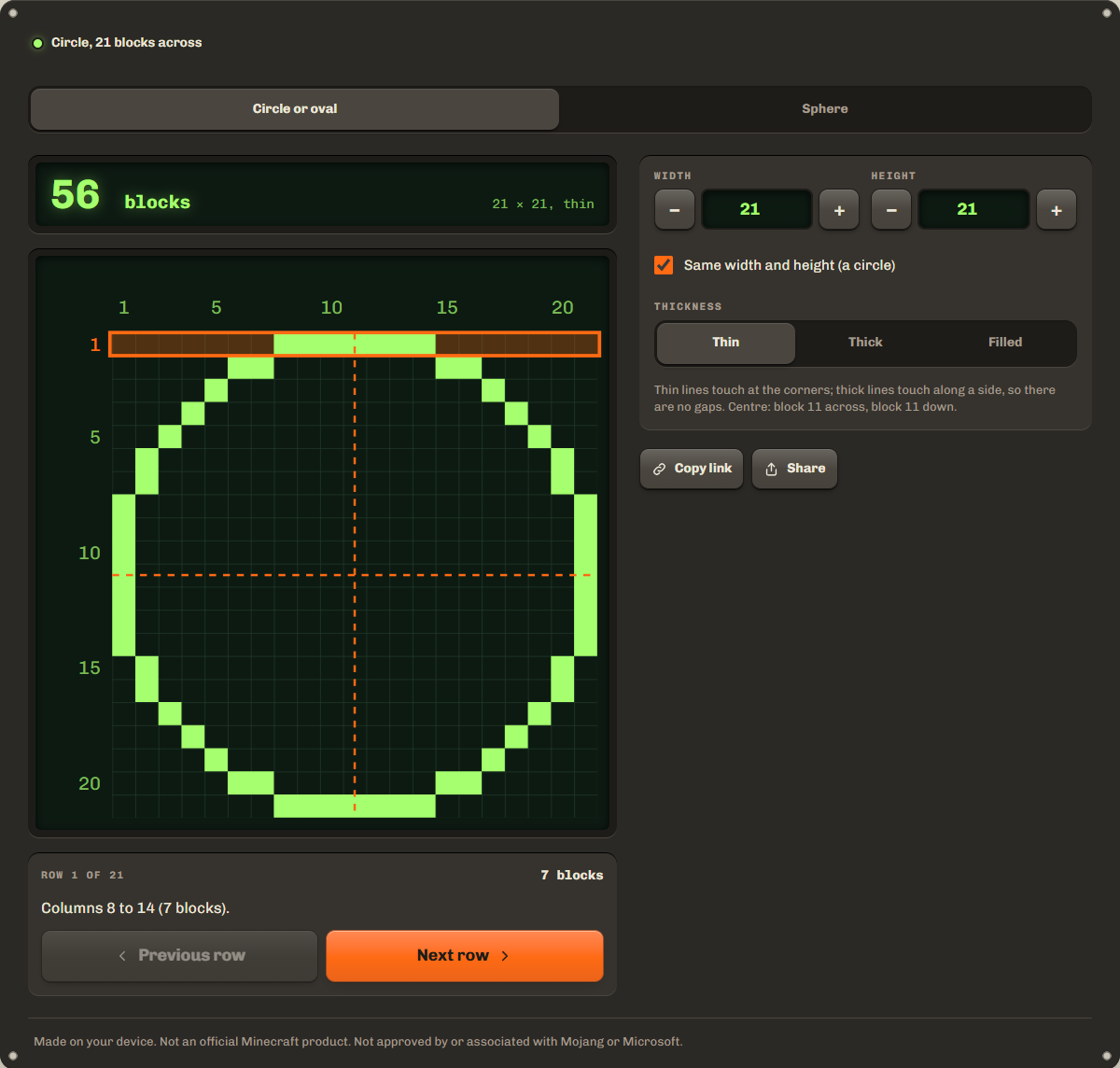
Once one quarter matches the plan, build the other three as mirror images. Count the steps out loud and repeat them in each quarter. For a thin 15 block circle that is a top row of 5, a step of 2, a single block, a step of 2 going down and a straight side of 5. The circle is symmetric, so if a step in one quarter does not match the same step in another, one of them is wrong.
Step 5: walls, domes and spheres
For a round wall, build the thick outline on the ground, check it, then repeat the same ring upwards. For a dome or a full sphere, every layer is a different circle. Switch the generator to Sphere, set the diameter and start at layer 1, the bottom. Each layer tells you its own block count. A dome is the top half: start at the middle layer and build up.
Spheres use more blocks than people expect. The table above shows a thin hollow sphere 21 blocks across needs over a thousand blocks, and the count grows fast with size, so gather materials first.
Common mistakes
- Counting the centre twice. For an odd size, the centre block belongs to both halves. A 15 block circle is 7 blocks, the centre, then 7 blocks.
- Mixing odd and even. A 16 block circle is not a 15 block circle with one more block. Pick one size and stay with its plan.
- Building by eye. The steps near the 45 degree diagonal are the hardest to judge. Use the plan for every row.
- Thin walls. A thin outline leaves corner gaps that you can see and that some things can pass through. Use thick for walls.
Quick answers
What is the best size for a round tower? Any odd size from about 11 blocks up gives a centre line for the door. Larger circles look rounder.
Can I make an oval? Yes. Untick Same width and height in the generator and set a different width and height. Ovals follow the same thin, thick and filled rules.
Does it work for any block game? The plan is just squares on a grid, so it works for any game or craft built on a grid, such as pixel art or cross stitch.