BPM Finder
Upload a song and this tempo detector finds its BPM on your device, with half and double time and a click to check it.
Ready
Choose a song (MP3, WAV or M4A) or drop it here. Its tempo is found on this device and the file is never uploaded.
Your file is analysed on your device. Nothing is uploaded.
How to find the BPM of a song
- Step 1Choose a songTap Choose a song and pick an MP3, WAV or M4A file, or drop it on the screen.
- Step 2Wait a few secondsThe tempo detector listens for where notes and drums start and finds how often that pattern repeats, on your device.
- Step 3Check itTap Play with click. If the click falls on the beat, the BPM is right. If it is twice or half as fast as you feel the beat, pick Double or Half.
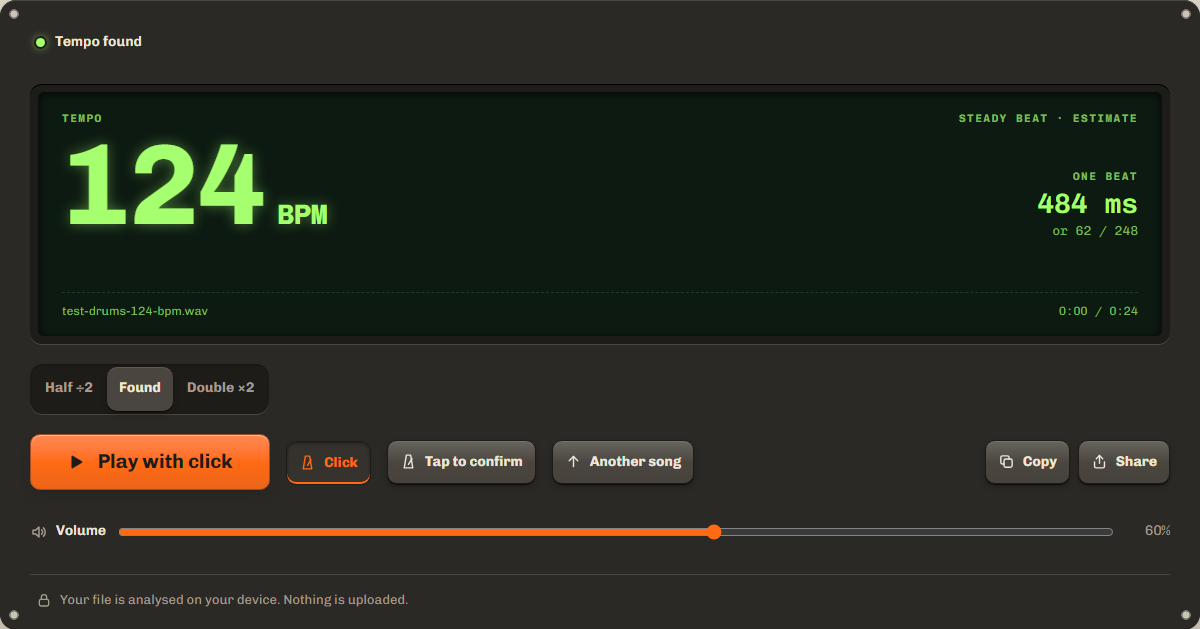
This BPM finder reads any audio file your browser can play (it decodes the file withdecodeAudioData). To be sure of the tempo, play the song with the click on, or tap along in the BPM tapper and compare.
How the tempo detector works
First it builds an onset envelope: for about every 12 ms of the song, how much new sound starts, measured as the rise in each frequency band (spectral flux). Drum hits and new notes make sharp peaks.
Then it compares the envelope with itself, shifted by every delay from a fraction of a second to a few seconds (anautocorrelation). When the shift equals one beat, the peaks line up and the match is strong. This is the same first step as in Dan Ellis's beat tracker (Journal of New Music Research, 2007).
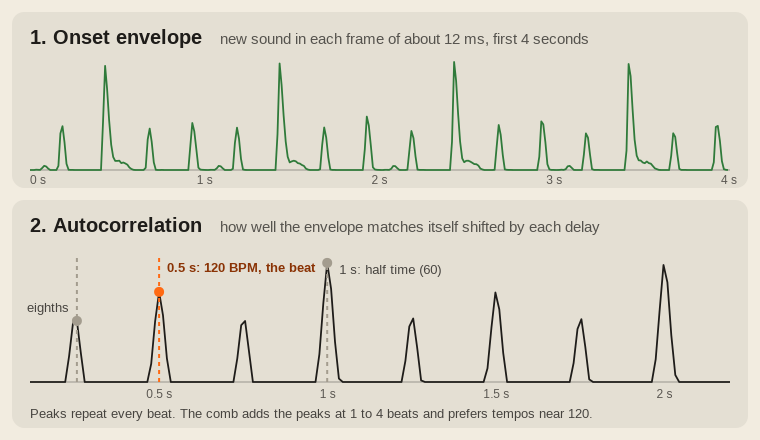
Each candidate tempo from 50 to 220 BPM is scored by the match at 1, 2, 3 and 4 beats, like a comb. A gentle preference for tempos near 120 BPM breaks ties between a tempo and its half or double. Finally the tool measures the beat period over up to 32 beats and fits one steady tempo through them, which brings the reading to a tenth of a BPM. It also finds where the first beat falls, so the click lands on the beat.
Half time and double time
Any steady beat also repeats at twice its gap, and its off-beats repeat at half the gap. A detector cannot know which one you count, so this one picks the most likely and offers both others. Half ÷2 suits songs felt slowly over a fast drum part, such as many trap and dubstep songs. Double ×2 suits slow songs counted in eighth notes.
The click follows your choice. In Half, it plays every other beat. In Double, it adds a click between the beats.
How accurate is it?
On a steady beat it is precise. In the tool's tests, generated click tracks from 100 to 140 BPM, with accents and with noise added, all read within 0.3 BPM of the true tempo, and drum loops read at the right tempo or its half or double. Real songs are harder:
- Works wellDance, pop, rock and hip hop with a drum machine or a steady drummer.
- Half or doubleVery fast or very slow songs, and songs with a half time feel. Use the Half and Double keys.
- HardClassical music, ballads without drums, rubato, and live songs that speed up. The tool then says Unclear beat.
- Swing and tripletsUsually right, but the click may land on the swung eighth note. Check by ear.
The fastest check is your own ear: play with the click, or tap along to confirm.
Why your file stays on your device
The tempo is found in your browser, in a background worker so the page stays responsive. The song is never uploaded and no copy is kept. When you close the page, the file and the result are gone.
FAQ
How do I find the BPM of a song?
Upload the song here and read the BPM. To check it, play the song with the click, or tap along in the BPM tapper. Both should agree within a BPM or two.
Why is the BPM half or double what I expected?
The beat repeats at the tempo and also at twice the gap, so a song at 87 BPM and one at 174 BPM look much alike. Many drum and bass and trap songs are felt at half the drum tempo. Pick Half or Double to match the beat you count.
Does the BPM finder use the microphone?
No. It reads a file on your device. To find the tempo of music playing in the room, tap along in the BPM tapper instead.
Is it free, and is my song uploaded?
It is free, with no sign-up and no limit. The song is analysed in your browser and never uploaded.
Does it work with songs that change tempo?
It gives one tempo for the whole file: the one that repeats most. For a live recording that speeds up, or a song with a slow intro, the result is an average, and the click drifts in parts.
Related tools
All audio toolsTap along to confirm the tempo, then play it on the metronome.
Find the key of the same song.
Find its chords on a timeline.
Turn the tempo into delay times for every note value.
Maintained by NabeelUpdated Oct 23, 2026.