Wingdings Translator
Turn text into Wingdings symbols that paste anywhere, no font needed, or paste symbols to read the letters behind them.
Translated to Wingdings
Wingdings
10 symbolsRuns in your browser. Nothing you type is sent anywhere.
How the Wingdings translator works
Every character you type has a number, and the Wingdings font draws a picture for almost every number from 33 to 255. The translator looks up that picture and puts in the Unicode character that stands for it. Hello becomes 🖗♏︎⚫︎⚫︎🞏: H is a hand pointing down, e and l are zodiac signs and a black circle, and o is a white square.
- Step 1Type your textEach letter, digit and sign becomes the symbol Wingdings draws for it: A is a victory hand, J a smiley.
- Step 2Copy the symbolsThey are Unicode characters, so they show in chats, posts and documents without the Wingdings font.
- Step 3Decode a messageSwitch to Wingdings to text and paste symbols to get the letters back.
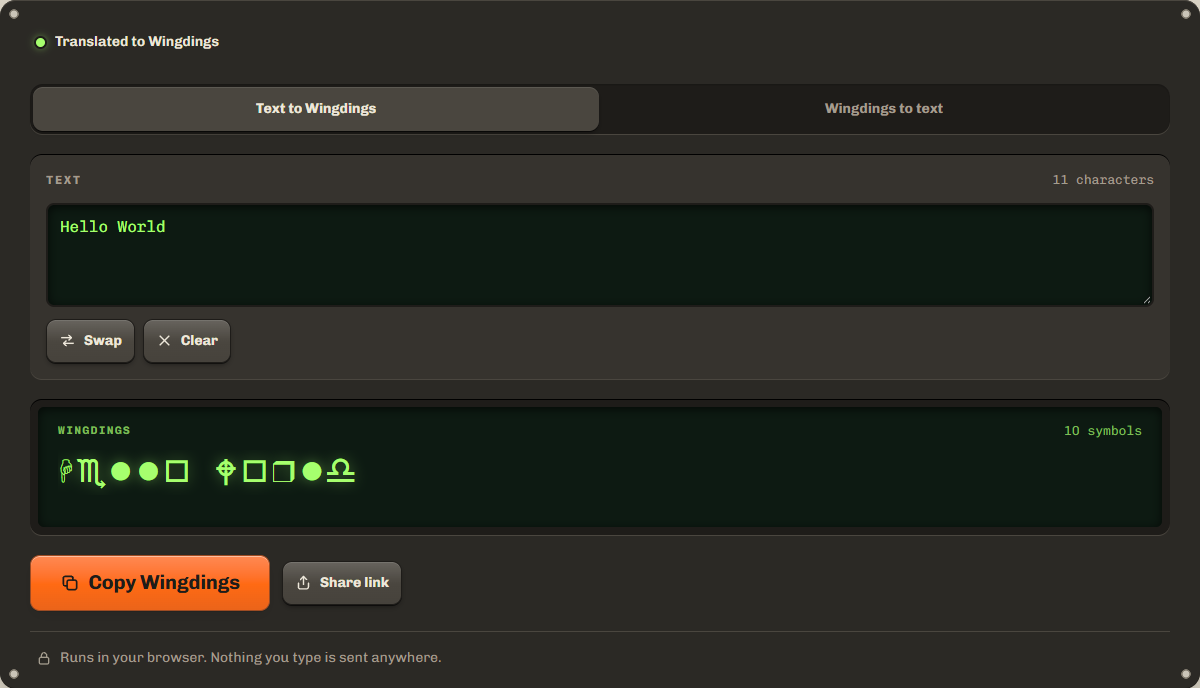
The lookup table is the one Unicode published itself, not a guess from screenshots. Spaces and line breaks stay as they are. Capital and small letters are different symbols in Wingdings, so case matters: A is a victory hand and a is the zodiac sign for Cancer.
Why Wingdings text breaks when you paste it
Wingdings is a symbol font. A document in Wingdings still stores the letters you typed, and the font only changes how they look. Copy the text into a chat or a browser, where Wingdings is not the font, and the letters come straight back. Phones usually do not have the font at all, so a Wingdings message sent as text arrives as plain letters.
The symbols from this translator are different: they are separate characters, such as U+270C for the victory hand, so they look like symbols in any app with a font that has them. Copy the Wingdings out of a Word document and you get letters, or characters from the Private Use range U+F020 to U+F0FF that Word uses for symbol fonts. Paste either into Text to Wingdings and the translator turns them into the symbols.
Wingdings chart: every character and its symbol
All 221 Wingdings characters that have a Unicode match, in font order. Codes above 127 come from the Windows character set: on Windows, hold Alt and type the code on the number pad to type them.
| Code | Typed as | Symbol | Unicode | Unicode name |
|---|---|---|---|---|
| 33 (0x21) | ! | 🖉 | U+1F589 | Lower left pencil |
| 34 (0x22) | " | ✂︎ | U+2702 | Black scissors |
| 35 (0x23) | # | ✁ | U+2701 | Upper blade scissors |
| 36 (0x24) | $ | 👓︎ | U+1F453 | Eyeglasses |
| 37 (0x25) | % | 🕭 | U+1F56D | Ringing bell |
| 38 (0x26) | & | 🕮 | U+1F56E | Book |
| 39 (0x27) | ' | 🕯︎ | U+1F56F | Candle |
| 40 (0x28) | ( | 🕿 | U+1F57F | Black touchtone telephone |
| 41 (0x29) | ) | ✆ | U+2706 | Telephone location sign |
| 42 (0x2A) | * | 🖂 | U+1F582 | Back of envelope |
| 43 (0x2B) | + | 🖃 | U+1F583 | Stamped envelope |
| 44 (0x2C) | , | 📪︎ | U+1F4EA | Closed mailbox with lowered flag |
| 45 (0x2D) | - | 📫︎ | U+1F4EB | Closed mailbox with raised flag |
| 46 (0x2E) | . | 📬︎ | U+1F4EC | Open mailbox with raised flag |
| 47 (0x2F) | / | 📭︎ | U+1F4ED | Open mailbox with lowered flag |
| 48 (0x30) | 0 | 🗀 | U+1F5C0 | Folder |
| 49 (0x31) | 1 | 🗁 | U+1F5C1 | Open folder |
| 50 (0x32) | 2 | 🗎 | U+1F5CE | Document |
| 51 (0x33) | 3 | 🗏 | U+1F5CF | Page |
| 52 (0x34) | 4 | 🗐 | U+1F5D0 | Pages |
| 53 (0x35) | 5 | 🗄︎ | U+1F5C4 | File cabinet |
| 54 (0x36) | 6 | ⏳︎ | U+23F3 | Hourglass with flowing sand |
| 55 (0x37) | 7 | 🖮 | U+1F5AE | Wired keyboard |
| 56 (0x38) | 8 | 🖰 | U+1F5B0 | Two button mouse |
| 57 (0x39) | 9 | 🖲︎ | U+1F5B2 | Trackball |
| 58 (0x3A) | : | 🖳 | U+1F5B3 | Old personal computer |
| 59 (0x3B) | ; | 🖴 | U+1F5B4 | Hard disk |
| 60 (0x3C) | < | 🖫 | U+1F5AB | White hard shell floppy disk |
| 61 (0x3D) | = | 🖬 | U+1F5AC | Soft shell floppy disk |
| 62 (0x3E) | > | ✇ | U+2707 | Tape drive |
| 63 (0x3F) | ? | ✍︎ | U+270D | Writing hand |
| 64 (0x40) | @ | 🖎 | U+1F58E | Left writing hand |
| 65 (0x41) | A | ✌︎ | U+270C | Victory hand |
| 66 (0x42) | B | 🖏 | U+1F58F | Turned ok hand sign |
| 67 (0x43) | C | 👍︎ | U+1F44D | Thumbs up sign |
| 68 (0x44) | D | 👎︎ | U+1F44E | Thumbs down sign |
| 69 (0x45) | E | ☜ | U+261C | White left pointing index |
| 70 (0x46) | F | ☞ | U+261E | White right pointing index |
| 71 (0x47) | G | ☝︎ | U+261D | White up pointing index |
| 72 (0x48) | H | 🖗 | U+1F597 | White down pointing left hand index |
| 73 (0x49) | I | 🖐︎ | U+1F590 | Raised hand with fingers splayed |
| 74 (0x4A) | J | ☺︎ | U+263A | White smiling face |
| 75 (0x4B) | K | 😐︎ | U+1F610 | Neutral face |
| 76 (0x4C) | L | ☹︎ | U+2639 | White frowning face |
| 77 (0x4D) | M | 💣︎ | U+1F4A3 | Bomb |
| 78 (0x4E) | N | 🕱 | U+1F571 | Black skull and crossbones |
| 79 (0x4F) | O | 🏳︎ | U+1F3F3 | Waving white flag |
| 80 (0x50) | P | 🏱 | U+1F3F1 | White pennant |
| 81 (0x51) | Q | ✈︎ | U+2708 | Airplane |
| 82 (0x52) | R | ☼ | U+263C | White sun with rays |
| 83 (0x53) | S | 🌢 | U+1F322 | Black droplet |
| 84 (0x54) | T | ❄︎ | U+2744 | Snowflake |
| 85 (0x55) | U | 🕆 | U+1F546 | White latin cross |
| 86 (0x56) | V | ✞ | U+271E | Shadowed white latin cross |
| 87 (0x57) | W | 🕈 | U+1F548 | Celtic cross |
| 88 (0x58) | X | ✠ | U+2720 | Maltese cross |
| 89 (0x59) | Y | ✡︎ | U+2721 | Star of david |
| 90 (0x5A) | Z | ☪︎ | U+262A | Star and crescent |
| 91 (0x5B) | [ | ☯︎ | U+262F | Yin yang |
| 92 (0x5C) | \ | 🕉︎ | U+1F549 | Om symbol |
| 93 (0x5D) | ] | ☸︎ | U+2638 | Wheel of dharma |
| 94 (0x5E) | ^ | ♈︎ | U+2648 | Aries |
| 95 (0x5F) | _ | ♉︎ | U+2649 | Taurus |
| 96 (0x60) | ` | ♊︎ | U+264A | Gemini |
| 97 (0x61) | a | ♋︎ | U+264B | Cancer |
| 98 (0x62) | b | ♌︎ | U+264C | Leo |
| 99 (0x63) | c | ♍︎ | U+264D | Virgo |
| 100 (0x64) | d | ♎︎ | U+264E | Libra |
| 101 (0x65) | e | ♏︎ | U+264F | Scorpius |
| 102 (0x66) | f | ♐︎ | U+2650 | Sagittarius |
| 103 (0x67) | g | ♑︎ | U+2651 | Capricorn |
| 104 (0x68) | h | ♒︎ | U+2652 | Aquarius |
| 105 (0x69) | i | ♓︎ | U+2653 | Pisces |
| 106 (0x6A) | j | 🙰 | U+1F670 | Script ligature et ornament |
| 107 (0x6B) | k | 🙵 | U+1F675 | Swash ampersand ornament |
| 108 (0x6C) | l | ⚫︎ | U+26AB | Medium black circle |
| 109 (0x6D) | m | 🔾 | U+1F53E | Lower right shadowed white circle |
| 110 (0x6E) | n | ◼︎ | U+25FC | Black medium square |
| 111 (0x6F) | o | 🞏 | U+1F78F | Medium white square |
| 112 (0x70) | p | 🞐 | U+1F790 | Bold white square |
| 113 (0x71) | q | ❑ | U+2751 | Lower right shadowed white square |
| 114 (0x72) | r | ❒ | U+2752 | Upper right shadowed white square |
| 115 (0x73) | s | 🞟 | U+1F79F | Black medium small lozenge |
| 116 (0x74) | t | ⧫ | U+29EB | Black lozenge |
| 117 (0x75) | u | ◆ | U+25C6 | Black diamond |
| 118 (0x76) | v | ❖ | U+2756 | Black diamond minus white x |
| 119 (0x77) | w | 🞙 | U+1F799 | Black medium small diamond |
| 120 (0x78) | x | ⌧ | U+2327 | X in a rectangle box |
| 121 (0x79) | y | ⮹ | U+2BB9 | Up arrowhead in a rectangle box |
| 122 (0x7A) | z | ⌘ | U+2318 | Place of interest sign |
| 123 (0x7B) | { | 🏵︎ | U+1F3F5 | Rosette |
| 124 (0x7C) | | | 🏶 | U+1F3F6 | Black rosette |
| 125 (0x7D) | } | 🙶 | U+1F676 | Sans-serif heavy double turned comma quotation mark ornament |
| 126 (0x7E) | ~ | 🙷 | U+1F677 | Sans-serif heavy double comma quotation mark ornament |
| 128 (0x80) | € (Alt+0128) | 🄋 | U+1F10B | Dingbat circled sans-serif digit zero |
| 129 (0x81) | Alt+0129 | ➀ | U+2780 | Dingbat circled sans-serif digit one |
| 130 (0x82) | ‚ (Alt+0130) | ➁ | U+2781 | Dingbat circled sans-serif digit two |
| 131 (0x83) | ƒ (Alt+0131) | ➂ | U+2782 | Dingbat circled sans-serif digit three |
| 132 (0x84) | „ (Alt+0132) | ➃ | U+2783 | Dingbat circled sans-serif digit four |
| 133 (0x85) | … (Alt+0133) | ➄ | U+2784 | Dingbat circled sans-serif digit five |
| 134 (0x86) | † (Alt+0134) | ➅ | U+2785 | Dingbat circled sans-serif digit six |
| 135 (0x87) | ‡ (Alt+0135) | ➆ | U+2786 | Dingbat circled sans-serif digit seven |
| 136 (0x88) | ˆ (Alt+0136) | ➇ | U+2787 | Dingbat circled sans-serif digit eight |
| 137 (0x89) | ‰ (Alt+0137) | ➈ | U+2788 | Dingbat circled sans-serif digit nine |
| 138 (0x8A) | Š (Alt+0138) | ➉ | U+2789 | Dingbat circled sans-serif number ten |
| 139 (0x8B) | ‹ (Alt+0139) | 🄌 | U+1F10C | Dingbat negative circled sans-serif digit zero |
| 140 (0x8C) | Œ (Alt+0140) | ➊ | U+278A | Dingbat negative circled sans-serif digit one |
| 141 (0x8D) | Alt+0141 | ➋ | U+278B | Dingbat negative circled sans-serif digit two |
| 142 (0x8E) | Ž (Alt+0142) | ➌ | U+278C | Dingbat negative circled sans-serif digit three |
| 143 (0x8F) | Alt+0143 | ➍ | U+278D | Dingbat negative circled sans-serif digit four |
| 144 (0x90) | Alt+0144 | ➎ | U+278E | Dingbat negative circled sans-serif digit five |
| 145 (0x91) | ‘ (Alt+0145) | ➏ | U+278F | Dingbat negative circled sans-serif digit six |
| 146 (0x92) | ’ (Alt+0146) | ➐ | U+2790 | Dingbat negative circled sans-serif digit seven |
| 147 (0x93) | “ (Alt+0147) | ➑ | U+2791 | Dingbat negative circled sans-serif digit eight |
| 148 (0x94) | ” (Alt+0148) | ➒ | U+2792 | Dingbat negative circled sans-serif digit nine |
| 149 (0x95) | • (Alt+0149) | ➓ | U+2793 | Dingbat negative circled sans-serif number ten |
| 150 (0x96) | Alt+0150 | 🙢 | U+1F662 | North east pointing bud |
| 151 (0x97) | Alt+0151 | 🙠 | U+1F660 | North west pointing bud |
| 152 (0x98) | ˜ (Alt+0152) | 🙡 | U+1F661 | South west pointing bud |
| 153 (0x99) | ™ (Alt+0153) | 🙣 | U+1F663 | South east pointing bud |
| 154 (0x9A) | š (Alt+0154) | 🙞 | U+1F65E | Heavy north east pointing vine leaf |
| 155 (0x9B) | › (Alt+0155) | 🙜 | U+1F65C | Heavy north west pointing vine leaf |
| 156 (0x9C) | œ (Alt+0156) | 🙝 | U+1F65D | Heavy south west pointing vine leaf |
| 157 (0x9D) | Alt+0157 | 🙟 | U+1F65F | Heavy south east pointing vine leaf |
| 158 (0x9E) | ž (Alt+0158) | ∙ | U+2219 | Bullet operator |
| 159 (0x9F) | Ÿ (Alt+0159) | • | U+2022 | Bullet |
| 160 (0xA0) | no-break space, Alt+0160 | ⬝ | U+2B1D | Black very small square |
| 161 (0xA1) | ¡ (Alt+0161) | ⭘ | U+2B58 | Heavy circle |
| 162 (0xA2) | ¢ (Alt+0162) | 🞆 | U+1F786 | Bold white circle |
| 163 (0xA3) | £ (Alt+0163) | 🞈 | U+1F788 | Very heavy white circle |
| 164 (0xA4) | ¤ (Alt+0164) | 🞊 | U+1F78A | White circle containing black small circle |
| 165 (0xA5) | ¥ (Alt+0165) | 🞋 | U+1F78B | Round target |
| 166 (0xA6) | ¦ (Alt+0166) | 🔿 | U+1F53F | Upper right shadowed white circle |
| 167 (0xA7) | § (Alt+0167) | ▪︎ | U+25AA | Black small square |
| 168 (0xA8) | ¨ (Alt+0168) | 🞎 | U+1F78E | Light white square |
| 169 (0xA9) | © (Alt+0169) | 🟁 | U+1F7C1 | Medium three pointed black star |
| 170 (0xAA) | ª (Alt+0170) | 🟅 | U+1F7C5 | Medium four pointed black star |
| 171 (0xAB) | « (Alt+0171) | ★ | U+2605 | Black star |
| 172 (0xAC) | ¬ (Alt+0172) | 🟋 | U+1F7CB | Medium six pointed black star |
| 173 (0xAD) | soft hyphen, Alt+0173 | 🟏 | U+1F7CF | Heavy eight pointed black star |
| 174 (0xAE) | ® (Alt+0174) | 🟓 | U+1F7D3 | Heavy twelve pointed black star |
| 175 (0xAF) | ¯ (Alt+0175) | 🟑 | U+1F7D1 | Heavy eight pointed pinwheel star |
| 176 (0xB0) | ° (Alt+0176) | ⯐ | U+2BD0 | Square position indicator |
| 177 (0xB1) | ± (Alt+0177) | ⌖ | U+2316 | Position indicator |
| 178 (0xB2) | ² (Alt+0178) | ⯎ | U+2BCE | White four pointed cusp |
| 179 (0xB3) | ³ (Alt+0179) | ⯏ | U+2BCF | Rotated white four pointed cusp |
| 180 (0xB4) | ´ (Alt+0180) | ⯑ | U+2BD1 | Uncertainty sign |
| 181 (0xB5) | µ (Alt+0181) | ✪ | U+272A | Circled white star |
| 182 (0xB6) | ¶ (Alt+0182) | ✰ | U+2730 | Shadowed white star |
| 183 (0xB7) | · (Alt+0183) | 🕐︎ | U+1F550 | Clock face one o'clock |
| 184 (0xB8) | ¸ (Alt+0184) | 🕑︎ | U+1F551 | Clock face two o'clock |
| 185 (0xB9) | ¹ (Alt+0185) | 🕒︎ | U+1F552 | Clock face three o'clock |
| 186 (0xBA) | º (Alt+0186) | 🕓︎ | U+1F553 | Clock face four o'clock |
| 187 (0xBB) | » (Alt+0187) | 🕔︎ | U+1F554 | Clock face five o'clock |
| 188 (0xBC) | ¼ (Alt+0188) | 🕕︎ | U+1F555 | Clock face six o'clock |
| 189 (0xBD) | ½ (Alt+0189) | 🕖︎ | U+1F556 | Clock face seven o'clock |
| 190 (0xBE) | ¾ (Alt+0190) | 🕗︎ | U+1F557 | Clock face eight o'clock |
| 191 (0xBF) | ¿ (Alt+0191) | 🕘︎ | U+1F558 | Clock face nine o'clock |
| 192 (0xC0) | À (Alt+0192) | 🕙︎ | U+1F559 | Clock face ten o'clock |
| 193 (0xC1) | Á (Alt+0193) | 🕚︎ | U+1F55A | Clock face eleven o'clock |
| 194 (0xC2) | Â (Alt+0194) | 🕛︎ | U+1F55B | Clock face twelve o'clock |
| 195 (0xC3) | Ã (Alt+0195) | ⮰ | U+2BB0 | Ribbon arrow down left |
| 196 (0xC4) | Ä (Alt+0196) | ⮱ | U+2BB1 | Ribbon arrow down right |
| 197 (0xC5) | Å (Alt+0197) | ⮲ | U+2BB2 | Ribbon arrow up left |
| 198 (0xC6) | Æ (Alt+0198) | ⮳ | U+2BB3 | Ribbon arrow up right |
| 199 (0xC7) | Ç (Alt+0199) | ⮴ | U+2BB4 | Ribbon arrow left up |
| 200 (0xC8) | È (Alt+0200) | ⮵ | U+2BB5 | Ribbon arrow right up |
| 201 (0xC9) | É (Alt+0201) | ⮶ | U+2BB6 | Ribbon arrow left down |
| 202 (0xCA) | Ê (Alt+0202) | ⮷ | U+2BB7 | Ribbon arrow right down |
| 203 (0xCB) | Ë (Alt+0203) | 🙪 | U+1F66A | Solid quilt square ornament |
| 204 (0xCC) | Ì (Alt+0204) | 🙫 | U+1F66B | Solid quilt square ornament in black square |
| 205 (0xCD) | Í (Alt+0205) | 🙕 | U+1F655 | Turned south west pointing leaf |
| 206 (0xCE) | Î (Alt+0206) | 🙔 | U+1F654 | Turned north west pointing leaf |
| 207 (0xCF) | Ï (Alt+0207) | 🙗 | U+1F657 | Turned south east pointing leaf |
| 208 (0xD0) | Ð (Alt+0208) | 🙖 | U+1F656 | Turned north east pointing leaf |
| 209 (0xD1) | Ñ (Alt+0209) | 🙐 | U+1F650 | North west pointing leaf |
| 210 (0xD2) | Ò (Alt+0210) | 🙑 | U+1F651 | South west pointing leaf |
| 211 (0xD3) | Ó (Alt+0211) | 🙒 | U+1F652 | North east pointing leaf |
| 212 (0xD4) | Ô (Alt+0212) | 🙓 | U+1F653 | South east pointing leaf |
| 213 (0xD5) | Õ (Alt+0213) | ⌫ | U+232B | Erase to the left |
| 214 (0xD6) | Ö (Alt+0214) | ⌦ | U+2326 | Erase to the right |
| 215 (0xD7) | × (Alt+0215) | ⮘ | U+2B98 | Three-d top-lighted leftwards equilateral arrowhead |
| 216 (0xD8) | Ø (Alt+0216) | ⮚ | U+2B9A | Three-d top-lighted rightwards equilateral arrowhead |
| 217 (0xD9) | Ù (Alt+0217) | ⮙ | U+2B99 | Three-d right-lighted upwards equilateral arrowhead |
| 218 (0xDA) | Ú (Alt+0218) | ⮛ | U+2B9B | Three-d left-lighted downwards equilateral arrowhead |
| 219 (0xDB) | Û (Alt+0219) | ⮈ | U+2B88 | Leftwards black circled white arrow |
| 220 (0xDC) | Ü (Alt+0220) | ⮊ | U+2B8A | Rightwards black circled white arrow |
| 221 (0xDD) | Ý (Alt+0221) | ⮉ | U+2B89 | Upwards black circled white arrow |
| 222 (0xDE) | Þ (Alt+0222) | ⮋ | U+2B8B | Downwards black circled white arrow |
| 223 (0xDF) | ß (Alt+0223) | 🡨 | U+1F868 | Wide-headed leftwards barb arrow |
| 224 (0xE0) | à (Alt+0224) | 🡪 | U+1F86A | Wide-headed rightwards barb arrow |
| 225 (0xE1) | á (Alt+0225) | 🡩 | U+1F869 | Wide-headed upwards barb arrow |
| 226 (0xE2) | â (Alt+0226) | 🡫 | U+1F86B | Wide-headed downwards barb arrow |
| 227 (0xE3) | ã (Alt+0227) | 🡬 | U+1F86C | Wide-headed north west barb arrow |
| 228 (0xE4) | ä (Alt+0228) | 🡭 | U+1F86D | Wide-headed north east barb arrow |
| 229 (0xE5) | å (Alt+0229) | 🡯 | U+1F86F | Wide-headed south west barb arrow |
| 230 (0xE6) | æ (Alt+0230) | 🡮 | U+1F86E | Wide-headed south east barb arrow |
| 231 (0xE7) | ç (Alt+0231) | 🡸 | U+1F878 | Wide-headed leftwards heavy barb arrow |
| 232 (0xE8) | è (Alt+0232) | 🡺 | U+1F87A | Wide-headed rightwards heavy barb arrow |
| 233 (0xE9) | é (Alt+0233) | 🡹 | U+1F879 | Wide-headed upwards heavy barb arrow |
| 234 (0xEA) | ê (Alt+0234) | 🡻 | U+1F87B | Wide-headed downwards heavy barb arrow |
| 235 (0xEB) | ë (Alt+0235) | 🡼 | U+1F87C | Wide-headed north west heavy barb arrow |
| 236 (0xEC) | ì (Alt+0236) | 🡽 | U+1F87D | Wide-headed north east heavy barb arrow |
| 237 (0xED) | í (Alt+0237) | 🡿 | U+1F87F | Wide-headed south west heavy barb arrow |
| 238 (0xEE) | î (Alt+0238) | 🡾 | U+1F87E | Wide-headed south east heavy barb arrow |
| 239 (0xEF) | ï (Alt+0239) | ⇦ | U+21E6 | Leftwards white arrow |
| 240 (0xF0) | ð (Alt+0240) | ⇨ | U+21E8 | Rightwards white arrow |
| 241 (0xF1) | ñ (Alt+0241) | ⇧ | U+21E7 | Upwards white arrow |
| 242 (0xF2) | ò (Alt+0242) | ⇩ | U+21E9 | Downwards white arrow |
| 243 (0xF3) | ó (Alt+0243) | ⬄ | U+2B04 | Left right white arrow |
| 244 (0xF4) | ô (Alt+0244) | ⇳ | U+21F3 | Up down white arrow |
| 245 (0xF5) | õ (Alt+0245) | ⬁ | U+2B01 | North west white arrow |
| 246 (0xF6) | ö (Alt+0246) | ⬀ | U+2B00 | North east white arrow |
| 247 (0xF7) | ÷ (Alt+0247) | ⬃ | U+2B03 | South west white arrow |
| 248 (0xF8) | ø (Alt+0248) | ⬂ | U+2B02 | South east white arrow |
| 249 (0xF9) | ù (Alt+0249) | 🢬 | U+1F8AC | White arrow shaft width one |
| 250 (0xFA) | ú (Alt+0250) | 🢭 | U+1F8AD | White arrow shaft width two thirds |
| 251 (0xFB) | û (Alt+0251) | 🗶 | U+1F5F6 | Ballot bold script x |
| 252 (0xFC) | ü (Alt+0252) | ✓ | U+2713 | Check mark |
| 253 (0xFD) | ý (Alt+0253) | 🗷 | U+1F5F7 | Ballot box with bold script x |
| 254 (0xFE) | þ (Alt+0254) | 🗹 | U+1F5F9 | Ballot box with bold check |
| 127 (0x7F) | none | none | Empty in the font | |
| 255 (0xFF) | ÿ (Alt+0255) | none | none | Windows logo, not in Unicode (trademark) |
How Wingdings got into Unicode
For years, Wingdings pictures existed only inside the font, which made them impossible to search or send. Unicode studied the Wingdings and Webdings sets in 2011 (document L2/11-052R) and encoded them as real characters in Unicode 7.0, released in 2014.
Unicode's status report L2/12-368 counts 867 characters across Webdings, Wingdings, Wingdings 2 and Wingdings 3. It lists 266 of them as matches for characters that already existed, such as the zodiac signs and the white arrows, and the rest as new characters. One was left out on purpose: the Windows logo, for trademark reasons. The report ends with a mapping file from each font position to its Unicode character, and this translator uses that file for the original Wingdings font. Where a Wingdings picture was matched to an older character, the official glyph can look a little different from the font, and that is the closest match there is.
Wingdings in Undertale
Many people meet Wingdings through Undertale, the 2015 game by Toby Fox. Its mysterious character W. D. Gaster speaks in Wingdings symbols, and his initials are widely read as a nod to the font. Fans decode his lines by matching each symbol to a letter. If you have the symbols as text, paste them into Wingdings to text above; if you only have a screenshot, read them against the chart.
FAQ
Why does my Wingdings text turn into normal letters when I paste it?
Text written in the Wingdings font is still made of letters; only the font draws them as pictures. Paste it where Wingdings is not set and the letters come back. This translator swaps each letter for a real Unicode symbol instead, so the symbols stay symbols anywhere.
How do I decode a Wingdings message?
If you have the symbols as text, choose Wingdings to text and paste them. If the message is a picture or a screenshot, find each symbol in the chart on this page and read the letter in the Typed as column.
Do the symbols look exactly like the Wingdings font?
Close, but not always exactly. Each symbol is drawn by the font of the app you paste into, so a hand or a mailbox may look a little different, and some show as color emoji. The meaning stays the same, because Unicode encoded these characters to match Wingdings.
Which characters have no symbol?
Code 255, the Windows logo, was left out of Unicode because it is a trademark, and code 127 is empty in the font. Letters outside the Windows Latin set, such as Polish or Greek letters, have no Wingdings glyph either. These are kept as you typed them and listed under the result.
Why does an apostrophe turn into a circled 7?
Curly quotes are not in plain ASCII. In the Windows character set that Wingdings uses, the curly apostrophe is code 146, and Wingdings draws code 146 as a black circled 7. A straight apostrophe, code 39, is a candle.
Is this the same as Webdings or Wingdings 2 and 3?
No. Those are separate fonts with their own pictures for each letter. This translator covers the original Wingdings font only.
Sources: Unicode L2/12-368, Status of encoding of Wingdings and Webdings Symbols; Unicode L2/11-052R, Wingdings and Webdings Symbols; Unicode 7.0.0; Microsoft Typography, Wingdings font.
Related tools
All creator toolsSpell a name in Egyptian hieroglyphs by sound.
Turn English into Unified English Braille, cell by cell.
Turn text into binary, with UTF-8 for any character.
Maintained by NabeelUpdated Nov 22, 2026.