1 mm actual size
See 1 mm at actual size on your screen: the ruler below opens on 1 mm (0.1 cm, 0.039 in). Calibrate it once with a bank card so it is real size.
Not calibrated yet
The orange bar shows 1 mm from the zero mark.
Without calibration this ruler uses the browser's idea of a centimetre, which is often wrong. Calibrate once with a bank card.
Settings
- Scale
- 3.780 CSS px per mm
- Screen
- calibrate to find out
- Source
- Browser default (1 inch = 96 CSS px)
The ruler follows browser zoom. Calibrate again on each screen, and after you change the display scaling of your computer.
The calibration is kept in this browser only.
Things that are about 1 mm
1 mm is the smallest mark on a metric ruler and a tenth of a centimetre. It is about 1/25 of an inch, so most everyday things that are 1 mm are thicknesses, not lengths.
| Object | Size | Compared with 1 mm | Source |
|---|---|---|---|
| microSD card thickness | 1.0 mm | about the same | SD and microSD card sizes |
| CD thickness | 1.2 mm | bigger | Compact disc size |
| Bank card thickness | 0.76 mm | smaller | ISO/IEC 7810 card sizes |
| Nano-SIM card thickness | 0.67 mm | smaller | SIM card formats |
| 1 euro cent coin thickness | 1.67 mm | bigger | European Central Bank, euro coins |
Sizes come from the standards and specs in the Source column. Sizes of two or more objects together are added up from those, so real coins and batteries in a row can differ by a fraction of a millimetre.
1 mm in mm, cm and inches
| Millimetres | 1 mm |
|---|---|
| Centimetres | 0.1 cm |
| Inches | 0.039 in |
| Nearest mark on an inch ruler | 1/16 in |
One inch is exactly 25.4 mm, so to turn millimetres into inches, divide by 25.4. One centimetre is 10 mm.
How to see 1 mm at actual size
- Step 1Calibrate once with a cardTap Calibrate with a card and match the outline to a bank card (85.60 mm wide). Skip it if you did it before in this browser.
- Step 2Read the orange barThe bar runs from the zero mark to 1 mm. Hold an object against the screen to compare.
- Step 3Measure something elseTap anywhere on the ruler to measure another length, or tap Show to go back.
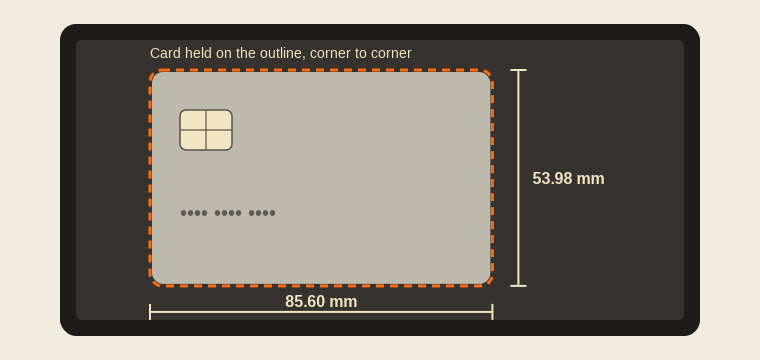
The calibration is kept in this browser, so it carries over to the full online ruler and to every other length below. Calibrate again on another screen, or after you change the display scaling.
Other lengths at actual size
For any other length, use the full online ruler and its mm actual size chart.
FAQ
Is this 1 mm at real size on my screen?
Only after you calibrate the ruler with a bank card. A web page cannot ask the screen how big its pixels are, so without calibration the bar uses the browser's own guess, which is often off. After calibration, 1 mm on the ruler is 1 mm on your screen.
How long is 1 mm?
1 mm is 1 mm, 0.1 cm or 0.039 in. On an inch ruler the nearest 1/16 inch mark is 1/16 in.
How can I see 1 mm on a screen?
Calibrate the ruler with a bank card first, then choose mm. One millimetre is the gap between two of the shortest marks. If the marks look too close to read, measure ten of them: 10 mm is 1 cm.
How can I check 1 mm without a ruler?
Hold up something with a known size. For example, microSD card thickness: 1.0 mm, about the same as 1 mm. The table above lists more.
Related tools
All measuring toolsThe full ruler in cm, mm and inches, to measure any length on your screen.
Print a millimetre ruler with a 10 cm check bar.
Use the same bank card to measure your pupillary distance from a photo.
Maintained by NabeelUpdated Nov 9, 2026.